<?xml version="1.0" encoding="utf-8"?><feed xmlns="http://www.w3.org/2005/Atom" xml:lang="en_US"><generator uri="https://jekyllrb.com/" version="4.4.1">Jekyll</generator><link href="https://fullgc.github.io/feed.xml" rel="self" type="application/atom+xml" /><link href="https://fullgc.github.io/" rel="alternate" type="text/html" hreflang="en_US" /><updated>2026-09-02T22:56:06+03:00</updated><id>https://fullgc.github.io/feed.xml</id><title type="html">fullgc</title><subtitle>Practical, in-depth engineering write-ups on Scala, the JVM, Akka, Kubernetes, Consul and HashiCorp Vault — by Dani Shemesh, backend and infrastructure engineer.</subtitle><author><name>Dani Shemesh</name><email>dani.meirsh@gmail.com</email></author><entry><title type="html">Secrets management at scale with HashiCorp Vault</title><link href="https://fullgc.github.io/overcome-the-secrets-management-challenge-with-hashicorp-vault-and-the-hashi-tools-library/" rel="alternate" type="text/html" title="Secrets management at scale with HashiCorp Vault" /><published>2019-10-20T17:15:45+03:00</published><updated>2019-10-20T17:15:45+03:00</updated><id>https://fullgc.github.io/Overcome-the-Secrets-challenge-management-with-Hashicorp-Vault-and-the-Hashi-Tools-library.-</id><content type="html" xml:base="https://fullgc.github.io/overcome-the-secrets-management-challenge-with-hashicorp-vault-and-the-hashi-tools-library/"><![CDATA[<p>Hashicorp Vault is a “secrets” management system, and one of the various Hashicorp open-source tools that the Fyber DevOps team uses.</p>

<p>This post describes the usage of Vault in Fyber as well as our newly open-sourced “hashi-tools” library.</p>

<h2 id="the-security-challenge"><strong>The Security challenge</strong></h2>

<p>About a year ago, we deployed Vault to our production environment.</p>

<p>We embraced Vault to get rid of some bad practices that are quite common in the industry; storing credentials statically in a configuration file, or even hard-coded within the project’s repository.</p>

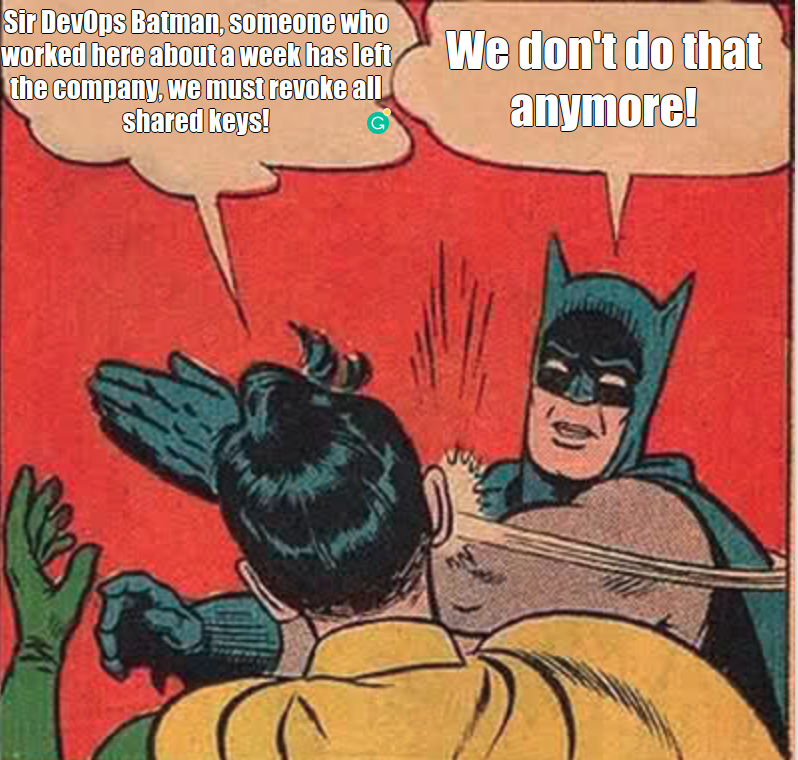
<p>Aside from the obvious security issue, this practice usually leads to a situation where multiple services share the same credentials, which means that these credentials need to have access to many resources. This breaks the least-privileges principle and makes the revoking process of these keys - in case they are compromised - very challenging.</p>

<p>For this reason (and others..), we wanted to change our way of working with secrets. We figured that it would be better to have:</p>

<ul>
  <li>
    <p>Secrets for applications and systems in one secure, centralized place.</p>
  </li>
  <li>
    <p>Dynamic and programmatic application access; services can get a temporary, unique credentials(called a lease) on demand, on runtime, <em>per service</em>.</p>
  </li>
  <li>
    <p>A solution for the “first introduction” problem, where a service needs to hold a secret to be able to access other systems, whether directly or through a third party.</p>
  </li>
  <li>
    <p>Easy key revocation.</p>
  </li>
  <li>
    <p>Secure auditing.</p>
  </li>
</ul>

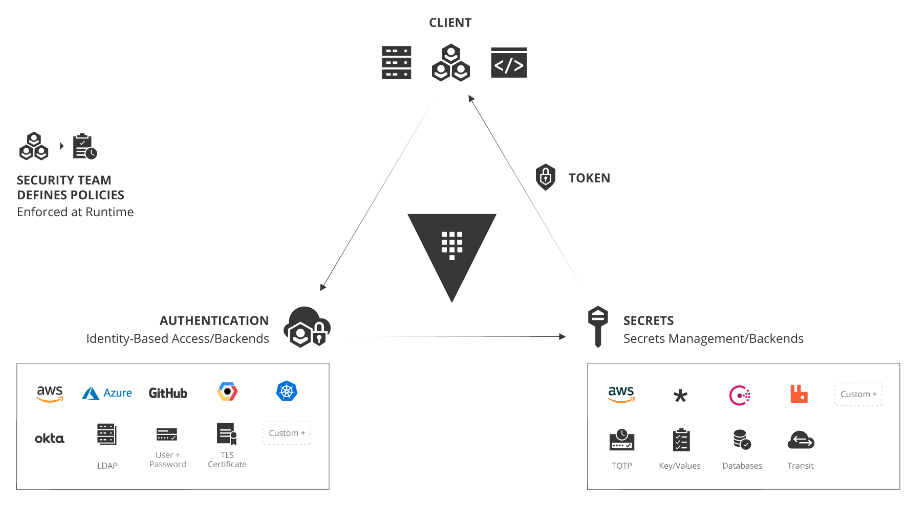
<p>Vault seemed like a natural fit, as it technically provides all of the above; it supports dynamic secrets for all popular systems and tools (cloud providers, databases, ssh, etc.), it provides a central, secure, configurable place to store secrets, it offers a variety of authentication methods which perform authentication and assigning policies to a user and services, and it has automatic revocation and auditing.</p>

<p>If you are not familiar with Vault, take a few minutes to review <a href="https://www.vaultproject.io/">the documentation here</a>.</p>

<p><img src="/public/cmDSyp5zKlr8wnoTn0r0UA_img_0.png" alt="Vault policies and roles mapping each service to per-backend permissions" /></p>

<h2 id="the-plan"><strong>The plan</strong></h2>

<p>In Vault, we use policies to restrict access, enforcing the “need to know” principle and instrument a “Role-Based Access Control” by specifying access privileges.</p>

<p>For each backend (AWS/Mysql, etc.), we define roles; each has a different set of permissions granted.</p>

<p>We want that <em>each service</em> would be able to get <em>credentials on demand</em>, <em>for each system</em>, generated by the Vault server <em>with the appropriate permissions</em>. When a service is replaced, rebooted, or dies, <em>its credentials should be revoked</em>.</p>

<p><img src="/public/cmDSyp5zKlr8wnoTn0r0UA_img_1.png" height="600" alt="Per-service credential flow: each service requests short-lived credentials from Vault at runtime" /></p>

<p>We also like to use Vault as, well, a “secret vault” to keep constant sensitive information there, just like as in Lastpass.</p>

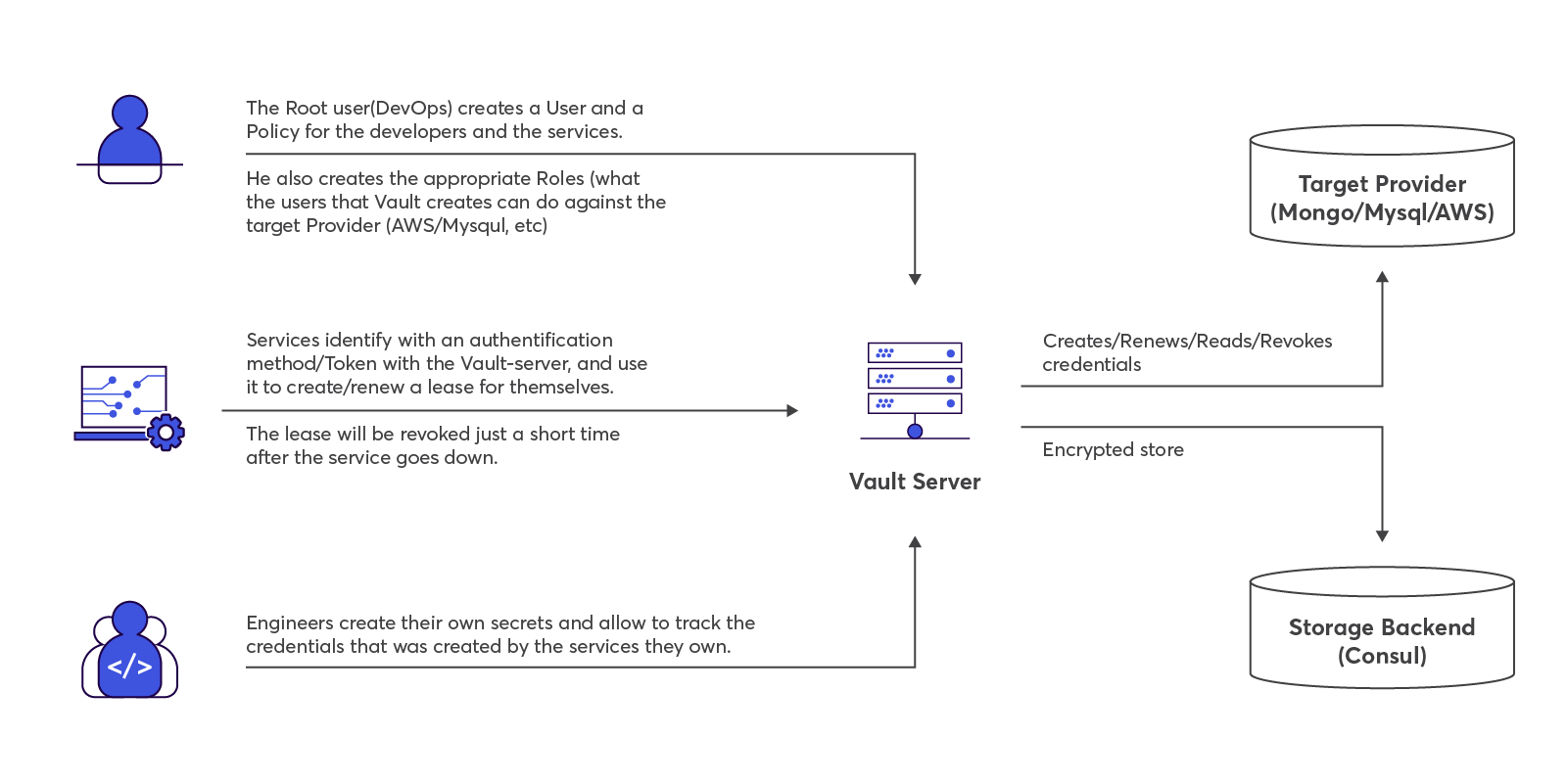
<p>The flow should then be something like this:</p>

<p><img src="/public/vault-workflow.png" width="600" alt="The full Vault workflow, from service authentication to credential revocation" /></p>

<h2 id="the-implementation-challenge"><strong>The implementation challenge</strong></h2>

<p>So we constructed a Vault cluster. The remaining implementation of the above workflow is on the developer’s side.
I feel safe in claiming that for most developers, dealing with secrets is no brainer. Credentials with more than enough permissions either find their way somehow to a configuration file inside the node, or they just all have access to them and they can put them wherever they like in the Git repo.
With Vault, to be able to comunnicate with the Vault server, the developer will have to implement an authentication mechanism in each project.
The way to do it is to:</p>

<ol>
  <li>
    <p>Store a pre-defined Vault token.
Most of our services are dynamic in the sense that they scale up and down, so creating a mechanism where we generate and place a Vault token in the service config file is not ideal, and anyway we prefer not to keep any secret physically inside a node.</p>
  </li>
  <li>
    <p>Use a Vault authentication method. Vault has pluggable authentication methods, making it easy to authenticate with Vault using whatever form works best for you. For example,  you can authenticate using your personal GitHub access token. However, as in this example, there is a need to store a secret physically, and the implementation is not always trivial.
In both cases, the temporary token needs to be periodically renewed by the application.</p>
  </li>
</ol>

<p>After logging-in, in order to obtain credentials from the Vault server, an HTTP call with the appropriate properties is needed; and then parse the response and periodically renew the lease, along with the regulars, such as handle failures, monitoring, etc.</p>

<h2 id="the-hashi-tools-library"><strong>The ‘hashi-tools’ library</strong></h2>

<p>To ease the migration of the secrets management to Vault, I wrote an <a href="https://github.com/FyberEngineers/hashi-tools">SDK library</a>. Most of our services are written in Scala, and so is the client.</p>

<p>The library contains two clients: ‘Secrets’ for Vault and ‘Discovery’ for <a href="/syncing-kubernetes-and-hashicorp-consul/">Consul</a>. The library is used by all of our backend applications that have been written in the past year.</p>

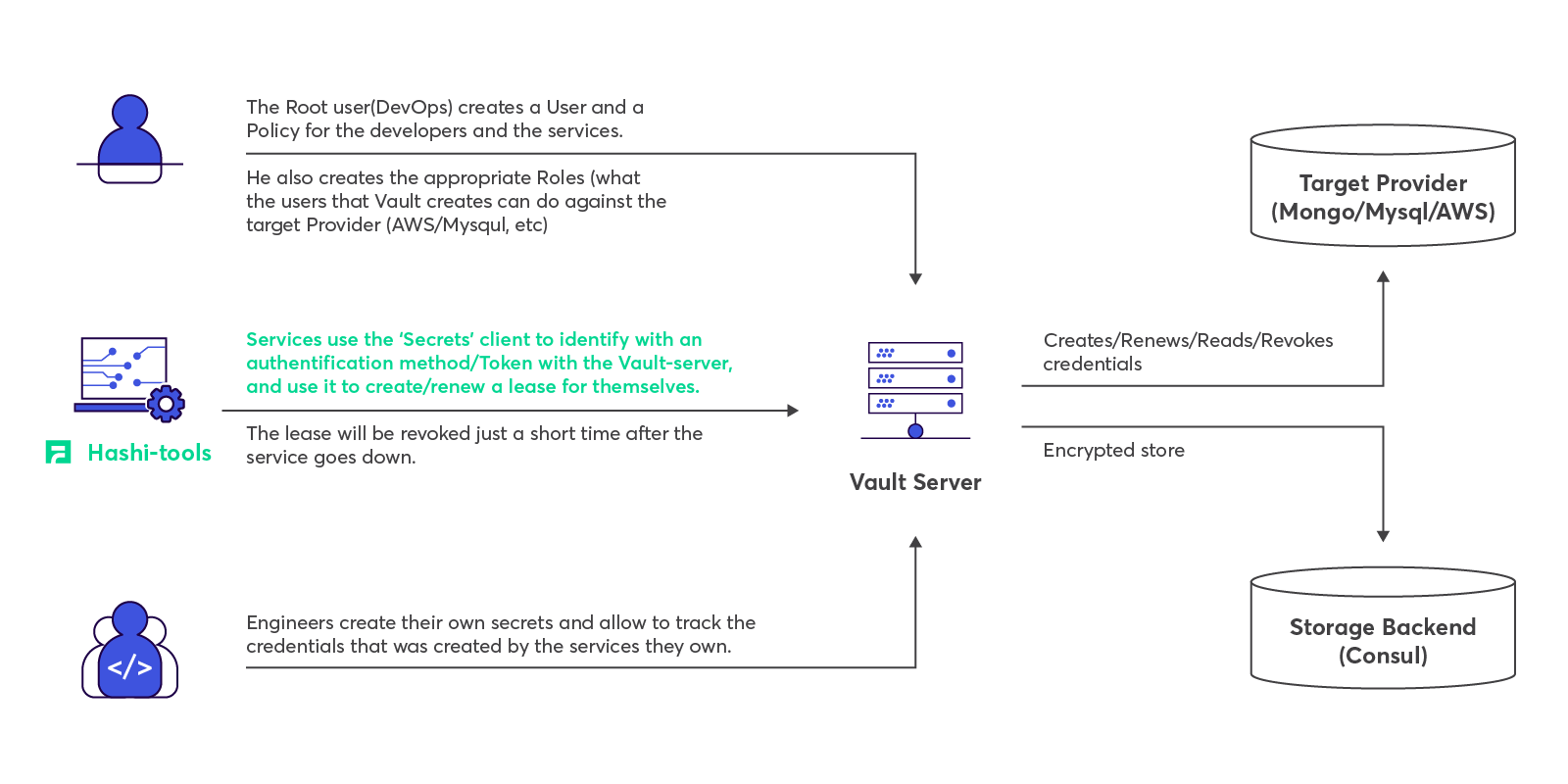
<p>So then let’s update the workflow:</p>

<p><img src="/public/cmDSyp5zKlr8wnoTn0r0UA_img_2.png" width="600" alt="hashi-tools authenticating a service against Vault and renewing its lease" /></p>

<h3 id="main-features">Main features</h3>

<p>The main features for ‘Secrets’ are:</p>

<ul>
  <li>
    <p>Scala-based.</p>
  </li>
  <li>
    <p>Friendly DSL (with Java applications as well).</p>
  </li>
  <li>
    <p>Implementation of the AWS AMI method.</p>
  </li>
  <li>
    <p>Renews its Vault token automatically if needed.</p>
  </li>
  <li>
    <p>Creates leases for Secret Engines and renews them automatically.</p>
  </li>
  <li>
    <p>It exposes operational metrics.</p>
  </li>
  <li>
    <p>It can be easily configured with the ‘application.conf’ file or with a Typesafe object.</p>
  </li>
  <li>
    <p>Async functionality.</p>
  </li>
</ul>

<p>The full documentation can be found in the <a href="https://github.com/FyberEngineers/hashi-tools">project’s repository</a>.</p>

<h3 id="usage-examples">Usage examples</h3>

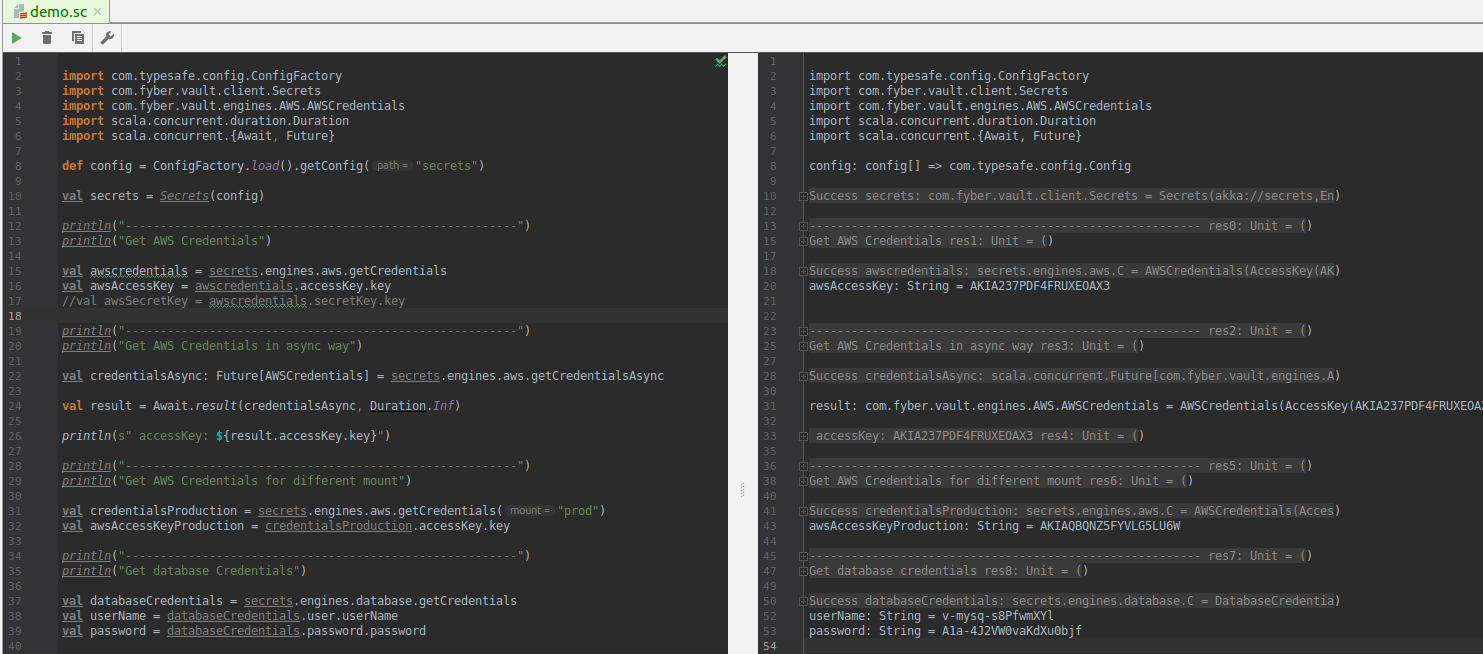
<p><img src="/public/vault-client-worksheet.png" alt="hashi-tools Vault client usage examples" /></p>

<script src="https://gist.github.com/FullGC/8e268f8e9f82a6e415113de5b5681bd5.js"></script>

<h3 id="you-can-contribute">You can contribute!</h3>

<p>There is still a long way to go to making the SKD more complete. The main tasks are <a href="https://github.com/FyberEngineers/hashi-tools/issues">here</a>.</p>]]></content><author><name>Dani Shemesh</name></author><category term="hashicorp" /><category term="fyber" /><category term="vault" /><category term="consul" /><category term="scala" /><category term="open-source" /><summary type="html"><![CDATA[HashiCorp Vault in production at Fyber, plus the open-source hashi-tools library that hands each service short-lived, least-privilege credentials at runtime.]]></summary><media:thumbnail xmlns:media="http://search.yahoo.com/mrss/" url="https://fullgc.github.io/img/keys-new-pixabay.jpg" /><media:content medium="image" url="https://fullgc.github.io/img/keys-new-pixabay.jpg" xmlns:media="http://search.yahoo.com/mrss/" /></entry><entry><title type="html">Syncing Kubernetes services with HashiCorp Consul</title><link href="https://fullgc.github.io/syncing-kubernetes-and-hashicorp-consul/" rel="alternate" type="text/html" title="Syncing Kubernetes services with HashiCorp Consul" /><published>2019-04-10T17:30:45+03:00</published><updated>2019-04-10T17:30:45+03:00</updated><id>https://fullgc.github.io/Syncing-Kubernetes-and-Hashicorp-Consul</id><content type="html" xml:base="https://fullgc.github.io/syncing-kubernetes-and-hashicorp-consul/"><![CDATA[<p>If you use Hashicorp’s Consul for service discovery/DNS and use (or plan to use) Kubernetes, then the recently announced integration between Consul and Kubernetes will come as welcome news!</p>

<p><img src="/public/xXR5gri6PhaGM4U2OMurfQ_img_0.png" alt="Architecture of the Consul and Kubernetes service-sync integration" /></p>

<p>The syncing can be done by running a process that is not part of the Kubernetes cluster itself; in Hashicorp’s<a href="https://github.com/hashicorp/consul-k8s"> consul-k8s project</a>, or, preferably, by installing the<a href="https://www.consul.io/docs/platform/k8s/run.html"> Consul-Helm</a> Chart.</p>

<p>Hashicorp released a Consul-Helm Chart for installing, configuring, and upgrading Consul on Kubernetes.</p>

<p>There are decisions to be made regarding the nature of the syncing, but the first step would always be to clone the<a href="https://github.com/hashicorp/consul-helm.git"> Consul-Helm project</a>.</p>

<p>Before installing the Helm Chart, let’s review some of the essential configurations that are found in the standard helm values file, “values.yaml”.</p>

<p><br /><br /></p>
<h2 id="configure-consul-helm">Configure consul-helm</h2>

<p>By default, the Chart resolution installs everything: a Consul server cluster, client agents on all nodes, and feature components.</p>

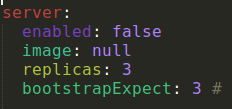
<p>If you already maintain a Consul cluster and are interested in joining the Kubernetes services to your existing cluster, then the “enable” property in the “server” section should be set to “false”:</p>

<p><img src="/public/xXR5gri6PhaGM4U2OMurfQ_img_1.png" alt="consul-helm values file with the Consul server enable property turned off" /></p>

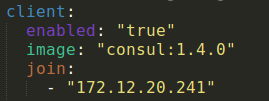
<p>We’ll also need to enable the Consul client and tell it what the Consul-server address is, so it can join the cluster:</p>

<p><img src="/public/xXR5gri6PhaGM4U2OMurfQ_img_2.png" alt="consul-helm values enabling the Consul client and pointing it at the Consul server address" /></p>

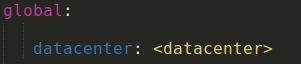
<p>We’ll also need to specify the datacenter:</p>

<p><img src="/public/xXR5gri6PhaGM4U2OMurfQ_img_3.png" alt="consul-helm values specifying the Consul datacenter" /></p>

<p>Now we have to choose whether to sync to Kubernetes or Consul (or both!).</p>

<p>Sync to Consul means that the Kubernetes services will appear in the Consul catalog, and they could be available via HTTP or Consul-DNS. Later on, we’ll describe how to configure that.</p>

<p>If you already maintain a Consul cluster, you probably want to sync to Consul.</p>

<p>Sync to Kubernetes means that services in Consul can be made available as first-class Kubernetes services, and thus able to access them through Kubernetes Core-DNS or with any Kubernetes way. If you are not planning on using it, you might want to set the sync to Kubernetes to “false”, since you might get lost with all the Consul services that would suddenly appear as Kubernetes’ components. If you enable it for every namespace, well, it can really get messy.</p>

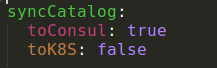
<p>For example, in the image below we’ll define a syncing to Consul and not to Kubernetes.</p>

<p><img src="/public/xXR5gri6PhaGM4U2OMurfQ_img_4.png" alt="syncCatalog configured to sync Kubernetes services into Consul but not the reverse" /></p>

<p>I recommend going over the entire “values.yaml” file and set the relevant values.</p>

<p>Now for the installation itself:</p>

<p>Clone the repository from<a href="https://github.com/hashicorp/consul-helm"> here</a> and perform “helm install”.</p>

<p><br /><br /></p>
<h2 id="accessing-the-consul-http-api">Accessing the Consul HTTP API</h2>

<p>Access to the Consul HTTP API is through the consul-agent, Pod, we’ve created.</p>

<p>Every Node has a Consul agent, and there are a couple of ways to expose access to them.</p>

<p>One way is to create a Nodeport service. A Nodeport defines a static port, meaning that it opens a specific port on all nodes so any traffic from the outside to this port would get to this service.</p>

<p>The service, in turn, would forward traffic to an application labeled “consul”, which is a Consul agent.</p>

<p>Below is an example of such Consul Service.
‘Kubectl apply’ it to spin the service.</p>

<div class="language-yaml highlighter-rouge"><div class="highlight"><pre class="highlight"><code><span class="na">apiVersion</span><span class="pi">:</span> <span class="s">v1</span>
<span class="na">kind</span><span class="pi">:</span> <span class="s">Service</span>
<span class="na">metadata</span><span class="pi">:</span>
  <span class="na">labels</span><span class="pi">:</span>
    <span class="na">app</span><span class="pi">:</span> <span class="s">consul</span>
  <span class="na">name</span><span class="pi">:</span> <span class="s">consul-http-api</span>
  <span class="na">namespace</span><span class="pi">:</span> <span class="s">&lt;namespace&gt;</span>
<span class="na">spec</span><span class="pi">:</span>
  <span class="na">selector</span><span class="pi">:</span>
    <span class="na">app</span><span class="pi">:</span> <span class="s">consul</span>
    <span class="na">hasDNS</span><span class="pi">:</span> <span class="s2">"</span><span class="s">true"</span>
    <span class="na">release</span><span class="pi">:</span> <span class="s">consul</span>
  <span class="na">ports</span><span class="pi">:</span>
  <span class="pi">-</span> <span class="na">name</span><span class="pi">:</span> <span class="s">http-api</span>
    <span class="na">protocol</span><span class="pi">:</span> <span class="s">TCP</span>
    <span class="na">port</span><span class="pi">:</span> <span class="m">8500</span>
    <span class="na">targetPort</span><span class="pi">:</span> <span class="m">8500</span>
  <span class="na">type</span><span class="pi">:</span> <span class="s">NodePort</span>

</code></pre></div></div>

<p><br /><br /></p>
<h2 id="configure-the-consul-domain-with-the-coredns">Configure the Consul domain with the CoreDNS</h2>

<p>CoreDNS is a DNS server that commonly serves as the Kubernetes cluster DNS.
It can be configured via its “Corefile”, which is defined in the “coredns” ConfigMap.
If we like to use the Consul-DNS to call our external Consul services from a Kubernetes component (instead of or along the CoreDNS addresses for Kubernetes services), we’ll need to configure Consul in the “Corefile” section.</p>

<p>In the CoreDNS .yaml file below, the “consul:53” section is what we are interested in.</p>

<p>To force all non-cluster DNS lookups to go through our consul-sync Kubernetes service so we will be able to use the Consul names.
The key “consul:53” means that names that end with the string “consul” will go through the consul-sync service.
Since the address of the Consul services is of this template:</p>
<div class="language-plaintext highlighter-rouge"><div class="highlight"><pre class="highlight"><code>&lt;service name&gt;.service.&lt;datacenter name&gt;.consul
</code></pre></div></div>

<p>This is exactly what we want.</p>

<div class="language-yaml highlighter-rouge"><div class="highlight"><pre class="highlight"><code><span class="na">apiVersion</span><span class="pi">:</span> <span class="s">v1</span>
<span class="na">kind</span><span class="pi">:</span> <span class="s">ConfigMap</span>
<span class="na">metadata</span><span class="pi">:</span>
 <span class="na">name</span><span class="pi">:</span> <span class="s">coredns</span>
 <span class="na">namespace</span><span class="pi">:</span> <span class="s">kube-system</span>
<span class="na">data</span><span class="pi">:</span>
 <span class="na">Corefile</span><span class="pi">:</span> <span class="pi">|</span>
   <span class="s">.:53 {</span>
       <span class="s">errors</span>
       <span class="s">log</span>
       <span class="s">health</span>
       <span class="s">kubernetes cluster.local 10.0.0.0/24</span>
       <span class="s">prometheus :9153</span>
       <span class="s">proxy . /etc/resolv.conf</span>
       <span class="s">cache 30</span>
       <span class="s">reload</span>
   <span class="s">}</span>
   <span class="s">consul:53 {</span>
       <span class="s">log</span>
       <span class="s">errors</span>
       <span class="s">cache 30</span>
       <span class="s">proxy . ${CONSUL_DNS_SERVER_ADDR} {</span>
        <span class="s"># policy round_robin</span>
        <span class="s"># health_check /health:8080</span>
       <span class="s">}</span>
   <span class="s">}</span>

</code></pre></div></div>
<p>Note that we configured “proxy”. Any queries that are not within the cluster domain of Kubernetes will be forwarded to predefined resolvers, in our case the Consul service.</p>

<p>The address of the Consul service can be invoked with this script:</p>

<div class="language-plaintext highlighter-rouge"><div class="highlight"><pre class="highlight"><code>CONSUL_DNS_SERVER_ADDR=kubectl get svc consul-sync-dns -o jsonpath='{.spec.clusterIP}' -n &lt;namespace&gt;
</code></pre></div></div>

<p>To reconfigure CoreDNS with the additionals to the ConfigMap, perform:</p>

<div class="language-plaintext highlighter-rouge"><div class="highlight"><pre class="highlight"><code>kubectl get pods -n kube-system -oname |grep coredns |xargs kubectl apply -f kube-system

</code></pre></div></div>

<p><em>Configurations of the Consul-K8s sync components are implemented as Jenkins-Pipeline methods on my <a href="https://github.com/FullGC/consul-kubernetes-sync-Pipeline">GitHub</a></em>.</p>]]></content><author><name>Dani Shemesh</name></author><category term="kubernetes" /><category term="consul" /><category term="hashicorp" /><summary type="html"><![CDATA[Sync Consul with Kubernetes services using consul-helm: the chart values that matter, reaching the Consul HTTP API, and resolving the domain in CoreDNS.]]></summary><media:thumbnail xmlns:media="http://search.yahoo.com/mrss/" url="https://fullgc.github.io/img/sync.png" /><media:content medium="image" url="https://fullgc.github.io/img/sync.png" xmlns:media="http://search.yahoo.com/mrss/" /></entry><entry><title type="html">Behavior-driven tests for JEE with JBehave — Part 3</title><link href="https://fullgc.github.io/developing-behavior-with-jbehave-part-3/" rel="alternate" type="text/html" title="Behavior-driven tests for JEE with JBehave — Part 3" /><published>2018-12-19T16:15:45+02:00</published><updated>2018-12-19T16:15:45+02:00</updated><id>https://fullgc.github.io/Developing-behavior-driven-tests-for-JEE-web-applications-with-Jbehave-part-3</id><content type="html" xml:base="https://fullgc.github.io/developing-behavior-with-jbehave-part-3/"><![CDATA[<p><br /><br />
Previously, we implemented the step cases in a Java code.
In this part we’ll learn how to automate them and generate informative reports at the end of the run.</p>

<hr />
<h2 id="identify-implementation-methods">Identify implementation methods</h2>

<p>You may recall we mentioned that Jbehave registered the Java implementation methods on start up. But how does it identify an implementation step?</p>

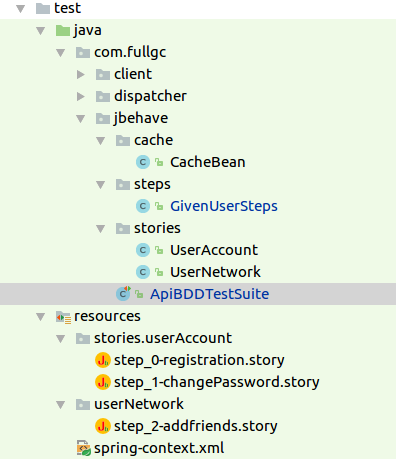
<p>Basically, these methods would have to override the configuration() method, which is part of the jbehave library. We have however, let ‘thucydides’ work for us. The ‘thucydides-core’ library (that comes with the ‘jbehave-plugin’), provides the ‘ThucydidesJUnitStories’ class. This identifies the ‘.story’ files and the links for the Java implementations. All we need is to have a Java class that inherits from it in the Java implementation root package:</p>

<div class="language-java highlighter-rouge"><div class="highlight"><pre class="highlight"><code><span class="kn">import</span> <span class="nn">net.thucydides.jbehave.ThucydidesJUnitStories</span><span class="o">;</span>
<span class="kd">public</span> <span class="kd">class</span> <span class="nc">ApiBDDTestSuite</span> <span class="kd">extends</span> <span class="nc">ThucydidesJUnitStories</span> <span class="o">{}</span>
</code></pre></div></div>

<h3 id="final-project-structure">Final project structure:</h3>

<p><img src="/public/dB6XOsGGWuUM1t1RHDV3g_img_6.png" alt="Final project structure of the JBehave and Thucydides test suite" /></p>

<p><br /><br /></p>
<h2 id="running-the-tests">Running the tests</h2>

<p>At this point, we can run the tests as Junit.</p>

<hr />
<h3 id="running-the-tests-manually">Running the tests manually</h3>

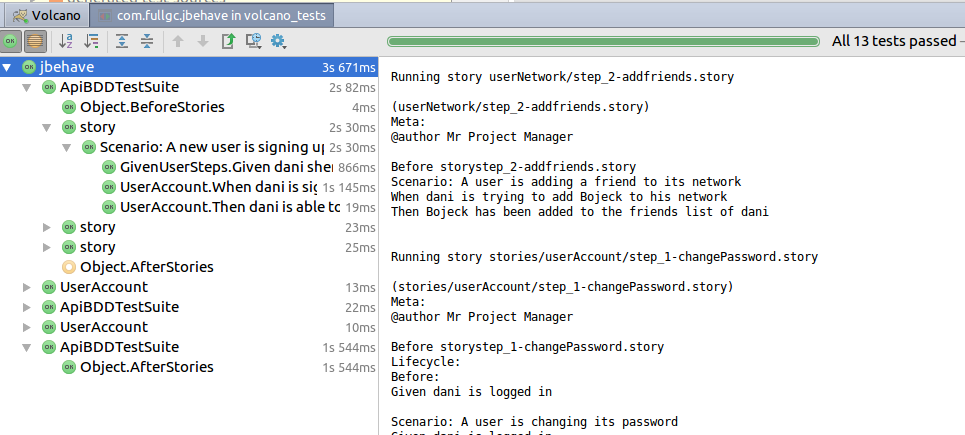
<p>In order for the black-box tests to pass, we need to have a server up and running. To run the tests with the IDE, right click on the ‘jbehave’ package.</p>

<p><img src="/public/dB6XOsGGWuUM1t1RHDV3g_img_7.png" alt="Running the JBehave suite from the IDE by right-clicking the jbehave package" /></p>

<p>In this fashion, we can run the tests quickly, debugging them and the server.</p>

<p><br /><br /></p>
<h3 id="automate-the-tests-with-jettymaven-plugin">Automate the tests with Jetty(Maven plugin)</h3>

<p>What we really want is to test the Volcano server as part of the maven build, the ‘maven compile’ task.
In this case, we need maven to start a Volcano HTTP server, run the tests, and get Volcano down.</p>

<p><a href="https://www.eclipse.org/jetty/">Eclipse Jetty</a> is an open-source project providing an HTTP server and javax.servlet container
We’ll use a Jetty maven-plugin, to start a Volcano server on which the tests will be running.</p>

<p>The maven plugin should be configured as follows:</p>

<div class="language-xml highlighter-rouge"><div class="highlight"><pre class="highlight"><code><span class="nt">&lt;plugin&gt;</span>
   <span class="nt">&lt;groupId&gt;</span>org.eclipse.jetty<span class="nt">&lt;/groupId&gt;</span>
   <span class="nt">&lt;artifactId&gt;</span>jetty-maven-plugin<span class="nt">&lt;/artifactId&gt;</span>
   <span class="nt">&lt;version&gt;</span>${jetty.version}<span class="nt">&lt;/version&gt;</span>
   <span class="nt">&lt;configuration&gt;</span>
       <span class="nt">&lt;httpConnector&gt;</span>
           <span class="nt">&lt;port&gt;</span>8083<span class="nt">&lt;/port&gt;</span>
       <span class="nt">&lt;/httpConnector&gt;</span>
       <span class="nt">&lt;scanIntervalSeconds&gt;</span>0<span class="nt">&lt;/scanIntervalSeconds&gt;</span>
       <span class="nt">&lt;stopKey&gt;</span>stopApiTestEnv<span class="nt">&lt;/stopKey&gt;</span>
       <span class="nt">&lt;stopPort&gt;</span>9999<span class="nt">&lt;/stopPort&gt;</span>
       <span class="nt">&lt;jvmArgs&gt;</span>-Xms1024m -Xmx2048m -XX:PermSize=256M -XX:MaxPermSize=512M<span class="nt">&lt;/jvmArgs&gt;</span>
       <span class="nt">&lt;contextHandlers&gt;</span>
           <span class="nt">&lt;contextHandler</span> <span class="na">implementation=</span><span class="s">"org.eclipse.jetty.maven.plugin.JettyWebAppContext"</span><span class="nt">&gt;</span>
               <span class="nt">&lt;war&gt;</span>${project.basedir}/../volcano_core/target/volcano_core-1.2-SNAPSHOT.war<span class="nt">&lt;/war&gt;</span>
               <span class="nt">&lt;contextPath&gt;</span>/volcano<span class="nt">&lt;/contextPath&gt;</span>
           <span class="nt">&lt;/contextHandler&gt;</span>
       <span class="nt">&lt;/contextHandlers&gt;</span>
   <span class="nt">&lt;/configuration&gt;</span>
   <span class="nt">&lt;executions&gt;</span>
       <span class="nt">&lt;execution&gt;</span>
           <span class="nt">&lt;id&gt;</span>start-jetty<span class="nt">&lt;/id&gt;</span>
           <span class="nt">&lt;phase&gt;</span>pre-integration-test<span class="nt">&lt;/phase&gt;</span>
           <span class="nt">&lt;goals&gt;</span>
               <span class="nt">&lt;goal&gt;</span>start<span class="nt">&lt;/goal&gt;</span>
           <span class="nt">&lt;/goals&gt;</span>
       <span class="nt">&lt;/execution&gt;</span>
       <span class="nt">&lt;execution&gt;</span>
           <span class="nt">&lt;id&gt;</span>stop-jetty<span class="nt">&lt;/id&gt;</span>
           <span class="nt">&lt;phase&gt;</span>post-integration-test<span class="nt">&lt;/phase&gt;</span>
           <span class="nt">&lt;goals&gt;</span>
               <span class="nt">&lt;goal&gt;</span>stop<span class="nt">&lt;/goal&gt;</span>
           <span class="nt">&lt;/goals&gt;</span>
       <span class="nt">&lt;/execution&gt;</span>
   <span class="nt">&lt;/executions&gt;</span>
<span class="nt">&lt;/plugin&gt;</span>
</code></pre></div></div>

<p>Note that:</p>

<ol>
  <li>
    <p>The server’s port needs to be available, you may want to declare a different port from the default that your server is using.</p>
  </li>
  <li>
    <p>The memory you declare allocated with the jvmargs needs to be enough to get the server up</p>
  </li>
  <li>
    <p>In ‘contextHandlers’ we provide the web application archive to be used. If you have multiple web modules in your project that need to be tested, provide them all.</p>
  </li>
  <li>
    <p>In the executions section we tell jetty to start before the tests are executed and stop afterwards. If we don’t explicitly ask that, then the jetty would stay up.</p>
  </li>
</ol>

<p><br /><br /></p>
<h2 id="test-summary-reports">Test Summary Reports</h2>

<p>Test Summary Reports are an important deliverable. They are needed to reflect test results in a clear way, allowing them to be analyzed quickly.</p>

<p>Jbehave <a href="https://jbehave.org/reference/stable/reporting-stories.html">storyReporter</a> supports many report formats and will generate the reports for each step and story automatically after the tests have been completed in the /target/jbehave folder.</p>

<p>We’ll use another Thucydides maven plugin to generate some better-looking reports:</p>

<div class="language-xml highlighter-rouge"><div class="highlight"><pre class="highlight"><code><span class="nt">&lt;plugin&gt;</span>
   <span class="nt">&lt;groupId&gt;</span>org.apache.maven.plugins<span class="nt">&lt;/groupId&gt;</span>
   <span class="nt">&lt;artifactId&gt;</span>maven-site-plugin<span class="nt">&lt;/artifactId&gt;</span>
   <span class="nt">&lt;version&gt;</span>3.2<span class="nt">&lt;/version&gt;</span>
   <span class="nt">&lt;configuration&gt;</span>
       <span class="nt">&lt;reportPlugins&gt;</span>
           <span class="nt">&lt;plugin&gt;</span>
               <span class="nt">&lt;groupId&gt;</span>net.thucydides.maven.plugins<span class="nt">&lt;/groupId&gt;</span>
               <span class="nt">&lt;artifactId&gt;</span>maven-thucydides-plugin<span class="nt">&lt;/artifactId&gt;</span>
               <span class="nt">&lt;version&gt;</span>${thucydides.version}<span class="nt">&lt;/version&gt;</span>
           <span class="nt">&lt;/plugin&gt;</span>
       <span class="nt">&lt;/reportPlugins&gt;</span>
   <span class="nt">&lt;/configuration&gt;</span>
<span class="nt">&lt;/plugin&gt;</span>
</code></pre></div></div>

<p>This will generate various reports automatically at the end of the Maven run, in /target/site.</p>

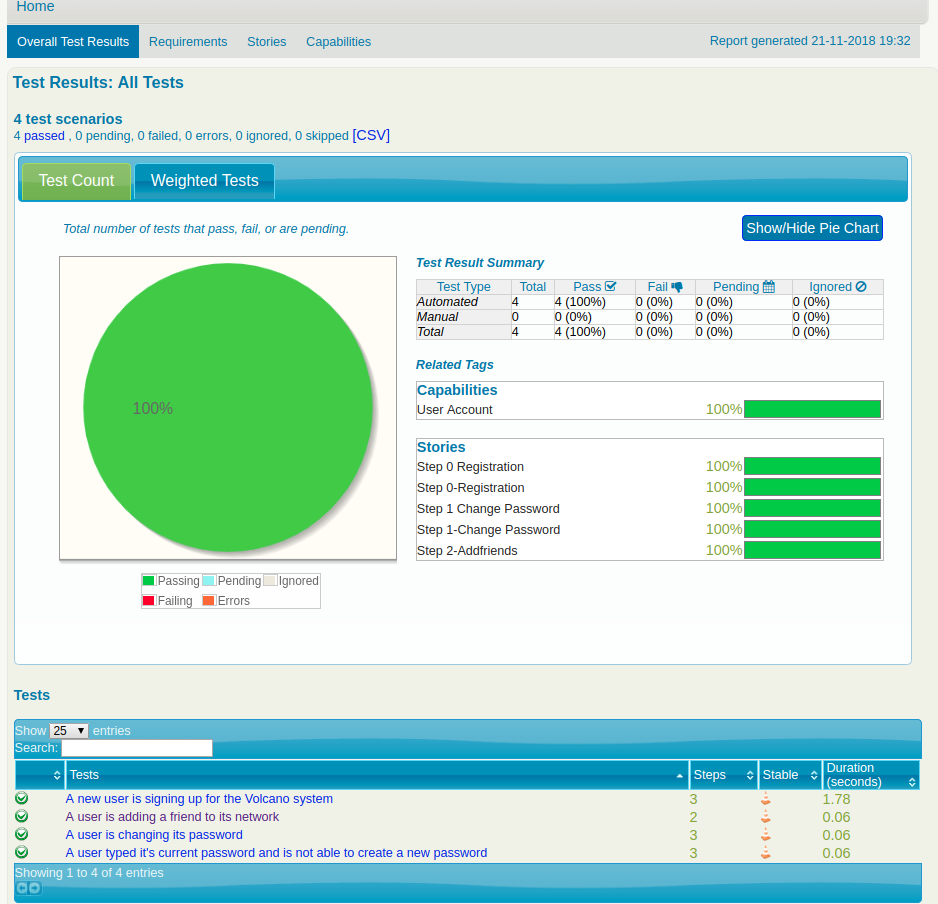
<p>The ‘index.html’ file that has been created is the most comprehensive, interactive report:</p>

<p><img src="/public/dB6XOsGGWuUM1t1RHDV3g_img_8.png" alt="The generated Thucydides index.html report summarising every test story" /></p>

<p>A click on the ‘change password’ test (story) for example, would provide some additional data on each step result.</p>

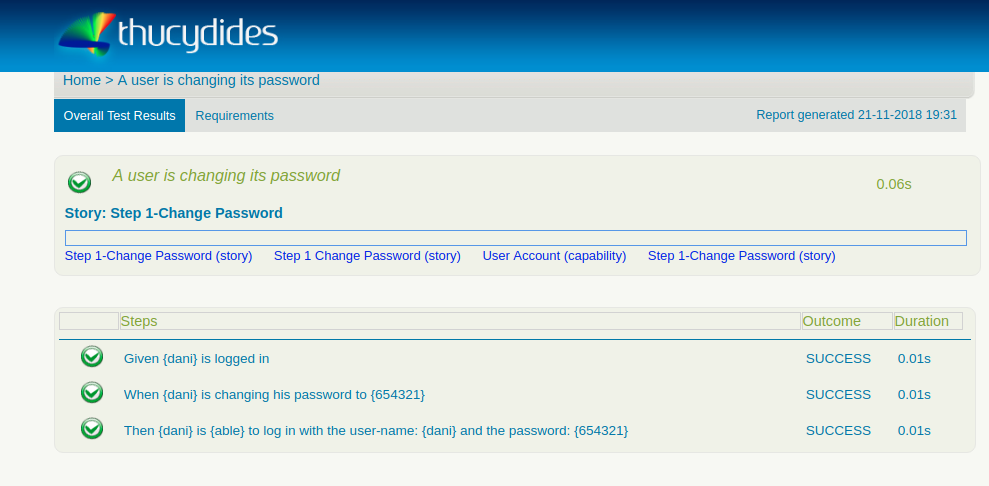
<p><img src="/public/dB6XOsGGWuUM1t1RHDV3g_img_9.png" alt="Thucydides report drilled into the 'change password' story, showing per-step results" /></p>

<p>You can zoom in with a click on the various test components to get results and statistics.</p>

<p><br /><br /></p>
<h2 id="wrapping-up">Wrapping up</h2>

<p>Behavior Driven Development is a methodology for developing software through example-based communication among developers, QAs, and project managers.</p>

<p>With Jbehave, this means writing Given-When-Then scenarios to illustrate examples in a plain text, which links to Java implementation methods.</p>

<p>As part of our mission to create Blackbox tests in a BDD fashion for the Volcano application, we’ve covered some test cases, discussed design and challenges, and reviewed some post-compilation reports.</p>

<hr />

<p><em>The complete code can be found in my <a href="https://github.com/FullGC/volcano">GitHub</a></em>.</p>]]></content><author><name>Dani Shemesh</name></author><category term="jee" /><category term="java" /><category term="jbehave" /><category term="bdd" /><category term="automation" /><category term="tests" /><summary type="html"><![CDATA[Automating a JBehave suite: map stories to step methods, run them against a live server, and generate the interactive Thucydides reports teams read.]]></summary><media:thumbnail xmlns:media="http://search.yahoo.com/mrss/" url="https://fullgc.github.io/img/behave-color.jpg" /><media:content medium="image" url="https://fullgc.github.io/img/behave-color.jpg" xmlns:media="http://search.yahoo.com/mrss/" /></entry><entry><title type="html">Behavior-driven tests for JEE with JBehave — Part 2</title><link href="https://fullgc.github.io/developing-behavior-with-jbehave-part-2/" rel="alternate" type="text/html" title="Behavior-driven tests for JEE with JBehave — Part 2" /><published>2018-12-19T16:10:45+02:00</published><updated>2018-12-19T16:10:45+02:00</updated><id>https://fullgc.github.io/Developing-behavior-driven-tests-for-JEE-web-applications-with-Jbehave-part-2</id><content type="html" xml:base="https://fullgc.github.io/developing-behavior-with-jbehave-part-2/"><![CDATA[<p><br /><br />
Following is a discussion of some Volcano test cases and their Java implementation.</p>

<hr />
<h2 id="registration-story">Registration story</h2>

<p>Let’s zoom in on the first story, which is the Volcano registration story file:</p>

<div class="language-plaintext highlighter-rouge"><div class="highlight"><pre class="highlight"><code>Narrative:
As a Volcano enthusiast Dani would like to register to Volcano social network

Scenario: A new user is signing up for the Volcano system
Given dani shemesh is a Volcano enthusiast
When dani is signing up for Volcano with the user-name: dani and the password: 123456
Then dani is able to log in with the user-name: dani and the password: 123456
</code></pre></div></div>

<p>Note that the story is written in the third person. This will let us capture the subject (i.e. the user) later.</p>

<p>The ‘Given’ is linked with a Java method. The method should:</p>

<ol>
  <li>
    <p>Carry the Jbehave @Given annotation</p>
  </li>
  <li>
    <p>The String parameter of the annotation should match the text described in the step, while the user name (i.e.)  ‘dani shemesh’ is replaced with a variable $user</p>
  </li>
  <li>
    <p>In order to capture the user parameter, the function receives a String parameter, following the @Named annotation</p>
  </li>
</ol>

<p>The @Given implementation of this scenario is a dummy for obvious reasons.</p>

<div class="language-java highlighter-rouge"><div class="highlight"><pre class="highlight"><code><span class="kd">public</span> <span class="kd">class</span> <span class="nc">UserAccount</span> <span class="o">{</span>
    <span class="nc">Cache</span> <span class="n">cache</span><span class="o">;</span>
<span class="o">...</span>
    <span class="nd">@Given</span><span class="o">(</span><span class="s">"$user is a Volcano enthusiast"</span><span class="o">)</span>
        <span class="kd">public</span> <span class="nc">String</span> <span class="nf">user</span><span class="o">(</span><span class="nd">@Named</span><span class="o">(</span><span class="s">"user"</span><span class="o">)</span><span class="nc">String</span> <span class="n">user</span><span class="o">)</span> <span class="o">{</span>
        <span class="k">return</span> <span class="s">"let "</span> <span class="o">+</span> <span class="n">user</span> <span class="o">+</span> <span class="s">"be a volcano enthusiast"</span><span class="o">;</span>
<span class="o">}</span>
</code></pre></div></div>

<p>Next is the implementation of the registration step where we cache the user details:</p>

<div class="language-java highlighter-rouge"><div class="highlight"><pre class="highlight"><code><span class="nd">@When</span><span class="o">(</span><span class="s">"$user is signing up for Volcano with the user-name: $user and the password: $password"</span><span class="o">)</span>
<span class="kd">public</span> <span class="kt">void</span>  <span class="nf">newUser</span><span class="o">(</span><span class="nd">@Named</span><span class="o">(</span><span class="s">"user"</span><span class="o">)</span><span class="nc">String</span> <span class="n">user</span><span class="o">,</span> <span class="nd">@Named</span><span class="o">(</span><span class="s">"password"</span><span class="o">)</span> <span class="nc">String</span> <span class="n">password</span><span class="o">)</span> <span class="o">{</span>
   <span class="nc">RequestDispatcher</span><span class="o">.</span><span class="na">createUser</span><span class="o">(</span><span class="n">user</span><span class="o">,</span> <span class="n">password</span><span class="o">);</span>
   <span class="n">cache</span><span class="o">.</span><span class="na">getUsers</span><span class="o">().</span><span class="na">put</span><span class="o">(</span><span class="n">user</span><span class="o">,</span> <span class="n">password</span><span class="o">);</span>
<span class="o">}</span>
</code></pre></div></div>

<p>And the verification step, where the user should be able to log in and have a live token.</p>

<div class="language-java highlighter-rouge"><div class="highlight"><pre class="highlight"><code><span class="nd">@Then</span><span class="o">(</span><span class="s">"$user is $ableorNot to log in with the user-name: $user and the password: $password"</span><span class="o">)</span>
<span class="kd">public</span> <span class="kt">void</span> <span class="nf">logIn</span><span class="o">(</span><span class="nd">@Named</span><span class="o">(</span><span class="s">"user"</span><span class="o">)</span><span class="nc">String</span> <span class="n">user</span><span class="o">,</span> <span class="nd">@Named</span><span class="o">(</span><span class="s">"ableorNotAble"</span><span class="o">)</span><span class="nc">String</span> <span class="n">ableOrNot</span><span class="o">,</span> <span class="nd">@Named</span><span class="o">(</span><span class="s">"password"</span><span class="o">)</span> <span class="nc">String</span> <span class="n">password</span><span class="o">)</span> <span class="kd">throws</span> <span class="nc">IOException</span> <span class="o">{</span>
   <span class="nc">String</span> <span class="n">token</span> <span class="o">=</span> <span class="nc">RequestDispatcher</span><span class="o">.</span><span class="na">logIn</span><span class="o">(</span><span class="n">user</span><span class="o">,</span> <span class="n">password</span><span class="o">).</span><span class="na">getResponseBody</span><span class="o">();</span>
   <span class="k">if</span> <span class="o">(</span><span class="nc">Objects</span><span class="o">.</span><span class="na">equals</span><span class="o">(</span><span class="n">ableOrNot</span><span class="o">,</span> <span class="s">"able"</span><span class="o">)){</span>
       <span class="k">assert</span> <span class="o">!</span><span class="n">token</span><span class="o">.</span><span class="na">isEmpty</span><span class="o">();</span>
       <span class="n">cache</span><span class="o">.</span><span class="na">getToken</span><span class="o">().</span><span class="na">put</span><span class="o">(</span><span class="n">user</span><span class="o">,</span> <span class="n">token</span><span class="o">);</span>
   <span class="o">}</span>
   <span class="k">else</span> <span class="k">assert</span> <span class="n">token</span><span class="o">.</span><span class="na">isEmpty</span><span class="o">();</span>
<span class="o">}</span>
</code></pre></div></div>

<p><br /><br /></p>
<h3 id="implementation-challenges">Implementation challenges</h3>

<p>Note that, we have used a cache to store the new user’s details in the registration step.</p>

<p>Considering other future user actions, like “change password” and “add a friend”, the user will be required to be logged-in, means that this would be a given step:</p>

<p><strong>Given</strong> dani is logged in</p>

<p>Now, we like to:</p>

<ol>
  <li>
    <p>Re-use the java implementation of the log-in method (reuse @Given methods)</p>
  </li>
  <li>
    <p>Avoid creating a new user and log-in before each scenario  (reuse @When actions)</p>
  </li>
</ol>

<p>This brings up unexpected challenges from an OOP point of view. Before discussing them, let’s explain why</p>

<p><br /><br /></p>
<h3 id="the-jbehave-environment">The Jbehave environment</h3>
<p><img src="/img/oop_meme.png" height="190" width="250" alt="Object-oriented inheritance meme" /></p>

<p>Though we are writing in Java, we are not in an OOP scope, but in Jbehave’s.</p>

<p>When JBehave starts up, it registers all the implemented methods and their parameters, then reads the steps in each scenario for each story and maps them to the appropriate method in the code behind. Here all their values are in memory and are executed one by one. The memory is cleaned after each story.</p>

<p><br /><br /></p>
<h3 id="re-use-the-given-methods">Re-use the @Given methods</h3>

<p>This one is easy. Instead of inheritance/composition, we can place the @Given methods wherever we like, and Jbehave will identify it. So, we’ll create a dedicated class for given methods, dealing with user scenarios:</p>

<div class="language-java highlighter-rouge"><div class="highlight"><pre class="highlight"><code><span class="kd">public</span> <span class="kd">class</span> <span class="nc">GivenUserSteps</span> <span class="o">{</span>
<span class="nc">Cache</span> <span class="n">cache</span><span class="o">;</span>
<span class="o">...</span>
<span class="nd">@Given</span><span class="o">(</span><span class="s">"$user is a Volcano enthusiast"</span><span class="o">)</span>
<span class="kd">public</span> <span class="nc">String</span> <span class="nf">user</span><span class="o">(</span><span class="nd">@Named</span><span class="o">(</span><span class="s">"user"</span><span class="o">)</span> <span class="nc">String</span> <span class="n">user</span><span class="o">)</span> <span class="o">{</span>
   <span class="k">return</span> <span class="s">"let "</span> <span class="o">+</span> <span class="n">user</span> <span class="o">+</span> <span class="s">"be a volcano enthusiast"</span><span class="o">;</span>
<span class="o">}</span>

<span class="nd">@Given</span><span class="o">(</span><span class="s">"$user is logged in"</span><span class="o">)</span>
<span class="kd">public</span> <span class="kt">void</span> <span class="nf">logIn</span><span class="o">(</span><span class="nd">@Named</span><span class="o">(</span><span class="s">"user"</span><span class="o">)</span> <span class="nc">String</span> <span class="n">user</span><span class="o">)</span> <span class="kd">throws</span> <span class="nc">IOException</span> <span class="o">{</span>
   <span class="nc">String</span> <span class="n">session</span> <span class="o">=</span> <span class="nc">RequestDispatcher</span><span class="o">.</span><span class="na">logIn</span><span class="o">(</span><span class="n">user</span><span class="o">,</span> <span class="n">cache</span><span class="o">.</span><span class="na">getUsers</span><span class="o">().</span><span class="na">get</span><span class="o">(</span><span class="n">user</span><span class="o">)).</span><span class="na">getResponseBody</span><span class="o">();</span>
   <span class="n">cache</span><span class="o">.</span><span class="na">getToken</span><span class="o">().</span><span class="na">put</span><span class="o">(</span><span class="n">user</span><span class="o">,</span> <span class="n">session</span><span class="o">);</span>
<span class="o">}</span>
</code></pre></div></div>

<p><br /><br /></p>
<h4 id="implement-tests-for-similar-entities-in-the-same-class">Implement tests for similar entities in the same class</h4>

<p>We can once again take advantage of the Jbehave environment to place test implementations with similar characters together, even if they implement steps of different stories, for example:</p>

<div class="language-java highlighter-rouge"><div class="highlight"><pre class="highlight"><code><span class="kd">public</span> <span class="kd">class</span> <span class="nc">UserAccount</span> <span class="o">{</span>

   <span class="nc">Cache</span> <span class="n">cache</span><span class="o">;</span>

   <span class="nd">@When</span><span class="o">(</span><span class="s">"$user is signing up for Volcano with the user-name: $user and the password: $password"</span><span class="o">)</span>
   <span class="kd">public</span> <span class="kt">void</span>  <span class="nf">newUser</span><span class="o">(</span><span class="nd">@Named</span><span class="o">(</span><span class="s">"user"</span><span class="o">)</span><span class="nc">String</span> <span class="n">user</span><span class="o">,</span> <span class="nd">@Named</span><span class="o">(</span><span class="s">"password"</span><span class="o">)</span> <span class="nc">String</span> <span class="n">password</span><span class="o">)</span> <span class="o">{</span>
       <span class="nc">RequestDispatcher</span><span class="o">.</span><span class="na">createUser</span><span class="o">(</span><span class="n">user</span><span class="o">,</span> <span class="n">password</span><span class="o">);</span>
       <span class="n">cache</span><span class="o">.</span><span class="na">getUsers</span><span class="o">().</span><span class="na">put</span><span class="o">(</span><span class="n">user</span><span class="o">,</span> <span class="n">password</span><span class="o">);</span>
   <span class="o">}</span>

   <span class="nd">@When</span><span class="o">(</span><span class="s">"$user is changing his password to $newPassword"</span><span class="o">)</span>
   <span class="kd">public</span> <span class="kt">void</span>  <span class="nf">changePassword</span><span class="o">(</span><span class="nd">@Named</span><span class="o">(</span><span class="s">"user"</span><span class="o">)</span><span class="nc">String</span> <span class="n">user</span><span class="o">,</span> <span class="nd">@Named</span><span class="o">(</span><span class="s">"newPassword"</span><span class="o">)</span> <span class="nc">String</span> <span class="n">newPassword</span><span class="o">)</span> <span class="kd">throws</span> <span class="nc">IOException</span> <span class="o">{</span>
       <span class="nc">String</span> <span class="n">response</span> <span class="o">=</span> <span class="nc">RequestDispatcher</span><span class="o">.</span><span class="na">changePassword</span><span class="o">(</span><span class="n">cache</span><span class="o">.</span><span class="na">getToken</span><span class="o">().</span><span class="na">get</span><span class="o">(</span><span class="n">user</span><span class="o">),</span> <span class="n">user</span><span class="o">,</span> <span class="n">cache</span><span class="o">.</span><span class="na">getUsers</span><span class="o">().</span><span class="na">get</span><span class="o">(</span><span class="n">user</span><span class="o">),</span> <span class="n">newPassword</span><span class="o">).</span><span class="na">getResponseBody</span><span class="o">();</span>
       <span class="k">if</span> <span class="o">(</span><span class="n">response</span><span class="o">.</span><span class="na">equals</span><span class="o">(</span><span class="s">"OK"</span><span class="o">))</span>
           <span class="n">cache</span><span class="o">.</span><span class="na">getUsers</span><span class="o">().</span><span class="na">put</span><span class="o">(</span><span class="n">user</span><span class="o">,</span> <span class="n">newPassword</span><span class="o">);</span>
   <span class="o">}</span>
<span class="err">…</span><span class="o">.</span>
<span class="o">}</span>
</code></pre></div></div>

<p><br /><br /></p>
<h4 id="re-use-actions-with-dependency-injection-using-spring">Re-use actions with Dependency Injection using Spring</h4>

<p>In order to reuse actions, in our case the user that we have created and logged in with, in the “registration” step, we need to cache. We cannot put the cache in a global variable or static at some place, since we are working with different classes and the memory cleans up after each story.</p>

<p>Luckily, <a href="https://jbehave.org/reference/latest/dependency-injection.html">Jbehave supports some of the most popular, Java based, dependency injection plugins</a>. The most popular is probably Spring, and we’ll use it to inject the resources (i.e. the cache) we need for reusing actions.</p>

<p><img src="/public/dB6XOsGGWuUM1t1RHDV3g_img_5.png" height="190" width="250" alt="JBehave story and step definition side by side" /></p>

<h5 id="configure-spring">Configure Spring</h5>

<p>We’ll use ‘org.springframework’ artifacts for the Spring integration:</p>

<div class="language-xml highlighter-rouge"><div class="highlight"><pre class="highlight"><code><span class="nt">&lt;artifactId&gt;</span>spring-context<span class="nt">&lt;/artifactId&gt;</span>
</code></pre></div></div>

<p>To make our test classes to be singleton spring beans, using the @Service annotation</p>

<div class="language-xml highlighter-rouge"><div class="highlight"><pre class="highlight"><code><span class="nt">&lt;artifactId&gt;</span>spring-test<span class="nt">&lt;/artifactId&gt;</span>
</code></pre></div></div>

<p>to identify the test classes beans under  com.fullgc.jbehave namespace, using @ContextConfiguration annotation and a spring-context xml file.</p>

<div class="language-xml highlighter-rouge"><div class="highlight"><pre class="highlight"><code>* <span class="nt">&lt;artifactId&gt;</span>spring-beans<span class="nt">&lt;/artifactId&gt;</span>
</code></pre></div></div>

<p>To inject the resources to the test classes, using the @Autowired annotation</p>

<p>And the following Thucydides artifact</p>

<div class="language-xml highlighter-rouge"><div class="highlight"><pre class="highlight"><code><span class="nt">&lt;groupId&gt;</span>net.thucydides<span class="nt">&lt;/groupId&gt;</span>
</code></pre></div></div>

<div class="language-xml highlighter-rouge"><div class="highlight"><pre class="highlight"><code><span class="nt">&lt;artifactId&gt;</span>thucydides-junit<span class="nt">&lt;/artifactId&gt;</span>
</code></pre></div></div>

<p>For the integration of the bean classes and with Jbehave, using SpringIntegration class.</p>

<p>The UserAccount test class now looks like this:</p>

<div class="language-java highlighter-rouge"><div class="highlight"><pre class="highlight"><code><span class="nd">@ContextConfiguration</span><span class="o">(</span><span class="n">locations</span> <span class="o">=</span> <span class="s">"/spring-context.xml"</span><span class="o">)</span>
<span class="nd">@Service</span>
<span class="kd">public</span> <span class="kd">class</span> <span class="nc">UserAccount</span> <span class="o">{</span>

   <span class="nd">@Rule</span>
   <span class="kd">public</span> <span class="nc">SpringIntegration</span> <span class="n">springIntegration</span> <span class="o">=</span> <span class="k">new</span> <span class="nc">SpringIntegration</span><span class="o">();</span>

   <span class="nd">@Autowired</span>
   <span class="nc">CacheBean</span> <span class="n">cache</span><span class="o">;</span>

   <span class="nd">@When</span><span class="o">(</span><span class="s">"$user is signing up for Volcano with the user-name: $user and the password: $password"</span><span class="o">)</span>
   <span class="kd">public</span> <span class="kt">void</span>  <span class="nf">newUser</span><span class="o">(</span><span class="nd">@Named</span><span class="o">(</span><span class="s">"user"</span><span class="o">)</span><span class="nc">String</span> <span class="n">user</span><span class="o">,</span> <span class="nd">@Named</span><span class="o">(</span><span class="s">"password"</span><span class="o">)</span> <span class="nc">String</span> <span class="n">password</span><span class="o">)</span> <span class="o">{</span>
       <span class="nc">RequestDispatcher</span><span class="o">.</span><span class="na">createUser</span><span class="o">(</span><span class="n">user</span><span class="o">,</span> <span class="n">password</span><span class="o">);</span>
       <span class="n">cache</span><span class="o">.</span><span class="na">getUsers</span><span class="o">().</span><span class="na">put</span><span class="o">(</span><span class="n">user</span><span class="o">,</span> <span class="n">password</span><span class="o">);</span>
   <span class="o">}</span>

   <span class="nd">@When</span><span class="o">(</span><span class="s">"$user is changing his password to $newPassword"</span><span class="o">)</span>
   <span class="kd">public</span> <span class="kt">void</span>  <span class="nf">changePassword</span><span class="o">(</span><span class="nd">@Named</span><span class="o">(</span><span class="s">"user"</span><span class="o">)</span><span class="nc">String</span> <span class="n">user</span><span class="o">,</span> <span class="nd">@Named</span><span class="o">(</span><span class="s">"newPassword"</span><span class="o">)</span> <span class="nc">String</span> <span class="n">newPassword</span><span class="o">)</span> <span class="kd">throws</span> <span class="nc">IOException</span> <span class="o">{</span>
       <span class="nc">String</span> <span class="n">response</span> <span class="o">=</span> <span class="nc">RequestDispatcher</span><span class="o">.</span><span class="na">changePassword</span><span class="o">(</span><span class="n">cache</span><span class="o">.</span><span class="na">getToken</span><span class="o">().</span><span class="na">get</span><span class="o">(</span><span class="n">user</span><span class="o">),</span> <span class="n">user</span><span class="o">,</span> <span class="n">cache</span><span class="o">.</span><span class="na">getUsers</span><span class="o">().</span><span class="na">get</span><span class="o">(</span><span class="n">user</span><span class="o">),</span> <span class="n">newPassword</span><span class="o">).</span><span class="na">getResponseBody</span><span class="o">();</span>
       <span class="k">if</span> <span class="o">(</span><span class="n">response</span><span class="o">.</span><span class="na">equals</span><span class="o">(</span><span class="s">"OK"</span><span class="o">))</span>
           <span class="n">cache</span><span class="o">.</span><span class="na">getUsers</span><span class="o">().</span><span class="na">put</span><span class="o">(</span><span class="n">user</span><span class="o">,</span> <span class="n">newPassword</span><span class="o">);</span>
   <span class="o">}</span>
<span class="o">...</span>
<span class="o">}</span>

</code></pre></div></div>

<p>Note that the new user is cached and reused for a “change password” action.</p>

<p>(We use the cache in the same fashion as the ‘add friend’ story, which we won’t cover here, but can be found in the ‘Volcano’ repository)</p>

<p>The other test classes should be modified in a similar fashion.</p>

<p>The spring context:</p>

<div class="language-xml highlighter-rouge"><div class="highlight"><pre class="highlight"><code><span class="cp">&lt;?xml version="1.0" encoding="UTF-8"?&gt;</span>
<span class="nt">&lt;beans</span> <span class="na">xmlns=</span><span class="s">"http://www.springframework.org/schema/beans"</span>
      <span class="na">xmlns:context=</span><span class="s">"http://www.springframework.org/schema/context"</span>
      <span class="na">xmlns:xsi=</span><span class="s">"http://www.w3.org/2001/XMLSchema-instance"</span>
      <span class="na">xmlns:task=</span><span class="s">"http://www.springframework.org/schema/task"</span>
      <span class="na">xsi:schemaLocation=</span><span class="s">"http://www.springframework.org/schema/beans http://www.springframework.org/schema/beans/spring-beans.xsd
       http://www.springframework.org/schema/context http://www.springframework.org/schema/context/spring-context.xsd
       http://www.springframework.org/schema/task http://www.springframework.org/schema/task/spring-task-3.0.xsd"</span><span class="nt">&gt;</span>

   <span class="nt">&lt;context:component-scan</span> <span class="na">base-package=</span><span class="s">"com.fullgc.jbehave"</span><span class="nt">/&gt;</span>
   <span class="nt">&lt;task:annotation-driven</span> <span class="nt">/&gt;</span>
<span class="nt">&lt;/beans&gt;</span>
</code></pre></div></div>

<p><br /><br /></p>
<h2 id="next">Next</h2>
<p>In <a href="/developing-behavior-with-jbehave-part-3/">Part-3</a> we’ll learn how to launch the web app in compile time, run the tests and generate summary reports.</p>]]></content><author><name>Dani Shemesh</name></author><category term="jee" /><category term="java" /><category term="jbehave" /><category term="bdd" /><category term="automation" /><category term="tests" /><summary type="html"><![CDATA[Writing JBehave stories and the Java step implementations behind them, worked through end to end with a complete user-registration story for a JEE app.]]></summary><media:thumbnail xmlns:media="http://search.yahoo.com/mrss/" url="https://fullgc.github.io/img/behave-color.jpg" /><media:content medium="image" url="https://fullgc.github.io/img/behave-color.jpg" xmlns:media="http://search.yahoo.com/mrss/" /></entry><entry><title type="html">Behavior-driven tests for JEE with JBehave — Part 1</title><link href="https://fullgc.github.io/developing-behavior-with-jbehave-part-1/" rel="alternate" type="text/html" title="Behavior-driven tests for JEE with JBehave — Part 1" /><published>2018-12-19T16:05:45+02:00</published><updated>2018-12-19T16:05:45+02:00</updated><id>https://fullgc.github.io/Developing-behavior-driven-tests-for-JEE</id><content type="html" xml:base="https://fullgc.github.io/developing-behavior-with-jbehave-part-1/"><![CDATA[<p>Behavior-driven development, or BDD, is an agile software development process that provides the developers, QA, project managers and business team with a shared tool-set and process for software development collaboration.</p>

<p>In this guide, we’ll learn to design, develop and automate <a href="https://en.wikipedia.org/wiki/Black-box_testing">Black-box</a> tests for a JEE web application in a <a href="https://en.wikipedia.org/wiki/Behavior-driven_development">BDD</a> fashion. We’ll develop on top of <a href="https://jbehave.org/">Jbehave</a> framework.</p>

<h2><br /><br /></h2>

<h2 id="glossary">Glossary</h2>

<hr />
<h3 id="black-box-testing">Black-box testing</h3>

<p>According to Wikipedia, “Black-box testing is a method of software testing that examines the functionality of an application without peering into its internal structures or workings”. As such, Black-box testing focuses entirely on the inputs and outputs of the software system – the “black box”.</p>

<p><br /><br /></p>
<h3 id="behavior-driven-developmentbdd">Behavior-driven development(BDD)</h3>

<p>Behavior-driven development is an extension of <a href="https://en.wikipedia.org/wiki/Test-driven_development">test-driven development</a> that makes use of a simple, domain-specific scripting language.</p>

<p>In BDD, you describe what you want the system to do by talking through example behavior. Work from the outside-in to implement those behaviors using examples to validate you’re what you’re building.</p>

<p>The customer (who may be a Scrum Product Owner) describes what they want, and the developers ask questions to flesh out enough detail about the behavior to be able to implement it”. (<a href="http://agilecoach.typepad.com/agile-coaching/2012/03/bdd-in-a-nutshell.html">BDD in a nutshell</a>)</p>

<p>Structure:</p>

<ul>
  <li>
    <p>A BDD <strong>story</strong> is a description of a requirement and its business benefit, and a set of criteria by which we all agree that it is “done”. There should be a story for each feature.</p>
  </li>
  <li>
    <p>A Story consists of a <strong>narrative</strong> and one or more <strong>scenarios</strong>.</p>
  </li>
  <li>
    <p>A narrative is a short, simple description of a feature told from <em>the perspective of a person or role that requires the new functionality</em>. The narrative shifts the focus from writing features to discussing them (<a href="https://technologyconversations.com/2013/11/17/behavior-driven-development-bdd-value-through-collaboration-part-2-narrative/">technologyconversations.com</a>).</p>
  </li>
  <li>
    <p>A scenario consists of <strong>steps</strong>, in the format of <strong>‘Given-When-Then’</strong>. ‘Given’ and ‘When’ trigger actions, and ‘Then’ is the verification:</p>
  </li>
</ul>

<p><img src="/public/dB6XOsGGWuUM1t1RHDV3g_img_0.jpg" alt="The behavior-driven development cycle" /></p>

<p><br /><br /></p>
<h2 id="frameworks-and-tools">Frameworks and Tools</h2>

<hr />
<h3 id="jbehave-in-a-nutshell">Jbehave in a nutshell</h3>

<p><a href="https://jbehave.org/">JBehave</a> is an open-source framework for Behavior-Driven Development.</p>

<p>It supports Java-based development, and plain English is used to form the story.</p>

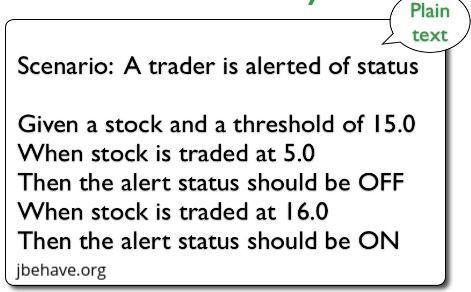
<p>The steps in the story are visually linked to a corresponding Java method:</p>

<p><img src="/public/dB6XOsGGWuUM1t1RHDV3g_img_1.png" alt="A JBehave story step linked to its corresponding Java implementation method" /></p>

<p>JBehave supports multiple mechanisms for parameter injection. In the above example, the ‘user’ and ‘password’ as arguments extracted from the @When step, with the @named annotation, following a natural order to the parameters in the annotated Java method.</p>

<p>In addition, Jbehave provides an easy way to create more intelligent data types than these strings. There are multiple plugins for generating comprehensive and interactive reports.</p>

<p>There are many (many!) advanced features that are worth checking out (see advanced topics in the <a href="https://jbehave.org/reference/stable/reporting-stories.html">Jbehave site</a>); we’ll only be using a few of them. We’ll explain how Jbehave works at a lower level later.</p>

<p><br /><br /></p>
<h3 id="thucydides">Thucydides</h3>

<p>Thucydides is a tool designed to make writing automated acceptance tests easier.</p>

<p>Thucydides and JBehave work well together. Thucydides uses simple conventions to make it easier to get started in writing and implementing JBehave stories. It reports on both JBehave and Thucydides steps, which can be seamlessly combined in the same class.</p>

<p><br /><br /></p>
<h3 id="requirements-and-tools"><strong>Requirements and tools</strong></h3>

<ul>
  <li>
    <p>There are JBehave plugins for IntelliJ-Idea and Eclipse. Both come with a custom JBehave Story Editor which provides a syntax highlighting, step hyperlink detection and link to corresponding Java method, step autocompletion, detecting both unimplemented steps and more. Hence, one of these IDE is required.</p>
  </li>
  <li>
    <p>We use maven for import libraries, build, run and automated tests</p>
  </li>
  <li>
    <p>You can download and follow the source code through the guide. The dispatcher of the ‘tests’ module is written in Scala. To run it you’ll need a Scala SDK.</p>
  </li>
</ul>

<p><br /><br /></p>
<h3 id="jbehave-plugin-and-the-volcano-stories">Jbehave Plugin and the ‘Volcano’ Stories</h3>
<hr />

<p>We use Idea IntelliJ-IDE with ‘Jbehave support’ plugin for writing the stories and the code behind.</p>

<h4 id="volcano">Volcano</h4>

<p>‘Volcano’ is intended to be a social network for Volcano enthusiasts.</p>

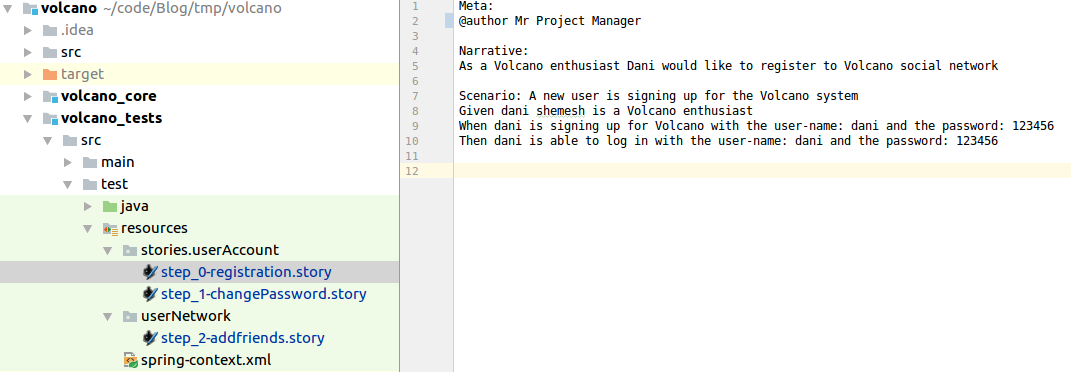
<p>The project manager of ‘Volcano’ would like to add some basic features and behaviors:</p>

<ol>
  <li>
    <p>User account</p>

    <ol>
      <li>
        <p>Registration to ‘Volcano’.</p>
      </li>
      <li>
        <p>Change password.</p>
      </li>
    </ol>
  </li>
  <li>
    <p>User network</p>

    <ol>
      <li>Add a new friend.</li>
    </ol>
  </li>
</ol>

<p>Each feature will be described in it’s own Jbehave story file. Here is how the “Registration” story looks like before applying the ‘‘Jbehave support’’ plugin:</p>

<p><img src="/public/dB6XOsGGWuUM1t1RHDV3g_img_2.png" alt="The Registration JBehave story file before the JBehave IDE support plugin is applied" /></p>

<p>And after:</p>

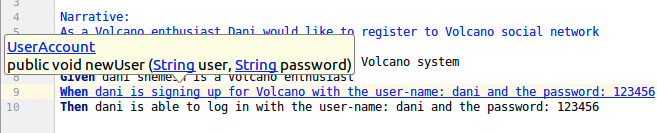
<p><img src="/public/dB6XOsGGWuUM1t1RHDV3g_img_3.png" alt="The same Registration story after the JBehave plugin adds step highlighting" /></p>

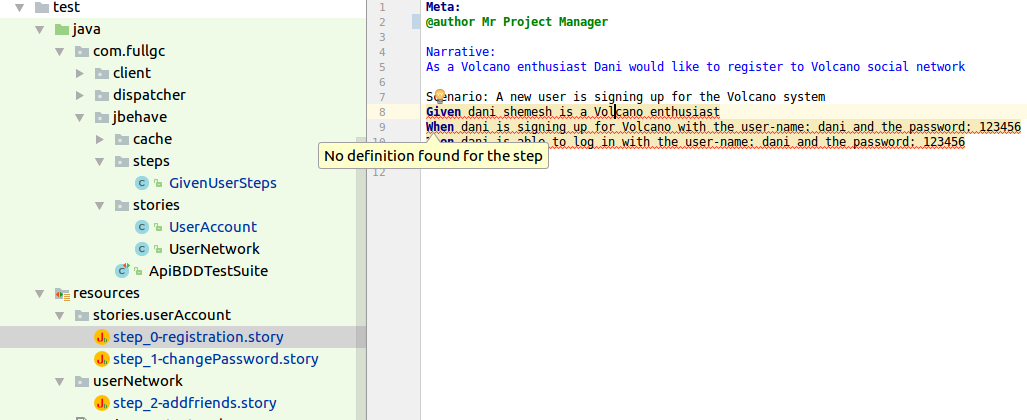
<p>At this stage the steps are marked in red, and we get a message when the mouse hovers that there is no Java method that linked with the steps.</p>

<h4 id="initial-dependencies">Initial Dependencies</h4>

<p>Here Thucydides kicks in.</p>

<p>We’ll use ‘<em>net.thucydides’</em> libraries for the implementation.</p>

<p>The following Jbehave plugin artifact:</p>

<div class="language-xml highlighter-rouge"><div class="highlight"><pre class="highlight"><code><span class="nt">&lt;groupId&gt;</span>net.thucydides<span class="nt">&lt;/groupId&gt;</span>
<span class="nt">&lt;artifactId&gt;</span>thucydides-jbehave-plugin<span class="nt">&lt;/artifactId&gt;</span>
</code></pre></div></div>

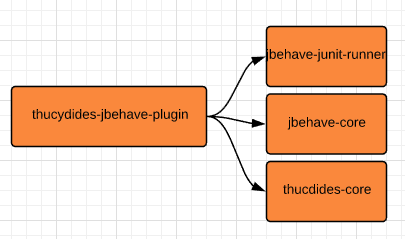
<p>This includes the Jbehave libraries that are required for the Java implementation code behind:</p>

<p><img src="/public/dB6XOsGGWuUM1t1RHDV3g_img_4.png" alt="Maven dependencies required for JBehave and the Java step implementations" /></p>

<p>‘Jbehave-core’ provides the basic Jbehave BDD building blocks: The @Given @When @Then Annotations, and the annotations responsible for the parameter injection (i.e. @Named) ‘Jbehave-junit-runner’ provides functionality for the story and scenarios lifecycle and reporting.</p>

<p>Later on, we’ll use it to identify the stories and run the test.</p>

<p><br /><br /></p>
<h3 id="next">Next</h3>

<p>In <a href="/developing-behavior-with-jbehave-part-2/">Part-2</a> we’ll implement the ‘Registration’ story, and review solutions to the implementation challenges.</p>]]></content><author><name>Dani Shemesh</name></author><category term="jee" /><category term="java" /><category term="jbehave" /><category term="bdd" /><category term="automation" /><category term="tests" /><summary type="html"><![CDATA[JBehave and Thucydides for BDD on a JEE web app: the terminology that matters, how the toolchain fits together, and the 'Volcano' stories used throughout.]]></summary><media:thumbnail xmlns:media="http://search.yahoo.com/mrss/" url="https://fullgc.github.io/img/behave-color.jpg" /><media:content medium="image" url="https://fullgc.github.io/img/behave-color.jpg" xmlns:media="http://search.yahoo.com/mrss/" /></entry><entry><title type="html">Delivery workflow with jGit-flow &amp;amp; Jenkins — Part 3</title><link href="https://fullgc.github.io/manage-development-and-delivery-workflow-with-jgit-flow-and-jenkins-pipeline-part-3/" rel="alternate" type="text/html" title="Delivery workflow with jGit-flow &amp;amp; Jenkins — Part 3" /><published>2018-09-11T17:15:45+03:00</published><updated>2018-09-11T17:15:45+03:00</updated><id>https://fullgc.github.io/Manage-development-and-delivery-workflow-part-3</id><content type="html" xml:base="https://fullgc.github.io/manage-development-and-delivery-workflow-with-jgit-flow-and-jenkins-pipeline-part-3/"><![CDATA[<p>The <a href="https://wiki.jenkins-ci.org/display/JENKINS/Pipeline+Plugin">Pipeline plugin</a>, allows users to implement a project’s entire build/test/deploy pipeline in a Jenkinsfile and stores that alongside their code.</p>

<p>Before we’ll begin writing the Jenkinsfile, keep in mind that there are many ways to implement a CI/CD process. The flow we’ll discuss and implement is just one approach.
Moreover, there are usually multiple ways of writing a command in the Jenkinsfile: Native Groovy (Pipeline plugin DSL is groovy based), use a shell script, a Pipeline script code, external libraries, etc..</p>

<h2 id="multibranch-pipeline">Multibranch Pipeline</h2>

<p>In a <a href="https://jenkins.io/doc/book/pipeline/multibranch/">Multibranch Pipeline</a> project, Jenkins automatically discovers, manages and executes Pipelines for branches which contain a Jenkinsfile in source control (It is possible to write a Pipeline script directly in the job configuration though). It enables an implementation of different Jenkinsfiles for different branches. However, here we’re going to implement a single Jenkinsfile for multiple branches.</p>

<h3 id="configuration">Configuration</h3>

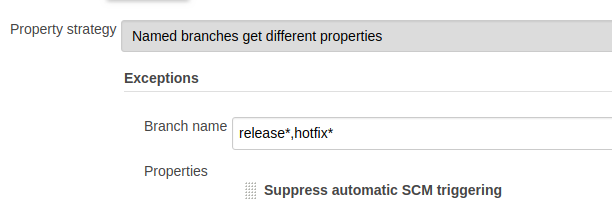
<p>The entire definition of the Pipeline would be written in the Jenkinsfile, except the following: In the ‘Branch Source’ we’ll declare the source control and repository that we’ll work with (this can also be done with code). In addition, we’ll set the branch discovery strategy to “All Branches”, meaning the job would start for every modification of the repository (i.e. for every push).</p>

<p>Then we’ll exclude the release and ‘hotfix’ branches (this will be explained later).</p>

<p><img src="/public/l8Up2rOYZomboTh06PZE0A_img_8.png" alt="Jenkins multibranch pipeline configuration excluding the release and hotfix branches" /></p>

<p><br /><br /></p>
<h2 id="writing-the-jenkinsfile-step-by-step">Writing the Jenkinsfile, step-by-step</h2>

<hr />

<h3 id="context">Context</h3>
<p>The Pipeline job should be run on a dedicated Jenkins slave, ‘server CICD’, hence the script would be written inside a node context:</p>

<div class="language-javascript highlighter-rouge"><div class="highlight"><pre class="highlight"><code><span class="nf">node</span><span class="p">(</span><span class="dl">'</span><span class="s1">Server CICD</span><span class="dl">'</span><span class="p">)</span> <span class="p">{</span> <span class="p">}</span>
</code></pre></div></div>

<hr />

<h3 id="checkout">Checkout</h3>
<p>This step checkouts code from source control. Scm is a special variable which instructs the checkout step to clone the specific revision which triggers this Pipeline run.</p>

<div class="language-javascript highlighter-rouge"><div class="highlight"><pre class="highlight"><code><span class="nf">stage</span><span class="p">(</span><span class="dl">'</span><span class="s1">Checkout</span><span class="dl">'</span><span class="p">)</span> <span class="p">{</span>
   <span class="nf">checkout</span><span class="p">([</span>
           <span class="nx">$class</span>           <span class="p">:</span> <span class="dl">'</span><span class="s1">GitSCM</span><span class="dl">'</span><span class="p">,</span>
           <span class="nx">branches</span>         <span class="p">:</span> <span class="nx">scm</span><span class="p">.</span><span class="nx">branches</span><span class="p">,</span>
           <span class="nx">extensions</span>       <span class="p">:</span> <span class="nx">scm</span><span class="p">.</span><span class="nx">extensions</span> <span class="o">+</span> <span class="p">[[</span><span class="nx">$class</span><span class="p">:</span> <span class="dl">'</span><span class="s1">LocalBranch</span><span class="dl">'</span><span class="p">,</span> <span class="nx">localBranch</span><span class="p">:</span> <span class="dl">''</span><span class="p">]],</span>
           <span class="nx">userRemoteConfigs</span><span class="p">:</span> <span class="nx">scm</span><span class="p">.</span><span class="nx">userRemoteConfigs</span>
   <span class="p">])</span>
<span class="p">}</span>
</code></pre></div></div>

<hr />

<h3 id="build">Build</h3>

<p>a. <strong>Maven build</strong>: We are using the maven build tool, and trigger a maven build with a shell command.
   We like to get a detailed report from Pipeline on a failure, including failed tests, links to them, and statistics. Moreover, we like the job status to become automatically ‘unstable’ if there were failed tests. These are provided by the <a href="https://wiki.jenkins.io/display/JENKINS/Pipeline+Maven+Plugin">Pipeline Maven plugin</a>, which wraps the maven build command.</p>

<div class="language-javascript highlighter-rouge"><div class="highlight"><pre class="highlight"><code><span class="nf">withMaven</span><span class="p">(</span><span class="nx">jdk</span><span class="p">:</span> <span class="dl">'</span><span class="s1">JDK 8 update 66</span><span class="dl">'</span><span class="p">,</span> <span class="nx">maven</span><span class="p">:</span> <span class="dl">'</span><span class="s1">Maven 3.0.5</span><span class="dl">'</span><span class="p">)</span> <span class="p">{</span>
           <span class="nx">sh</span> <span class="dl">"</span><span class="s2">mvn -Dmaven.test.failure.ignore=true clean install</span><span class="dl">"</span>
<span class="p">}</span>
</code></pre></div></div>

<p><img src="/public/l8Up2rOYZomboTh06PZE0A_img_9.png" alt="Build stage configuration in the Jenkins pipeline" /></p>

<p>b. <strong>Handle build exceptions</strong> and test failures:
 On maven build failure:</p>

<p>If Pipeline checked out a feature branch (triggered by a push to a branch which starts with ‘ST-‘  ),  a notification email should be sent to the feature owner only. We’ll use the <a href="https://wiki.jenkins.io/display/JENKINS/Mailer">Mailer plugin</a> for that.</p>

<p>Otherwise, we like an email notification to be sent to all server members, and a notification to the slack channel as well (<a href="https://jenkins.io/doc/pipeline/steps/slack/">Slack plugin</a>). This should include a list of the last Git commits with the committer name, so that we can get an idea of what code modification broke the build.</p>

<p>If an exception has been thrown during the build, we like to:</p>

<ol>
  <li>
    <p>Catch it</p>
  </li>
  <li>
    <p>Change the build status to ‘failure’</p>
  </li>
  <li>
    <p>Send the appropriate notifications</p>
  </li>
  <li>
    <p>Throw the exception</p>
  </li>
</ol>

<p>The final script for the build looks like this:</p>

<div class="language-javascript highlighter-rouge"><div class="highlight"><pre class="highlight"><code><span class="nb">String</span> <span class="nx">branch</span> <span class="o">=</span> <span class="nx">env</span><span class="p">.</span><span class="nx">BRANCH_NAME</span><span class="p">.</span><span class="nf">toString</span><span class="p">()</span>
<span class="nf">stage</span><span class="p">(</span><span class="dl">'</span><span class="s1">Maven build</span><span class="dl">'</span><span class="p">)</span> <span class="p">{</span>

    <span class="c1">//returns a set of git revisions with the name of the committer</span>
   <span class="p">@</span><span class="nd">NonCPS</span>
   <span class="nx">def</span> <span class="nx">commitList</span> <span class="o">=</span> <span class="p">{</span>
       <span class="nx">def</span> <span class="nx">changes</span> <span class="o">=</span> <span class="dl">""</span>
       <span class="nx">currentBuild</span><span class="p">.</span><span class="nx">changeSets</span><span class="p">.</span><span class="nx">each</span> <span class="p">{</span> <span class="kd">set</span> <span class="o">-&gt;</span>
           <span class="kd">set</span><span class="p">.</span><span class="nx">each</span> <span class="p">{</span> <span class="nx">entry</span> <span class="o">-&gt;</span>
               <span class="nx">changes</span> <span class="o">+=</span> <span class="dl">"</span><span class="s2">${entry.commitId} - ${entry.msg} </span><span class="se">\n</span><span class="s2"> by ${entry.author.fullName}</span><span class="se">\n</span><span class="dl">"</span>
           <span class="p">}</span>
       <span class="p">}</span>
       <span class="k">return</span> <span class="nx">changes</span>
   <span class="p">}</span>

   <span class="nx">def</span> <span class="nx">handleFailures</span> <span class="o">=</span> <span class="p">{</span>
       <span class="k">if </span><span class="p">(</span><span class="nx">branch</span><span class="p">.</span><span class="nf">startsWith</span><span class="p">(</span><span class="dl">"</span><span class="s2">ST-</span><span class="dl">"</span><span class="p">))</span> <span class="p">{</span>
           <span class="nf">step</span><span class="p">([</span><span class="na">$class</span><span class="p">:</span> <span class="dl">'</span><span class="s1">Mailer</span><span class="dl">'</span><span class="p">,</span> <span class="na">notifyEveryUnstableBuild</span><span class="p">:</span> <span class="kc">true</span><span class="p">,</span> <span class="na">recipients</span><span class="p">:</span> <span class="nf">emailextrecipients</span><span class="p">([[</span><span class="na">$class</span><span class="p">:</span> <span class="dl">'</span><span class="s1">RequesterRecipientProvider</span><span class="dl">'</span><span class="p">]]),</span> <span class="na">sendToIndividuals</span><span class="p">:</span> <span class="kc">true</span><span class="p">])</span>
       <span class="p">}</span> <span class="k">else</span> <span class="p">{</span>
           <span class="nf">step</span><span class="p">(</span><span class="dl">'</span><span class="s1">Send notification</span><span class="dl">'</span><span class="p">)</span> <span class="p">{</span>
               <span class="nf">mail</span><span class="p">(</span><span class="na">to</span><span class="p">:</span> <span class="dl">'</span><span class="s1">server@fullgc.com</span><span class="dl">'</span><span class="p">,</span>
                       <span class="na">subject</span><span class="p">:</span> <span class="dl">"</span><span class="s2">Maven build failed for branch: </span><span class="dl">"</span> <span class="o">+</span> <span class="nx">env</span><span class="p">.</span><span class="nx">BRANCH_NAME</span><span class="p">.</span><span class="nf">toString</span><span class="p">(),</span>
                       <span class="na">body</span><span class="p">:</span> <span class="dl">"</span><span class="s2">last commits are: </span><span class="dl">"</span> <span class="o">+</span> <span class="nf">commitList</span><span class="p">().</span><span class="nf">toString</span><span class="p">()</span> <span class="o">+</span> <span class="dl">"</span><span class="s2"> (&lt;$BUILD_URL/console|Job&gt;)</span><span class="dl">"</span><span class="p">);</span>
           <span class="p">}</span>
           <span class="nx">slackSend</span> <span class="na">channel</span><span class="p">:</span> <span class="dl">'</span><span class="s1">server</span><span class="dl">'</span><span class="p">,</span> <span class="na">color</span><span class="p">:</span> <span class="dl">'</span><span class="s1">warning</span><span class="dl">'</span><span class="p">,</span> <span class="na">message</span><span class="p">:</span> <span class="dl">"</span><span class="s2">Maven build failed for branch ${branch} </span><span class="se">\"</span><span class="s2">. </span><span class="se">\n</span><span class="s2">last Commits are: </span><span class="se">\n</span><span class="dl">"</span> <span class="o">+</span> <span class="nf">commitList</span><span class="p">().</span><span class="nf">toString</span><span class="p">()</span> <span class="o">+</span> <span class="dl">"</span><span class="se">\n</span><span class="s2"> (&lt;$BUILD_URL/console|Job&gt;)</span><span class="dl">"</span>
       <span class="p">}</span>
   <span class="p">}</span>

   <span class="k">try</span> <span class="p">{</span>
       <span class="nf">withMaven</span><span class="p">(</span><span class="na">jdk</span><span class="p">:</span> <span class="dl">'</span><span class="s1">JDK 8 update 66</span><span class="dl">'</span><span class="p">,</span> <span class="na">maven</span><span class="p">:</span> <span class="dl">'</span><span class="s1">Maven 3.0.5</span><span class="dl">'</span><span class="p">)</span> <span class="p">{</span>
           <span class="nx">sh</span> <span class="dl">"</span><span class="s2">mvn -Dmaven.test.failure.ignore=true clean install</span><span class="dl">"</span>
       <span class="p">}</span>
       <span class="k">if </span><span class="p">(</span><span class="nx">currentBuild</span><span class="p">.</span><span class="nf">result</span><span class="p">(</span><span class="dl">"</span><span class="s2">UNSTABLE</span><span class="dl">"</span><span class="p">))</span> <span class="p">{</span>
           <span class="nf">handleFailures</span><span class="p">()</span>
       <span class="p">}</span>
   <span class="p">}</span> <span class="k">catch </span><span class="p">(</span><span class="nx">Exception</span> <span class="nx">e</span><span class="p">)</span> <span class="p">{</span>
       <span class="nx">manager</span><span class="p">.</span><span class="nf">buildFailure</span><span class="p">()</span>
       <span class="nf">handleFailures</span><span class="p">()</span>
       <span class="k">throw</span> <span class="nx">e</span>
   <span class="p">}</span>
<span class="p">}</span>
</code></pre></div></div>

<hr />

<h3 id="release-process">Release process</h3>
<p><img align="right" src="/img/releasememe.png" height="110" width="230" alt="Release process meme" />
In this process, we’ll upload a tar (the maven build output) to s3, where the environment depends on the git branch we’re working on. The code would be placed in the ‘process’ step:</p>

<p>a. <strong>Release tar name.</strong> The release file is a tar file (the maven build output). Its name should represent the release version. The release version is found in the root pom.xml file, and we’ll extract it from there</p>

<p>b. <strong>Release candidate tar name.</strong> This is somewhat tricky.
On <strong>release/hotfix</strong> only, we like to create a release candidate for QA.
The release candidate holds the name:</p>

<div class="language-javascript highlighter-rouge"><div class="highlight"><pre class="highlight"><code><span class="o">&lt;</span><span class="nx">volcano</span> <span class="nx">version</span><span class="o">&gt;</span><span class="nx">RC</span><span class="o">-&lt;</span><span class="nx">RC</span> <span class="nx">number</span><span class="o">&gt;</span>
</code></pre></div></div>

<p>In our story, the first release candidate would be: ‘volcano-1.2.0-RC-1’(‘volcano-1.2.1-RC-1’ in the case of a hotfix).</p>

<p>The RC number starts with 1. If a QA person found a bug, we’d need to fix it, and then increment the RC number, i.e. ‘volcano-1.2.0-RC-2’ and so on.</p>

<p>We’ll use a text file with the current RC number to know what the next version should be for release. We then update the file, commit changes and create a new tart with the correct name.</p>

<div class="language-javascript highlighter-rouge"><div class="highlight"><pre class="highlight"><code><span class="nx">def</span> <span class="nx">pom</span> <span class="o">=</span> <span class="nx">readFile</span> <span class="dl">'</span><span class="s1">pom.xml</span><span class="dl">'</span>
<span class="nx">def</span> <span class="nx">project</span> <span class="o">=</span> <span class="k">new</span> <span class="nc">XmlSlurper</span><span class="p">().</span><span class="nf">parseText</span><span class="p">(</span><span class="nx">pom</span><span class="p">)</span>
<span class="nb">String</span> <span class="nx">version</span> <span class="o">=</span> <span class="nx">project</span><span class="p">.</span><span class="nx">version</span><span class="p">.</span><span class="nf">toString</span><span class="p">()</span>
<span class="nb">String</span> <span class="nx">tarName</span> <span class="o">=</span> <span class="dl">"</span><span class="s2">volcano-${version}-release-pack.tar.gz</span><span class="dl">"</span>

<span class="nf">stage</span><span class="p">(</span><span class="dl">'</span><span class="s1">Release</span><span class="dl">'</span><span class="p">){</span>

<span class="p">@</span><span class="nd">NonCPS</span>
<span class="nx">def</span> <span class="nx">newVersion</span> <span class="o">=</span> <span class="p">{</span>
   <span class="nx">def</span> <span class="nx">doesFileExist</span> <span class="o">=</span> <span class="nx">fileExists</span> <span class="dl">'</span><span class="s1">releases.txt</span><span class="dl">'</span>
   <span class="k">if </span><span class="p">(</span><span class="nx">doesFileExist</span><span class="p">)</span> <span class="p">{</span>
       <span class="nx">echo</span> <span class="dl">"</span><span class="s2">file releases.txt exists</span><span class="dl">"</span>
       <span class="nx">def</span> <span class="nx">file</span> <span class="o">=</span> <span class="nx">readFile</span> <span class="dl">'</span><span class="s1">releases.txt</span><span class="dl">'</span>
       <span class="nb">String</span> <span class="nx">fileContents</span> <span class="o">=</span> <span class="nx">file</span><span class="p">.</span><span class="nf">toString</span><span class="p">()</span>
       <span class="nx">Integer</span> <span class="nx">newTarVersion</span> <span class="o">=</span> <span class="nx">fileContents</span><span class="p">.</span><span class="nf">toInteger</span><span class="p">()</span> <span class="o">+</span> <span class="mi">1</span>
       <span class="nx">writeFile</span> <span class="na">file</span><span class="p">:</span> <span class="dl">'</span><span class="s1">releases.txt</span><span class="dl">'</span><span class="p">,</span> <span class="na">text</span><span class="p">:</span> <span class="nx">newTarVersion</span><span class="p">.</span><span class="nf">toString</span><span class="p">()</span>
       <span class="nx">echo</span> <span class="dl">"</span><span class="s2">new tar version is: </span><span class="dl">"</span> <span class="o">+</span> <span class="nx">newTarVersion</span>
   <span class="p">}</span> <span class="k">else</span> <span class="p">{</span>
       <span class="nx">echo</span> <span class="dl">"</span><span class="s2">file releases.txt does not exist</span><span class="dl">"</span>
       <span class="nx">writeFile</span> <span class="na">file</span><span class="p">:</span> <span class="dl">'</span><span class="s1">releases.txt</span><span class="dl">'</span><span class="p">,</span> <span class="na">text</span><span class="p">:</span> <span class="dl">"</span><span class="s2">1</span><span class="dl">"</span>
   <span class="p">}</span>
   <span class="nx">readFile</span> <span class="dl">'</span><span class="s1">releases.txt</span><span class="dl">'</span>
<span class="p">}</span>

<span class="k">if </span><span class="p">(</span><span class="nx">branch</span><span class="p">.</span><span class="nf">startsWith</span><span class="p">(</span><span class="dl">"</span><span class="s2">release</span><span class="dl">"</span><span class="p">)</span> <span class="o">||</span> <span class="nx">branch</span><span class="p">.</span><span class="nf">startsWith</span><span class="p">(</span><span class="dl">"</span><span class="s2">hotfix</span><span class="dl">"</span><span class="p">))</span> <span class="p">{</span>
   <span class="nb">String</span> <span class="nx">tarRCVersion</span> <span class="o">=</span> <span class="nf">newVersion</span><span class="p">()</span>
   <span class="nx">newTarName</span> <span class="o">=</span> <span class="dl">"</span><span class="s2">volcano${version}-RC-${tarRCVersion}-release-pack.tar.gz</span><span class="dl">"</span>
   <span class="nx">sh</span> <span class="dl">"</span><span class="s2">mv ./volcano/target/${tarName} ./viper/target/${newTarName}</span><span class="dl">"</span>
   <span class="nx">tarName</span> <span class="o">=</span> <span class="nx">newTarName</span>
<span class="p">}</span>

<span class="nf">step</span><span class="p">(</span><span class="dl">'</span><span class="s1">Commit and push releases file</span><span class="dl">'</span><span class="p">)</span> <span class="p">{</span>
   <span class="nx">sh</span> <span class="dl">"</span><span class="s2">git remote set-url origin git@bitbucket.org:fullgc/volcano.git</span><span class="dl">"</span>
   <span class="nx">sh</span> <span class="dl">"</span><span class="s2">git add -A</span><span class="dl">"</span>
   <span class="nx">sh</span> <span class="dl">"</span><span class="s2">git commit -m 'update volcano version to '${tarRCVersion}</span><span class="dl">"</span>
   <span class="nx">sh</span> <span class="dl">"</span><span class="s2">git push</span><span class="dl">"</span>
<span class="p">}</span>
</code></pre></div></div>

<p>Note that we did exclude the release/hotfix branches. This allows a couple of team members to work on the branch when QA has made a rejection or there is a bug to fix, without the new version being released with every push.</p>

<hr />

<h3 id="upload-tar-to-s3">Upload tar to s3</h3>
<p>We won’t implement the deployment process with the Pipeline script, and leave it for the deployment tool, ‘Chef’ for the sake of this illustration.
Chef will deploy a new volcano app, with the appropriate version in s3. This would require amazon s3 credentials.
For the upload itself, there is a pipeline script. Nevertheless, we’ll implement it here using
Amazon CLI commands, using the shell.</p>

<div class="language-javascript highlighter-rouge"><div class="highlight"><pre class="highlight"><code><span class="nf">step</span><span class="p">(</span><span class="dl">'</span><span class="s1">Upload tar to s3 cli</span><span class="dl">'</span><span class="p">)</span> <span class="p">{</span>
   <span class="nf">withCredentials</span><span class="p">([[</span><span class="nx">$class</span><span class="p">:</span> <span class="dl">'</span><span class="s1">AmazonWebServicesCredentialsBinding</span><span class="dl">'</span><span class="p">,</span> <span class="nx">credentialsId</span><span class="p">:</span> <span class="dl">'</span><span class="s1">xxxxxxxx-xxxx-xxxx-xxxx-xxxxxxxxxxxx</span><span class="dl">'</span><span class="p">,</span> <span class="nx">accessKeyVariable</span><span class="p">:</span> <span class="dl">'</span><span class="s1">AWS_ACCESS_KEY_ID</span><span class="dl">'</span><span class="p">,</span> <span class="nx">secretKeyVariable</span><span class="p">:</span> <span class="dl">'</span><span class="s1">AWS_SECRET_ACCESS_KEY</span><span class="dl">'</span><span class="p">]])</span> <span class="p">{</span>
       <span class="nx">sh</span> <span class="dl">"</span><span class="s2">pip install --user awscli</span><span class="dl">"</span>
       <span class="nx">sh</span> <span class="dl">"</span><span class="s2">sudo apt-get -y install awscli</span><span class="dl">"</span>
       <span class="nx">sh</span> <span class="dl">"</span><span class="s2">aws s3 cp ./volcano/target/${tarName} s3://fullgc/tars/</span><span class="dl">"</span>
   <span class="p">}</span>
<span class="p">}</span>
</code></pre></div></div>

<hr />

<h3 id="deployment-process">Deployment process</h3>
<p>We won’t be diving too deeply into how Chef performs a deployment, but suffice to say this: In order for Chef to know that there is a new ‘volcano’ version it needs to deploy, the version in the <a href="https://docs.chef.io/environments.html">environment</a> (qa or development or production) file needs to be updated to the new version.</p>

<p>a. First, we’ll check out the Chef repository and ‘cd’  in the environments directory which the environment files rely on.</p>

<p>b. Replace the current version of the appropriate environment for the new version. This can be done by shell tools like jq. Here we’ll use Groovy.</p>

<p>c. Commit and push changes</p>

<p>d. Send a slack notification</p>

<p>e. If the branch is develop or master, it removes the releases.txt file</p>

<div class="language-javascript highlighter-rouge"><div class="highlight"><pre class="highlight"><code><span class="k">if </span><span class="p">(</span><span class="o">!</span><span class="nx">branch</span><span class="p">.</span><span class="nf">startsWith</span><span class="p">(</span><span class="dl">'</span><span class="s1">ST-</span><span class="dl">'</span><span class="p">)){</span>
  <span class="nf">stage</span><span class="p">(</span><span class="dl">'</span><span class="s1">Deploy</span><span class="dl">'</span><span class="p">)</span> <span class="p">{</span>

  <span class="nx">def</span> <span class="nx">incrementVersion</span> <span class="o">=</span> <span class="p">{</span>
     <span class="nx">def</span> <span class="nx">environment</span> <span class="o">=</span> <span class="p">{</span>
     <span class="k">switch</span><span class="p">(</span><span class="nx">branch</span><span class="p">)</span> <span class="p">{</span>
         <span class="k">case</span> <span class="dl">'</span><span class="s1">develop</span><span class="dl">'</span><span class="p">:</span> <span class="dl">'</span><span class="s1">development.json</span><span class="dl">'</span>
             <span class="k">break</span>
         <span class="k">case</span> <span class="dl">'</span><span class="s1">master</span><span class="dl">'</span><span class="p">:</span> <span class="dl">'</span><span class="s1">production.json</span><span class="dl">'</span>
             <span class="k">break</span>
         <span class="na">default</span><span class="p">:</span> <span class="dl">'</span><span class="s1">qa.json</span><span class="dl">'</span>
     <span class="p">}</span>
  <span class="p">}</span>
   <span class="nx">def</span> <span class="nx">environmentFileContent</span> <span class="o">=</span> <span class="nx">readFile</span> <span class="nx">environment</span>
   <span class="nx">def</span> <span class="nx">environmentJson</span> <span class="o">=</span> <span class="k">new</span> <span class="nx">groovy</span><span class="p">.</span><span class="nx">json</span><span class="p">.</span><span class="nc">JsonSlurper</span><span class="p">().</span><span class="nf">parseText</span><span class="p">(</span><span class="nx">environmentFileContent</span><span class="p">)</span>
   <span class="nx">environmentJson</span><span class="p">.</span><span class="nx">default_attributes</span><span class="p">.</span><span class="nx">volcano</span><span class="p">.</span><span class="nx">version</span> <span class="o">=</span> <span class="dl">"</span><span class="s2">volcano-${version}</span><span class="dl">"</span>
   <span class="nb">String</span> <span class="nx">environmentPrettyJsonString</span> <span class="o">=</span> <span class="k">new</span> <span class="nx">groovy</span><span class="p">.</span><span class="nx">json</span><span class="p">.</span><span class="nc">JsonBuilder</span><span class="p">(</span><span class="nx">environmentJson</span><span class="p">).</span><span class="nf">toPrettyString</span><span class="p">()</span>
   <span class="nx">environmentJson</span> <span class="o">=</span> <span class="kc">null</span>
   <span class="nx">writeFile</span> <span class="na">file</span><span class="p">:</span> <span class="nx">$environment</span><span class="p">,</span> <span class="na">text</span><span class="p">:</span> <span class="nx">environmentPrettyJsonString</span>

  <span class="nx">sh</span> <span class="dl">"</span><span class="s2">git commit -am 'Changed volcano version in $environment env to '${version}</span><span class="dl">"</span>
  <span class="nx">sh</span> <span class="dl">"</span><span class="s2">git push</span><span class="dl">"</span>
<span class="p">}</span>

<span class="nx">checkout</span> <span class="nx">changelog</span><span class="p">:</span> <span class="kc">false</span><span class="p">,</span> <span class="nx">poll</span><span class="p">:</span> <span class="kc">false</span><span class="p">,</span> <span class="nx">scm</span><span class="p">:</span> <span class="p">[</span><span class="nx">$class</span><span class="p">:</span> <span class="dl">'</span><span class="s1">GitSCM</span><span class="dl">'</span><span class="p">,</span> <span class="nx">browser</span><span class="p">:</span> <span class="p">[</span><span class="nx">$class</span><span class="p">:</span> <span class="dl">'</span><span class="s1">BitbucketWeb</span><span class="dl">'</span><span class="p">,</span> <span class="nx">repoUrl</span><span class="p">:</span> <span class="dl">'</span><span class="s1">https://bitbucket.org/fullgc/chef</span><span class="dl">'</span><span class="p">],</span> <span class="nx">doGenerateSubmoduleConfigurations</span><span class="p">:</span> <span class="kc">false</span><span class="p">,</span> <span class="nx">extensions</span><span class="p">:</span> <span class="p">[[</span><span class="nx">$class</span><span class="p">:</span> <span class="dl">'</span><span class="s1">LocalBranch</span><span class="dl">'</span><span class="p">,</span> <span class="nx">localBranch</span><span class="p">:</span>
  <span class="dl">'</span><span class="s1">**</span><span class="dl">'</span><span class="p">]],</span> <span class="nx">submoduleCfg</span><span class="p">:</span> <span class="p">[],</span> <span class="nx">userRemoteConfigs</span><span class="p">:</span> <span class="p">[[</span><span class="nx">url</span><span class="p">:</span> <span class="dl">'</span><span class="s1">git@bitbucket.org:fullgc/chef</span><span class="dl">'</span><span class="p">]]]</span>
   <span class="nf">dir</span><span class="p">(</span><span class="dl">'</span><span class="s1">environments/</span><span class="dl">'</span><span class="p">)</span> <span class="p">{</span>
       <span class="nf">incrementVersion</span><span class="p">()</span>
   <span class="p">}</span>
<span class="nx">slackSend</span> <span class="nx">channel</span><span class="p">:</span> <span class="dl">'</span><span class="s1">server</span><span class="dl">'</span><span class="p">,</span> <span class="nx">color</span><span class="p">:</span> <span class="dl">'</span><span class="s1">good</span><span class="dl">'</span><span class="p">,</span> <span class="nx">message</span><span class="p">:</span> <span class="dl">"</span><span class="s2"> New volcano version ${version} is being deployed to $environment</span><span class="dl">"</span>
  <span class="p">}</span>
<span class="k">if </span><span class="p">(</span><span class="nx">branch</span> <span class="o">==</span> <span class="dl">'</span><span class="s1">develop</span><span class="dl">'</span> <span class="o">||</span> <span class="nx">branch</span> <span class="o">==</span> <span class="dl">'</span><span class="s1">master</span><span class="dl">'</span><span class="p">)</span> <span class="nx">sh</span> <span class="dl">"</span><span class="s2">rm releases.txt</span><span class="dl">"</span>
<span class="p">}</span>
</code></pre></div></div>

<p>In the image below an example of a Pipeline run:</p>

<p><img src="/public/l8Up2rOYZomboTh06PZE0A_img_10.png" alt="An example Jenkins Pipeline run, showing each stage of the deployment process" /></p>

<p><br /><br /></p>
<h2 id="tips">Tips</h2>

<ul>
  <li>
    <p>To save a lot of time, use the <a href="https://www.jenkins.io/doc/book/pipeline/getting-started/#snippet-generator">Pipeline Syntax generator</a> in your own Jenkins for every pipeline command</p>
  </li>
  <li>
    <p>While working on the Jenkinsfile, you don’t have to commit and push every modification just to test an execution. You can use run an execution using <a href="https://jenkins.io/doc/book/pipeline/development/#replay">‘replay’</a> until everything works.</p>
  </li>
  <li>
    <p><a href="https://jenkins.io/doc/book/blueocean/">Jenkins Blue Ocean</a> plugin provides a new awesome user experience, check it out.</p>
  </li>
  <li>
    <p>Pipeline is still new, but you shouldn’t get too frustrated by weird errors you may get while writing the script, most of them are common and the solution can be easily found on the web.</p>
  </li>
  <li>
    <p>The <a href="https://github.com/jenkinsci/JenkinsPipelineUnit/">Pipeline Unit Testing</a> Framework allows you to unit test Pipelines before running them in full.</p>
  </li>
</ul>

<p><br /><br /></p>
<h2 id="wrapping-up">Wrapping up</h2>

<p>Pipeline as a code is pretty much a game changer, in the sense that it is now in the hands of every programmer, allowing them to write a full release (and deployment) process, that can fit the development workflow easily.</p>

<hr />

<p><em>The complete code can be found in my <a href="https://github.com/FullGC/volcano">GitHub</a></em>.</p>]]></content><author><name>Dani Shemesh</name></author><category term="jira" /><category term="jenkins" /><category term="pipeline" /><category term="ci/cd" /><category term="release" /><category term="deployment" /><summary type="html"><![CDATA[A Jenkins multibranch pipeline built step by step: the Jenkinsfile stages, why the release and hotfix branches are excluded, and the hard-won tips.]]></summary><media:thumbnail xmlns:media="http://search.yahoo.com/mrss/" url="https://fullgc.github.io/img/workflow-main.jpg" /><media:content medium="image" url="https://fullgc.github.io/img/workflow-main.jpg" xmlns:media="http://search.yahoo.com/mrss/" /></entry><entry><title type="html">Delivery workflow with jGit-flow &amp;amp; Jenkins — Part 2</title><link href="https://fullgc.github.io/manage-development-and-delivery-workflow-with-jgit-flow-and-jenkins-pipeline-part-2/" rel="alternate" type="text/html" title="Delivery workflow with jGit-flow &amp;amp; Jenkins — Part 2" /><published>2018-09-11T17:10:45+03:00</published><updated>2018-09-11T17:10:45+03:00</updated><id>https://fullgc.github.io/Manage-development-and-delivery-workflow-part-2</id><content type="html" xml:base="https://fullgc.github.io/manage-development-and-delivery-workflow-with-jgit-flow-and-jenkins-pipeline-part-2/"><![CDATA[<p>The Git workflow is based on ‘git-flow’, with some modifications, and implemented here with ‘Jgit-flow-jira’.</p>

<p>This section covers the green and purple steps in the workflow graph (<a href="/manage-development-and-delivery-workflow-with-jgit-flow-and-jenkins-pipeline-part-1/">from part-1</a>).</p>

<p>The following is the basic plugin configuration needed for our story. It gives a name to the Git branches and tags. 
The ‘scmCommentPrefix’ would be the prefix for the commits performed by ‘jGit-flow’(i.e. the Git ‘squash’ operation)</p>

<div class="language-plaintext highlighter-rouge"><div class="highlight"><pre class="highlight"><code>&lt;configuration&gt;
  &lt;flowInitContext&gt;
     &lt;masterBranchName&gt;master&lt;/masterBranchName&gt;
     &lt;developBranchName&gt;develop&lt;/developBranchName&gt;
     &lt;featureBranchPrefix&gt;ST-&lt;/featureBranchPrefix&gt;
     &lt;releaseBranchPrefix&gt;release-&lt;/releaseBranchPrefix&gt;
     &lt;hotfixBranchPrefix&gt;hotfix-&lt;/hotfixBranchPrefix&gt;
     &lt;versionTagPrefix&gt;volcano&lt;/versionTagPrefix&gt;
  &lt;/flowInitContext&gt;
  &lt;scmCommentPrefix&gt;JgitFLow step: &lt;/scmCommentPrefix&gt;
&lt;/configuration&gt;
</code></pre></div></div>

<p><br /><br /></p>
<h2 id="a-feature-lifecycle">A Feature Lifecycle:</h2>

<h3 id="start-a-feature-git-flow-process">Start a feature git flow process</h3>

<p>A new feature starts with the command <i>mvn jgitflow:feature-start</i>.</p>

<ul>
  <li>This prompts the user for the feature-branch name, which should carry the ticket ID (in our story, ‘ST-145’):</li>
</ul>

<p><img src="/public/l8Up2rOYZomboTh06PZE0A_img_2.png" alt="Terminal output of mvn jgitflow:feature-start prompting for a feature name" /></p>

<p>A new feature branch is then checked out from ‘develop’ and the ticket status is updated to ‘IN PROGRESS’:</p>

<p><img src="/public/l8Up2rOYZomboTh06PZE0A_img_3.png" alt="Feature branch checked out from develop, with the Jira ticket moved to In Progress" /></p>

<h3 id="complete-a-feature-git-flow-process">Complete a feature git flow process</h3>

<p>The command <i>mvn jgitflow:feature-finish</i> ends the feature lifecycle.</p>

<p>It prompts the user for the desired feature name to finish, where the default is the current branch.</p>

<p><img src="/public/l8Up2rOYZomboTh06PZE0A_img_4.png" alt="mvn jgitflow:feature-finish prompting for the feature to finish, defaulting to the current branch" /></p>

<p>The feature branch is then merged into ‘develop’, and ‘develop’ is pushed.</p>

<p>Before the merge, we like branch ‘develop’ to be pulled and the commits in the feature branch to be squashed, and so cleaner.</p>

<p>To achieve that, we’ll add the followings configuration to jgit-flow plugin:</p>
<div class="language-plaintext highlighter-rouge"><div class="highlight"><pre class="highlight"><code>&lt;pullDevelop&gt;true&lt;/pullDevelop&gt;
&lt;squash&gt;true&lt;/squash&gt;
</code></pre></div></div>
<p><img src="/img/squash.png" height="200" width="160" alt="Squashing commits before finishing a feature branch" /></p>

<p>When the feature is done, we like to resolve it and pass to the QA guy. Hence, it’s resolution should be switched to ‘Done’, and it’s status ‘QA’
<img src="/public/l8Up2rOYZomboTh06PZE0A_img_5.png" alt="Jira ticket with resolution set to Done and status moved to QA" /></p>

<p><br /><br /></p>
<h2 id="a-release-lifecycle">A Release Lifecycle:</h2>

<p>After all the features of the next version have been completed and merged to ‘develop’ branch, it’s time for the git flow release process to kick in.</p>

<h3 id="start-a-release-git-flow-process">Start a release git flow process</h3>

<p>A release process starts with the command <i>mvn jgitflow:release-start</i> on branch ‘develop’, which prompts the user for the version name.</p>

<p><img src="/public/l8Up2rOYZomboTh06PZE0A_img_6.png" alt="mvn jgitflow:release-start on develop, prompting for the release version name" /></p>

<p>The default is the next major version (according to the pom file), in this case, 1.2.0.
Then it performs the following actions:</p>

<ul>
  <li>
    <p>Pulls from the remote ‘develop’ branch (we’ve already configured).</p>
  </li>
  <li>
    <p>Updates and commits the poms with the new version. This requires the following tag attribute:</p>
  </li>
</ul>

<div class="language-plaintext highlighter-rouge"><div class="highlight"><pre class="highlight"><code>&lt;autoVersionSubmodules&gt;true&lt;/autoVersionSubmodules&gt;
</code></pre></div></div>

<ul>
  <li>
    <p>Checks out to the new ‘release’ branch, called release-VERSION (e.g. release-1.2.0).</p>
  </li>
  <li>
    <p>Pushes (this would trigger a release process of a ‘release candidate’ for QA machines. (The release processes will be described in the next section, ‘Pipeline’)</p>
  </li>
</ul>

<h3 id="complete-a-release-git-flow-process">Complete a release git-flow process</h3>

<p>Once the version is approved by QA, the ‘git-flow’ release can be completed.
The command <i>mvn jgitflow:release-finish</i> performs the following:</p>

<ul>
  <li>
    <p>Merges the ‘release’ branch back into ‘master’</p>
  </li>
  <li>
    <p>Tags the ‘release’ with its name.</p>
  </li>
  <li>
    <p>Back merges the ‘release’ into ‘develop’</p>
  </li>
  <li>
    <p>Updates ‘develop’s poms with ‘<next version="">-SNAPSHOT'. (1.3-SNAPSHOT).</next></p>
  </li>
  <li>
    <p>Removes the ‘release’ branch.</p>
  </li>
</ul>

<p>Checkout and push ‘master’ branch would start the release process</p>

<p><br /><br /></p>
<h2 id="a-hotfix-lifecycle">A Hotfix Lifecycle</h2>

<p>When there is a need for a quick fix for a code that is already in production, the ‘git-flow’ hotfix comes to the rescue.</p>

<h3 id="start-a-hotfix-git-flow-process">Start a hotfix git flow process</h3>

<p>The ‘master’ branch is always synced with the latest deployment code.
The Feature starts with the command <i>mvn jgitflow:hotfix-start</i> prompts the user for the version name.</p>

<p><img src="/public/l8Up2rOYZomboTh06PZE0A_img_7.png" alt="mvn jgitflow:hotfix-start prompting for the hotfix version name" /></p>

<p>The default is the next minor version (according to the pom file), in this case, 1.2.1</p>

<ul>
  <li>Pulls from the remote ‘master’ branch (done by adding the configuration).</li>
</ul>

<div class="language-plaintext highlighter-rouge"><div class="highlight"><pre class="highlight"><code>&lt;pullMaster&gt;true&lt;/pullMaster&gt;
</code></pre></div></div>

<ul>
  <li>
    <p>Updates and commits the poms with the new version.</p>
  </li>
  <li>
    <p>Checks out to the new ‘hotfix’ branch, called hotfix-VERSION (e.g. release-1.2.1).</p>
  </li>
  <li>
    <p>Pushes (like the stage that triggers a release of a hotfix candidate’ for QA machines).</p>
  </li>
</ul>

<h3 id="complete-a-release-git-flow-process-1">Complete a release git-flow process</h3>

<p>Once the version is approved by QA, the ‘hotfix’ git flow can be completed.
The command <i>mvn jgitflow:hotfix-finish</i> performs actions which are quite similar to the ‘release-finish’:</p>

<ul>
  <li>
    <p>Merges the ‘release’ branch back into ‘master’</p>
  </li>
  <li>
    <p>Tags the release with its name.</p>
  </li>
  <li>
    <p>Back merges the release into ‘develop’</p>
  </li>
  <li>
    <p>Restores poms version in ‘develop’ (the version is still 1.3-SNAPSHOT)</p>
  </li>
  <li>
    <p>Removes the ‘release’ branch.</p>
  </li>
</ul>

<p>Checkout and push ‘master’ branch would start the release process</p>

<p><br /><br /></p>
<h2 id="summary">Summary</h2>

<p>We’ve reviewed the git workflow of a new feature, ‘release’ and ‘hotfix’, and ended up with the following ‘jgit-flow’ configuration:</p>

<div class="language-plaintext highlighter-rouge"><div class="highlight"><pre class="highlight"><code>&lt;configuration&gt;
    &lt;flowInitContext&gt;
         &lt;masterBranchName&gt;master&lt;/masterBranchName&gt;
         &lt;developBranchName&gt;develop&lt;/developBranchName&gt;
         &lt;featureBranchPrefix&gt;ST-&lt;/featureBranchPrefix&gt;
         &lt;releaseBranchPrefix&gt;release-&lt;/releaseBranchPrefix&gt;
         &lt;hotfixBranchPrefix&gt;hotfix-&lt;/hotfixBranchPrefix&gt;
         &lt;versionTagPrefix&gt;volcano&lt;/versionTagPrefix&gt;
    &lt;/flowInitContext&gt;
    &lt;scmCommentPrefix&gt;JgitFLow step: &lt;/scmCommentPrefix&gt;
    &lt;pullDevelop&gt;true&lt;/pullDevelop&gt;
    &lt;pullMaster&gt;true&lt;/pullMaster&gt;
    &lt;squash&gt;true&lt;/squash&gt;
    &lt;autoVersionSubmodules&gt;true&lt;/autoVersionSubmodules&gt;
&lt;/configuration&gt;
</code></pre></div></div>

<p>In <a href="/manage-development-and-delivery-workflow-with-jgit-flow-and-jenkins-pipeline-part-3/">part-3</a> we’ll review the Jenkins Pipeline script, which compiles, runs the tests and performs the release process.</p>]]></content><author><name>Dani Shemesh</name></author><category term="jira" /><category term="git-flow" /><category term="jgit-flow" /><category term="ci/cd" /><category term="Atlassian" /><summary type="html"><![CDATA[jgit-flow in practice: the feature, release and hotfix lifecycles run command by command, and how each Maven goal moves branches and bumps your versions.]]></summary><media:thumbnail xmlns:media="http://search.yahoo.com/mrss/" url="https://fullgc.github.io/img/workflow-main.jpg" /><media:content medium="image" url="https://fullgc.github.io/img/workflow-main.jpg" xmlns:media="http://search.yahoo.com/mrss/" /></entry><entry><title type="html">Delivery workflow with jGit-flow &amp;amp; Jenkins — Part 1</title><link href="https://fullgc.github.io/manage-development-and-delivery-workflow-with-jgit-flow-and-jenkins-pipeline-part-1/" rel="alternate" type="text/html" title="Delivery workflow with jGit-flow &amp;amp; Jenkins — Part 1" /><published>2018-09-11T17:05:45+03:00</published><updated>2018-09-11T17:05:45+03:00</updated><id>https://fullgc.github.io/Manage-development-and-delivery-workflow-part-1</id><content type="html" xml:base="https://fullgc.github.io/manage-development-and-delivery-workflow-with-jgit-flow-and-jenkins-pipeline-part-1/"><![CDATA[<p>As the team grows bigger, and the projects become more complex, proper development conventions, workflow and <a href="https://en.wikipedia.org/wiki/CI/CD">CI/CD</a> process become very important.
In this series of posts I’ll describe such flow and process, from the Jira ticket to the delivery (and deployment), using a popular stack, including Jira, Git, Maven, and Jenkins.</p>

<p><br /><br />
Let’s start with a quick review of the tools we’ll use for the workflow implementation</p>

<p><br /><br /></p>
<h2 id="jira"><strong>Jira</strong></h2>

<p><a href="https://en.wikipedia.org/wiki/Jira_(software)">Atlassian Jira</a> is a popular proprietary issue tracking system.</p>

<p>We’ll manipulate Atlassian Jira feature tickets along the flow. This can be skipped if you don’t use Jira.</p>

<p>The project we’ll manage would be part of the Server team (ST) and the feature that we like to implement and deploy would be ST-145.</p>

<p>Its initial ticket status is ‘open’, the resolution is ‘unresolved’:</p>

<p><img src="/img/inital_task.png" alt="Jira ticket ST-145 in its initial state: status Open, resolution Unresolved" /></p>

<p><br /><br /></p>
<h2 id="gitflow"><strong>GitFlow</strong></h2>

<p><a href="http://nvie.com/posts/a-successful-git-branching-model/">GitFlow</a> is a branching model for Git, created by Vincent Driessen.</p>

<p>The GitFlow workflow defines a strict branching model designed around the project release. It uses the following branches:</p>

<ul>
  <li>
    <p>Master: Stores the official release history. The origin/master is the main branch where the source code of HEAD always reflects a <em>production-ready</em> state.</p>
  </li>
  <li>
    <p>Develop: Serves as an integration branch for features</p>
  </li>
  <li>
    <p>Feature: Each new feature resides in its own branch. Feature branches use ‘develop’ as their parent branch. When a feature is complete, it gets merged back into ‘develop’</p>
  </li>
  <li>
    <p>Release: Supports preparation of a new production release.</p>
  </li>
  <li>
    <p>Hotfix: When a critical bug in a production version must be resolved immediately, a ‘hotfix’ branch may be branched off from the corresponding tag on the ‘master’ branch that marks the production version.</p>
  </li>
</ul>

<p>If you’re new to git-flow, please take some time to read about it <a href="http://nvie.com/posts/a-successful-git-branching-model/">in Driessen’s post</a> or in <a href="https://www.atlassian.com/git/tutorials/comparing-workflows/gitflow-workflow">Atlassian’s Guide</a>.</p>

<p><br /><br /></p>
<h2 id="jgit-flow-maven-plugin"><strong>Jgit-flow (Maven plugin)</strong></h2>

<p><a href="https://bitbucket.org/atlassian/jgit-flow">JGit-Flow</a> <a href="https://mvnrepository.com/artifact/external.atlassian.jgitflow/jgitflow-maven-plugin">maven plugin</a> is a Java implementation of GitFlow, and like Jira, it was published by Atlassian. It designs for releasing a maven-based project and includes many other useful features.</p>

<p>‘jGit-flow’ provides the following git-flow basic functionality:</p>

<ul>
  <li>
    <p><a href="https://web.archive.org/web/20210112062255/https://bitbucket.org/atlassian/jgit-flow/wiki/goals/feature-start">jgitflow:feature-start</a> Starts a feature branch</p>
  </li>
  <li>
    <p><a href="https://web.archive.org/web/20190920065509/https://bitbucket.org/atlassian/jgit-flow/wiki/goals/feature-finish">jgitflow:feature-finish</a> Merges a feature branch</p>
  </li>
  <li>
    <p><a href="https://web.archive.org/web/20201201114936/https://bitbucket.org/atlassian/jgit-flow/wiki/goals/release-start">jgitflow:release-start</a> Starts a release</p>
  </li>
  <li>
    <p><a href="https://web.archive.org/web/20201201124310/https://bitbucket.org/atlassian/jgit-flow/wiki/goals/release-finish">jgitflow:release-finish</a> Merges a release</p>
  </li>
  <li>
    <p><a href="https://web.archive.org/web/20210112062303/https://bitbucket.org/atlassian/jgit-flow/wiki/goals/hotfix-start">jgitflow:hotfix-start</a> Starts a hotfix</p>
  </li>
  <li>
    <p><a href="https://web.archive.org/web/20210112062257/https://bitbucket.org/atlassian/jgit-flow/wiki/goals/hotfix-finish">jgitflow:hotfix-finish</a> Merges a hotfix</p>
  </li>
</ul>

<p>Each feature contains many attributes, providing very useful functionality (described in the links), that we’ll use later on.</p>

<p><br /><br /></p>
<h2 id="jgit-flow-jira"><strong>Jgit-flow-jira</strong></h2>

<p><a href="https://github.com/FullGC/jgit-flow-jira">JGit-Flow-Jira</a> is a fork that I made for ‘jgit-flow’, which uses a Jira client to change the state of a Jira ticket during the lifecycle of a feature. Unfortunately, jgit-flow is not bug-free, and currently maintained mostly by the users and not by Atlassian. It is, however, published as open source and written very clearly. Jgitflow-jira contains a fix for this <a href="https://ecosystem.atlassian.net/browse/MJF-109">open bug</a> as well.</p>

<p><br /><br /></p>
<h2 id="jenkinspipeline"><strong>Jenkins(Pipeline)</strong></h2>

<p><a href="https://jenkins.io/doc/book/pipeline/">Jenkins Pipeline</a> (or simply “Pipeline”) is a suite of plugins which supports implementing and integrating <em>continuous delivery pipelines</em> into Jenkins.
<img align="right" src="/img/pipelinememe.png" height="200" width="150" alt="Pipeline meme" /></p>

<p>As opposed to the historic Gui-driven CI/CD tools for Jenkins jobs, the definition of a Pipeline is written into a text file (called a <a href="https://jenkins.io/doc/book/pipeline/jenkinsfile">Jenkinsfile</a>) as a code. This in turn can be committed to a project’s source control repository.</p>

<p>We will use Pipeline for build, tests and release.</p>

<p>The Pipeline script would be written in Groovy and would use Jenkins syntax and shell commands.</p>

<p><br /><br /></p>
<h2 id="complete-development-release-and-deployment-plan"><strong>Complete development, release and deployment plan</strong></h2>

<p>The flow-chart below describes the entire workflow, from the Jira ticket to deployment, that we’ll learn how to implement in the following sections.</p>

<p>We’ll review a development flow of a feature that was assigned to the ‘server team’ called ‘ST-145’, and the process of releasing and deploying the next version: v 1.2.0, of an application called ‘volcano’.</p>

<p>There are many shapes and arrows in the graph, but there’s no need to make sense of them all right now, since we’re going to do exactly that in the following sections.<img src="/public/l8Up2rOYZomboTh06PZE0A_img_1.png" alt="The complete development, release and deployment flow across Jira, jGit-flow and Jenkins" /></p>]]></content><author><name>Dani Shemesh</name></author><category term="jira" /><category term="jenkins" /><category term="pipeline" /><category term="git-flow" /><category term="jgit-flow" /><category term="ci/cd" /><category term="release" /><category term="deployment" /><category term="maven" /><summary type="html"><![CDATA[The jgit-flow Maven plugin, Jira and Jenkins Pipeline as a single delivery workflow: what each tool owns, and how git-flow maps onto your real releases.]]></summary><media:thumbnail xmlns:media="http://search.yahoo.com/mrss/" url="https://fullgc.github.io/img/workflow-main.jpg" /><media:content medium="image" url="https://fullgc.github.io/img/workflow-main.jpg" xmlns:media="http://search.yahoo.com/mrss/" /></entry><entry><title type="html">How to tune Akka for actor-based systems — Part 2</title><link href="https://fullgc.github.io/how-to-tune-akka-to-get-the-most-from-your-actor-based-system-part-2/" rel="alternate" type="text/html" title="How to tune Akka for actor-based systems — Part 2" /><published>2018-07-25T17:30:45+03:00</published><updated>2018-07-25T17:30:45+03:00</updated><id>https://fullgc.github.io/How-to-tune-Akka-to-get-the-most-from-your-Actor-based-system-Part-2</id><content type="html" xml:base="https://fullgc.github.io/how-to-tune-akka-to-get-the-most-from-your-actor-based-system-part-2/"><![CDATA[<p><a href="/how-to-tune-akka-to-get-the-most-from-your-actor-based-system-part-1/">Previously</a>, we tried to adjust Akka configurations for some possible use cases. After we set up a configuration and have a system up and running, we’d like to know how well we did and “re-tune” the configuration where needed.</p>

<p><br /><br />
This part focuses on Akka metrics, meaning a high-level data on the Akka Objects that we’ve configured (i.e. Dispatchers, Routes, Actors (Routees), and Messages). We will consider how we gather them at Inneractive and give some useful tips.</p>

<p><br /><br /></p>
<h2 id="monitoring-tools-for-akka"><strong>Monitoring Tools for Akka</strong></h2>

<p>The Akka library does not include a native monitoring tool. However, there are a few tools that provide additional metrics for an Akka-based application (i.e. memory usage, trace information), profiling and further capabilities that help identify performance issues or identify a bottleneck.</p>

<p>To name a few:</p>

<ul>
  <li>
    <p><a href="https://doc.akka.io/docs/akka-insights/current/home.html">‘Lightbend Monitoring’ </a></p>

    <p>Provides all necessary features, including key Akka metrics and <a href="https://doc.akka.io/libraries/akka-insights/current/instrumentations/akka/akka.html">span traces</a>.</p>

    <p>Takipi plugin provides actor events that can trigger debug snapshots of the stack trace, i.e. the state at the time of the error. By the way… It’s not free…</p>
  </li>
  <li>
    <p><a href="https://docs.newrelic.com/">Newrelic</a></p>

    <p>A powerful performance monitoring and management framework, with Spray and</p>

    <p>Akka-Http instrumented features. However it’s most important feature, at least regarding our purpose, the <a href="https://docs.newrelic.com/docs/apm/transactions/x-ray-sessions/introduction-x-ray-sessions">X-ray</a>, which gives deeper insight into key transactions, and is available only with a ‘Pro’ subscription.</p>
  </li>
  <li>
    <p>Flame Graphs / VirtualVm or any other JVM profiling tool</p>
  </li>
  <li>
    <p>Kamon</p>
  </li>
</ul>

<p><br /><br /></p>
<h2 id="kamon"><strong>Kamon</strong></h2>

<h3 id="overview">Overview</h3>

<p>Kamon is an open source tool for monitoring applications running on the JVM. It supports various backends and has <a href="http://kamon.io/documentation/get-started">modules</a> that integrate and gather metrics for Akka, Play, Spray/Akka-Http and more.</p>

<p>Kamon uses <a href="http://www.eclipse.org/aspectj/">Aspectj</a> to add a layer of code before and after a method is executed, and in this <a href="https://en.wikipedia.org/wiki/Aspect-oriented_programming">aspect- oriented</a> fashion records metrics data (e.g. Records time before and after processing of messages/futures/routing (See <a href="#appendix">Appendix</a>).</p>

<p>Here at Inneractive we use Kamon to gather all metrics, including application custom metrics, even in applications that do not use Akka, because it proves to perform better (CPU wise) than other alternatives.</p>

<p>It contains metric types functionalities like .histogram(..), .counter(..), .gauge(..) and .minMaxCounter(..)</p>

<h3 id="configuration-for-kamon-akka-metrics">Configuration for Kamon Akka metrics</h3>

<p><a href="https://kamon.io/docs/latest/instrumentation/akka/">Akka integration </a>has a <a href="https://kamon.io/docs/latest/instrumentation/akka/metrics/">collection of metrics</a> for actor, router and dispatcher objects. Firstly, they are all collected in our Exchange server. Soon enough our monitoring tools, <a href="https://prometheus.io/">Prometheus</a> and <a href="https://www.datadoghq.com/">Datadog</a> went down / froze because of a crazy load of metrics. The reason is that we have 1000 to 1500 Actor instances. The metrics’ names include the instance name (it is not a Tag as you might expect). We do have our own tags like ‘environment’ and ‘host’, and about ~600 Exchange instances. There you get the vast number of metrics that our monitors could not handle.</p>

<p>In addition, the ‘aspect’ way of gathering metric’s data is quite expensive, performance wise.</p>

<p>Our metric configuration looks as follows:</p>

<div class="language-plaintext highlighter-rouge"><div class="highlight"><pre class="highlight"><code>"metric": {
      "filters": {
       "akka-actor": {
         "excludes": ["**"],
         "includes": []
       },
       "akka-dispatcher": {
         "excludes": [],
         "includes": ["**"]
       },
       "akka-router": {
         "excludes": [],
         "includes": ["**"]
       },
       "trace": {
         "excludes": [],
         "includes": [ "**"]
       }
     }
    ...
    }
</code></pre></div></div>

<p>As you may notice, we exclude akka-actor, which means all routees metrics (time-in-mailbox, processing-time, mailbox-size), and gather metrics for actors ourselves. This is because:</p>

<ul>
  <li>
    <p>Routees metrics outnumbered all the others combined, since we have lots of actor instances, and we desperately needed our monitors to be up and running…</p>
  </li>
  <li>
    <p>We don’t really mind about a single routee in pretty much all cases, so gathered information like average, sum, 95 can do the trick</p>
  </li>
  <li>
    <p>The metrics’ names are somewhat awkward (partially because the name of the routees is like $a $b… and naming them requires them to be created explicitly in the code)</p>
  </li>
  <li>
    <p>We know the names of our actors, and have a foothold in our own actor’s code; so we could easily gather metrics ourselves, and with a more concise information.
In addition, we wanted metrics about the messages, processing time and the time it took the
message to arrive.</p>
  </li>
</ul>

<h3 id="tips">Tips</h3>

<ol>
  <li>
    <p>When you route manually, meaning when you don’t have a router, or whenever you have created the routees explicitly, you can give them names yourself(see <a href="https://doc.akka.io/api/akka/current/akka/actor/ActorContext.html">actorOf</a> parameters).</p>
  </li>
  <li>
    <p>Akka does not provide an API to know the size of the mailbox. Instead, you can monitor by:</p>
  </li>
</ol>

<ul>
  <li>
    <p>Have a messages counter (like Kamon does)</p>
  </li>
  <li>
    <p>Override the MessageQueue. Google it.</p>
  </li>
</ul>

<h3 id="configuration-for-kamon-akka-actorsystem">Configuration for Kamon Akka ActorSystem</h3>

<p>As stated, the aspectj operating by Kamon is quite expensive, even when excluding of all routees metrics. By default, Kamon uses the default-dispatcher. If you don’t set a default-dispatcher yourself, the threadpool size of the default-dispatcher will be the number of cores. In practice Kamon told us that about 75% of the running threads were Kamon’s..</p>

<p><img src="/img/kamon_the_rock.png" height="400" alt="Kamon, illustrated" /></p>

<p>You can set a dispatcher for Kamon as follows:</p>
<div class="language-plaintext highlighter-rouge"><div class="highlight"><pre class="highlight"><code>"internal-config": {
 "akka": {
   "actor": {
     "default-dispatcher": {
       "fork-join-executor": {
         "parallelism-factor": 0.25,
         "parallelism-max": 2,
         "parallelism-min": 1
       }
     }
   }
 }
}
</code></pre></div></div>

<p>Here we allow up to two threads (but even one would probably be enough), with a parallelism-factor of 0.25, meaning up to two threads when the machine has at least eight cores.
This does the job.</p>

<h3 id="appendix">Appendix</h3>

<p>class <a href="https://github.com/kamon-io/Kamon/blob/master/instrumentation/kamon-akka/src/common/scala/kamon/instrumentation/akka/instrumentations/ActorMonitor.scala">ActorMonitor.scala</a> from the module kamon-akka</p>

<!-- HTML generated using hilite.me -->
<div style="background: #f0f0f0; overflow:auto;width:auto;border:solid gray;border-width:.1em .1em .1em .8em;padding:.2em .6em;"><table><tr><td><pre style="margin: 0; line-height: 125%">83
84
85
86
87
88
89
90
91
92
93
94
95
96
97
98
99
100
101
102
103
104
109
110</pre></td><td><pre style="margin: 0; line-height: 125%"> <span style="color: #007020; font-weight: bold">def</span> processMessage<span style="color: #666666">(</span>pjp<span style="color: #007020; font-weight: bold">:</span> <span style="color: #902000">ProceedingJoinPoint</span><span style="color: #666666">,</span> envelopeContext<span style="color: #007020; font-weight: bold">:</span> <span style="color: #902000">EnvelopeContext</span><span style="color: #666666">)</span><span style="color: #007020; font-weight: bold">:</span> <span style="color: #902000">AnyRef</span> <span style="color: #666666">=</span> <span style="color: #666666">{</span>
       <span style="color: #007020; font-weight: bold">val</span> timestampBeforeProcessing <span style="color: #007020; font-weight: bold">=</span> <span style="color: #0e84b5; font-weight: bold">RelativeNanoTimestamp</span><span style="color: #666666">.</span>now

      <span style="color: #007020; font-weight: bold">try</span> <span style="color: #666666">{</span>
        <span style="color: #0e84b5; font-weight: bold">Tracer</span><span style="color: #666666">.</span>withContext<span style="color: #666666">(</span>envelopeContext<span style="color: #666666">.</span>context<span style="color: #666666">)</span> <span style="color: #666666">{</span>
          pjp<span style="color: #666666">.</span>proceed<span style="color: #666666">()</span>
        <span style="color: #666666">}</span>

      <span style="color: #666666">}</span> <span style="color: #007020; font-weight: bold">finally</span> <span style="color: #666666">{</span>
        <span style="color: #007020; font-weight: bold">val</span> timestampAfterProcessing <span style="color: #007020; font-weight: bold">=</span> <span style="color: #0e84b5; font-weight: bold">RelativeNanoTimestamp</span><span style="color: #666666">.</span>now
        <span style="color: #007020; font-weight: bold">val</span> timeInMailbox <span style="color: #007020; font-weight: bold">=</span> timestampBeforeProcessing <span style="color: #666666">-</span> envelopeContext<span style="color: #666666">.</span>nanoTime
        <span style="color: #007020; font-weight: bold">val</span> processingTime <span style="color: #007020; font-weight: bold">=</span> timestampAfterProcessing <span style="color: #666666">-</span> timestampBeforeProcessing

        actorMetrics<span style="color: #666666">.</span>foreach <span style="color: #666666">{</span> am <span style="color: #007020; font-weight: bold">=&gt;</span>
          am<span style="color: #666666">.</span>processingTime<span style="color: #666666">.</span>record<span style="color: #666666">(</span>processingTime<span style="color: #666666">.</span>nanos<span style="color: #666666">)</span>
          am<span style="color: #666666">.</span>timeInMailbox<span style="color: #666666">.</span>record<span style="color: #666666">(</span>timeInMailbox<span style="color: #666666">.</span>nanos<span style="color: #666666">)</span>
          am<span style="color: #666666">.</span>mailboxSize<span style="color: #666666">.</span>decrement<span style="color: #666666">()</span>
        <span style="color: #666666">}</span>
       <span style="color: #666666">...</span>
      <span style="color: #666666">}</span>
    <span style="color: #666666">}</span>

<span>…</span>
  <span style="color: #666666">}</span>
</pre></td></tr></table></div>

<!-- HTML generated using hilite.me -->
<div style="background: #f0f0f0; overflow:auto;width:auto;border:solid gray;border-width:.1em .1em .1em .8em;padding:.2em .6em;"><pre style="margin: 0; line-height: 125%"><span style="color: #0e84b5; font-weight: bold">Line</span> <span style="color: #40a070">83</span> <span style="color: #666666">-</span> 'processMessage' executes 'around'<span style="color: #666666">(</span>before and after<span style="color: #666666">)</span> message processing by the actor<span style="color: #666666">(</span>jpg<span style="color: #666666">,</span> line <span style="color: #40a070">88</span><span style="color: #666666">)</span>
<span style="color: #0e84b5; font-weight: bold">Line</span> <span style="color: #40a070">84</span> <span style="color: #666666">-</span> <span style="color: #0e84b5; font-weight: bold">Takes</span> start time before the message being processed
<span style="color: #0e84b5; font-weight: bold">Line</span> <span style="color: #40a070">88</span> <span style="color: #666666">-</span> <span style="color: #0e84b5; font-weight: bold">Invokes</span> the method that handles message is processing
<span style="color: #0e84b5; font-weight: bold">Lines</span> <span style="color: #40a070">92</span><span style="color: #666666">-</span><span style="color: #40a070">94</span> <span style="color: #666666">-</span> <span style="color: #0e84b5; font-weight: bold">Latency</span> calculations
<span style="color: #0e84b5; font-weight: bold">Lines</span> <span style="color: #40a070">96</span><span style="color: #666666">-</span><span style="color: #40a070">99</span> <span style="color: #0e84b5; font-weight: bold">Updates</span> metrics cache
</pre></div>

<p><br /><br /></p>
<h2 id="monitor-with-stackable-actor-traits"><strong>Monitor with Stackable Actor Traits</strong></h2>

<p>We like to collect aggregated data for the routees and messages then.</p>

<p>To monitor time-in-mailbox, processing-time, mailbox-size that we excluded from Kamon metric configuration, we need to monitor ‘around’ the message processing, i.e. around the ‘receive’ method</p>

<p>It can be achieved by imitating Kamon’s usage of Aspectj as we just saw.
However, we use <a href="/stackable-traits-pattern/">stackable-traits</a> mixed to the Actors, for a monitoring layer around ‘receive’.</p>

<p><a href="/stackable-traits-pattern/">I wrote about the stackable traits pattern</a>. In <a href="/stackable-traits-pattern---part-2/">Part-2</a> <strong>I described (a simplified version of) how we use stackable actor traits at Inneractive, with code samples.</strong></p>

<p><br /><br /></p>
<h2 id="dashboard-overview"><strong>Dashboard Overview</strong></h2>

<p>Our dashboard consists of Kamon’s Akka metrics and custom metrics.</p>

<p>Akka metrics collection is explained in detail in the <a href="https://kamon.io/docs/latest/instrumentation/akka/metrics/">docs</a></p>

<p>Among all metrics, put special attention to:</p>

<ul>
  <li>
    <p>‘active-threads’ and ‘running-threads’, these give a very good view of your threads distribution so you can tune the dispatcher’s configuration if needed</p>
  </li>
  <li>
    <p>‘pool-size’, when you set upper, lower and increment factor and not a fixed size. This tells you how many threads are allocated in the pool, in practice.</p>
  </li>
  <li>
    <p>‘processed-tasks’ - How busy is the executor, maybe more threads are needed</p>
  </li>
  <li>
    <p>‘routing-time’ - indicates if the routing strategy fits.</p>
  </li>
  <li>
    <p>Custom metrics - ‘time-in-mailbox by actor/message’ for routees. Maybe a specific message handling is causing the problem.</p>
  </li>
  <li>
    <p>Custom metrics ‘message-start-process’ for routees. When the value is high, it can indicate that the receiver needs more resources or there are too many instances. This leads to lots of context-switches. An increase of the “throughput” parameter may help.</p>
  </li>
</ul>

<p><img src="/img/dashboard.png" alt="Dashboard of Akka actor metrics collected through Kamon" /></p>

<p><br /><br /></p>
<h2 id="wrapping-up">Wrapping up</h2>

<p>Monitoring of the Akka objects plays an important and integral part of the tuning step (and is generally important for keeping track of the system behavior).
There are various tools and ways to do so, Kamon is friendly and recommended, and you can gather the metrics yourself.</p>

<p><br /><br /></p>
<h2 id="references">References</h2>

<p><em><a href="http://kamon.io/documentation/get-started/">Kamon Documentation</a></em></p>

<p><em><a href="https://github.com/kamon-io/kamon-akka">Kamon-Akka repository</a></em></p>

<p><em><a href="/stackable-traits-pattern---part-2/">Stackable Actor Traits</a></em></p>]]></content><author><name>Dani Shemesh</name></author><category term="scala" /><category term="akka" /><category term="kamon" /><summary type="html"><![CDATA[Akka metrics with Kamon: instrument actors, routers and dispatchers using stackable traits, then read the dashboard to find where the real bottleneck is.]]></summary><media:thumbnail xmlns:media="http://search.yahoo.com/mrss/" url="https://fullgc.github.io/img/tune-Akka.jpg" /><media:content medium="image" url="https://fullgc.github.io/img/tune-Akka.jpg" xmlns:media="http://search.yahoo.com/mrss/" /></entry><entry><title type="html">How to tune Akka for actor-based systems — Part 1</title><link href="https://fullgc.github.io/how-to-tune-akka-to-get-the-most-from-your-actor-based-system-part-1/" rel="alternate" type="text/html" title="How to tune Akka for actor-based systems — Part 1" /><published>2018-07-25T17:20:45+03:00</published><updated>2018-07-25T17:20:45+03:00</updated><id>https://fullgc.github.io/How-to-tune-Akka-to-get-the-most-from-your-Actor-based-system-Part-1</id><content type="html" xml:base="https://fullgc.github.io/how-to-tune-akka-to-get-the-most-from-your-actor-based-system-part-1/"><![CDATA[<p>At some point, whether it is during your new actor-based system planning, or after you have a prototype working, you’ll probably find yourself digging into the <a href="https://doc.akka.io/docs/akka/2.5/scala/index.html">Akka Docs</a> to find the right combination of possibilities for routing, dispatcher, number of actors instances and so forth…
Depending on the complexity of your system and performance requirements, this could get tedious.</p>

<p><br /><br />
Let’s start with Akka configuration, specifically the configuration of actor-instances, routing strategy and dispatchers &amp; executors. Below is the relevant section of the application.conf</p>

<div class="language-plaintext highlighter-rouge"><div class="highlight"><pre class="highlight"><code> {
  akka {
    actor {
      akka.actor.deployment {
        /my-service {
           nr-of-instances = ???
           router = ???
           dispatcher = "my-dispatcher"
    }
  my-dispatcher {
    executor = ???
    type = ???
}
</code></pre></div></div>

<p><br /><br /></p>
<h2 id="the-number-of-actor-instances"><strong>The number of actor instances</strong></h2>

<p>I like to start by thinking about how many instances of an actor are suitable?</p>
<div class="language-plaintext highlighter-rouge"><div class="highlight"><pre class="highlight"><code> akka.actor.deployment {
    /my-service {
      nr-of-instances = ???
    }
}
</code></pre></div></div>

<p>The size may depend on other configurations like routing strategy, dispatcher, threadpool size and more. Nevertheless, the nr-of-actor ‘strategy’ can already be decided at this point.
Let’s review our options and use cases:</p>

<h3 id="single-instance-or--domain-actor">Single instance (or- Domain actor)</h3>

<ul>
  <li>A dedicated actor for low-priority side-effects like sending metrics, write to a log or to a cache and so forth.</li>
  <li>A mutable, single-source that needs to be handled(Cache)</li>
  <li>When you need to work sequentially for whatever reason</li>
</ul>

<h3 id="fixed-number-of-instances">Fixed number of instances</h3>

<ul>
  <li>Instance per a copy of resource, or per a mutable resource</li>
  <li>For sharding, i.e. when you manage a distributed key-value cache and want to shard the inputs, then you may want an actor to manage each shard</li>
  <li>To execute tasks in parallel, and you don’t think you’ll need to manage <a href="https://www.reactivemanifesto.org/glossary">Back-Pressure</a> nor to scale up</li>
</ul>

<h3 id="resizeable-number-of-instanceswhen-using-a-router">Resizeable number of instances(when using a router)</h3>
<div class="language-plaintext highlighter-rouge"><div class="highlight"><pre class="highlight"><code>akka.actor.deployment {
  /parent/router {
    resizer {
      lower-bound = ???
      upper-bound = ???
      pressure-threshold = ???
      messages-per-resize = ???
      ...
    }
  }
}
</code></pre></div></div>

<p>It is possible to configure resizable routees (actor instances managed by a router).</p>

<p>Routees can be added or removed dynamically, based on performance. You can configure specifically how much to scale up and down in case of unusual behavior.</p>

<h4 id="scale---back-pressure-diy">Scale /  <a href="https://www.reactivemanifesto.org/glossary">Back-Pressure</a> DIY!</h4>

<p>When one component is struggling to keep-up, the entire system needs to respond in a sensible way.</p>

<p>You’re might be somewhat familiar wit <a href="https://doc.akka.io/docs/akka/2.5/scala/stream/index.html">Akka-Streams</a>, widely known as a framework that manages your back-pressure. It’s possible to imitate the general behavior by yourself.</p>

<p>Let’s review some scenarios in which you may want to scale your routees:</p>

<h5 id="the-producerin-our-use-case-one-of-your-actors-can-produce-faster-than-the-received-consumeractor-or-any-other-source-can-handle"><em>The producer(In our use case, one of your actors), can produce faster than the received consumer(actor or any other source) can handle.</em></h5>
<p><img align="right" src="/img/loaded.png" height="290" width="290" alt="An overloaded actor mailbox" />
 In this case you may:</p>

<ul>
  <li>
    <p>Back-pressure the producer, i.e. reduce the number of producer’s routees.</p>
  </li>
  <li>
    <p>Add more consumers(routees…)!</p>
  </li>
  <li>
    <p>Leave it. You don’t necessarily need to back-pressure. It may lead to a loss of messages (bounded mailbox) or running out of memory…</p>
  </li>
</ul>

<p><img align="right" src="/img/easy.png" height="290" width="290" alt="A comfortably loaded actor" /></p>
<h5 id="the-consumer-is-faster-than-the-producer"><em>The consumer is faster than the producer.</em></h5>

<p>Here the consumer will block waiting for the next item.</p>

<ul>
  <li>
    <p>Remove some consumers(routees…)!</p>
  </li>
  <li>
    <p>Add more producers if your system can theoretically produce faster.</p>
  </li>
  <li>
    <p>Leave it. Then you may not get the most from your machine.</p>
  </li>
</ul>

<h3 id="actor-per-request">Actor per-request</h3>
<p><img align="right" src="/img/meeseeks.png" height="100" width="100" alt="Mr. Meeseeks, standing in for a short-lived actor instance" />
<span style="font-weight: 400;">“</span><i><span style="font-weight: 400;">You press, you make a request, the </span></i><a href="https://en.wikipedia.org/wiki/Meeseeks_and_Destroy"><i><span style="font-weight: 400;">Meeseeks</span></i></a><i><span style="font-weight: 400;"> fulfills the request, and then it stops existing”(</span></i><a href="https://en.wikipedia.org/wiki/Rick_Sanchez_(Rick_and_Morty)"><i><span style="font-weight: 400;">Rick Sanchez</span></i></a><i><span style="font-weight: 400;">)</span></i></p>

<p>Actor per request works very similarly. An instance is created for every request, process it and then it will be destroyed.</p>

<p>You can configure Spray/Akka-HTTP to work in actor-per-request mode or do it yourself. However, it is not part of the Akka configuration, so I won’t go into too much detail. In a nutshell:</p>

<ul>
  <li>
    <p>Easy to manage state in the actor, because the context is always of a specific request, hence you don’t have to maintain any mapping of State =&gt; Request</p>
  </li>
  <li>
    <p><a href="https://web.archive.org/web/20190715225042/http://techblog.net-a-porter.com/2013/12/ask-tell-and-per-request-actors/">And here are some more insights</a></p>
  </li>
</ul>

<p>Note that there is a context-switches overhead which could theoretically lead to memory issues</p>

<p><br /><br /></p>
<h2 id="routing"><strong>Routing</strong></h2>

<p>Akka provides “strategies” for the Akka router to define the workload distribution among actors.</p>
<div class="language-plaintext highlighter-rouge"><div class="highlight"><pre class="highlight"><code>akka.actor.deployment {
    /my-service {
      router = ???
    }
}
</code></pre></div></div>

<h3 id="strategies-overview">Strategies Overview</h3>

<p>Let’s quickly review the the routing strategies</p>
<ul>
  <li>
    <p><strong>Random</strong> - Distributes messages randomly</p>
  </li>
  <li>
    <p><strong>Round-Robin</strong> - Distributes messages in sequence</p>
  </li>
  <li>
    <p><strong>Smallest-Mailbox</strong> - Sends the message to the smallest mailbox</p>
  </li>
  <li>
    <p><strong>Broadcast</strong> - Distributes every message to all routees.</p>
  </li>
  <li>
    <p><strong>Scatter-Gather-First</strong> - Distributes every message to all routees. Only the first to respond will execute the task.</p>
  </li>
  <li>
    <p><strong>Tail-Chopping</strong> - Sends the message to one, randomly picked, routee and then after a small delay to a second routee.</p>
  </li>
  <li>
    <p><strong>Consistent-hashing</strong> - Uses consistent hashing to select a routee based on the sent message</p>
  </li>
  <li>
    <p><strong>In-Code</strong> - Custom your own routing by routing it yourself</p>
  </li>
</ul>

<h3 id="strategies-cheatsheet"><em>Strategies Cheatsheet</em></h3>

<p><img src="/img/routingstrategies.jpg" alt="Cheatsheet comparing Akka routing strategies and when each one applies" /></p>

<p>*Can be solved by increasing the number of routees (which may cost in context-switches overhead)</p>

<p>**As a replacement for ‘smallest mailbox’. Latency differences could be high among connections to remote actors)</p>

<p>***The overhead depends on the task, whether it on the same machine or not</p>

<p><br /><br /></p>
<h2 id="dispatchers-and-executors"><strong>Dispatchers and Executors</strong></h2>
<div class="language-plaintext highlighter-rouge"><div class="highlight"><pre class="highlight"><code>akka.actor.deployment {
    /my-service {
      dispatcher = ???
      type = ???
    }
}
</code></pre></div></div>

<p>Dispatchers are <a href="https://doc.akka.io/docs/akka/2.5/java/dispatchers.html">what makes Akka actors “tick”</a>, means put messages in mailboxes and route them. In addition, they are also an implementation of ExecutionContext, means they can execute Runnables and so a Scala Future.</p>
<div class="language-plaintext highlighter-rouge"><div class="highlight"><pre class="highlight"><code>my-dispatcher {
  executor = ???
  throughput = ???
....
}
</code></pre></div></div>

<h3 id="fork-join-executor">Fork-Join-executor</h3>

<div class="language-plaintext highlighter-rouge"><div class="highlight"><pre class="highlight"><code>my-dispatcher {
  executor = "fork-join-executor"
....
}
</code></pre></div></div>

<p>Java 7 introduced the Fork-Join executor.</p>

<p>As the name suggests, it <em>forks</em> a task into subtasks, each executed by a different thread, and <em>joined</em> the results.</p>

<p>There are two main characters that are worth mentioning here. According to <a href="https://docs.oracle.com/javase/tutorial/essential/concurrency/forkjoin.html">Oracle docs</a> -</p>

<ol>
  <li>
    <p><em>“It is designed for work that can be broken into smaller pieces recursively”.</em></p>

    <p>Hence it is best for recursive problems - where a task can be broken into sub-tasks such that they would be executed in parallel and their results would be collected.</p>
  </li>
  <li>
    <p><em>“The fork/join framework is distinct because it uses a work-stealing algorithm. Worker threads that run out of things to do can steal tasks from other threads that are still busy”</em></p>

    <p>Fork-Join shows better performance in most cases, compared to old Thread-Pool-Executor. It makes a better use of resources, since the idle threads can steal tasks from busier threads.
 However, there is a built-in danger here.</p>

    <p>Regarding the first statement, when a ‘Fork’ is performed, we have multiple threads and each of them is responsible for running a task.
 From the second, when a thread is finished it can take another task. But what if he got stuck performing this task?
 The other threads will wait on the ‘Join’ at some point, which is a threads starvation.</p>
  </li>
</ol>

<div class="language-plaintext highlighter-rouge"><div class="highlight"><pre class="highlight"><code>my-dispatcher {
  executor = "fork-join-executor"
  fork-join-executor {
    # Min number of threads to cap factor-based parallelism number to
    # Note that these threads will be created anyway on fork'
    # so try to avoid an unnecessary overhead.
    parallelism-min = ???
    # Parallelism (threads) ... ceil(available processors * factor)
    parallelism-factor = ???
    # This is NOT an upper bound on the total number of threads!
    # Max number of threads to cap factor-based parallelism number to
    parallelism-max = ???
....
  }
}
</code></pre></div></div>

<p>A common case is to use Fork-Join executor for future tasks inside an actor. Here, the dispatcher’s configuration of the actor should be considered as well. For example, the more threads you have for the actor, the more ‘future’ tasks will be performed, and you may want more threads for them.</p>
<h3 id="thread-pool-executor">Thread-pool-executor</h3>

<p>The old Java 5 executor for asynchronous task execution can still fit in some cases and without the Fork-Join overhead.</p>

<p>While Fork-Join breaks the task for you, if you know how to break the task yourself then your code should be already built as a minimal task, executed by a single thread, which fits a thread-pool-executor.</p>

<p>The thread-pool executor is used by Akka Dispatcher and PinnedDispatcher.</p>

<p><strong>Dispatcher</strong> allows you to define ‘min’, ‘max’ and increase ‘factor’ / ‘fixed’ size for your thread pool.</p>

<div class="language-plaintext highlighter-rouge"><div class="highlight"><pre class="highlight"><code>my-dispatcher {
  type = Dispatcher
  executor = "thread-pool-executor"
  thread-pool-executor {
    # Min number of threads to cap factor-based parallelism number to
    parallelism-min = ???
    # Parallelism (threads) ... ceil(available processors * factor)
    parallelism-factor = ???
    # Max number of threads to cap factor-based parallelism number to
    parallelism-max = ???
  }
....
}
</code></pre></div></div>

<p>The key is to find the right balance for actor instances to work in parallel and use the threads as much as they are need so other actors and processes can work as well. It’s also true for the Fork-Join executor and needs to be quite accurate.</p>

<p><strong>PinnedDispatcher</strong> dedicates a unique thread to each actor. This is usually not the pattern you want for the machine, given the limited resources. Hence, it makes sense for the actor to share a pool of threads. However, if your actor performs a preferred task, you won’t want its instances to share the pool.</p>

<p>Do not use it if you have more instances than the number of cores in the machine.
It is also not recommended for Futures, because you’ll probably need more than 1 thread…</p>

<h3 id="affinity-pool-executor">Affinity-pool-executor</h3>

<div class="language-plaintext highlighter-rouge"><div class="highlight"><pre class="highlight"><code>my-dispatcher {
  executor = "affinity-pool-executor"
....
}
</code></pre></div></div>

<p>This executor tries its best to have your actor instance always schedule with the same thread, which should increase throughput.</p>

<p>This is recommended for a small number of actor instances, where you have much more instances than threads, it is just not possible.</p>

<h3 id="tips">Tips</h3>
<p><img align="right" src="/img/dispatcher.jpg" height="250" width="250" alt="Akka dispatcher assigning actors to threads" /></p>
<ul>
  <li>
    <p>Don’t use the <a href="https://doc.akka.io/docs/akka/2.5/scala/dispatchers.html">Akka default dispatcher</a> for your actorSystem, or for the actors themselves. Note that external Akka based frameworks use it as default, and you should configure a dedicated dispatcher for them as well.</p>
  </li>
  <li>
    <p>Have a different dispatcher for each actor, and for Futures inside an actor.</p>
  </li>
  <li>
    <p>Dispatchers have a ‘throughput’ parameter, which “<em>defines the maximum number of messages to be processed per actor before the thread jumps to the next actor”</em> Setting It to a higher value than the default, 1, is likely to improve performance so long as it is not part of the Affinity-pool dispatcher, and your actors are generally not very busy (otherwise the lack of fairness can cause a high load in some mailboxes).</p>
  </li>
  <li>
    <p>Read <a href="https://scalac.io/blog/improving-akka-dispatchers/">this terrific post in the ScalaC blog</a>. It explains dispatcher’s internals in details.</p>
  </li>
</ul>

<p><br /><br /></p>
<h2 id="next"><strong>Next</strong></h2>

<p>In <a href="/how-to-tune-akka-to-get-the-most-from-your-actor-based-system-part-2/">Part-2</a> I will show how we monitor and analyze our actor-based system.</p>]]></content><author><name>Dani Shemesh</name></author><category term="scala" /><category term="akka" /><summary type="html"><![CDATA[Akka dispatcher tuning: how many actor instances to run, which routing strategy fits which load, and how to size the fork-join and thread-pool executors.]]></summary><media:thumbnail xmlns:media="http://search.yahoo.com/mrss/" url="https://fullgc.github.io/img/tune-Akka.jpg" /><media:content medium="image" url="https://fullgc.github.io/img/tune-Akka.jpg" xmlns:media="http://search.yahoo.com/mrss/" /></entry></feed>