What the series is for
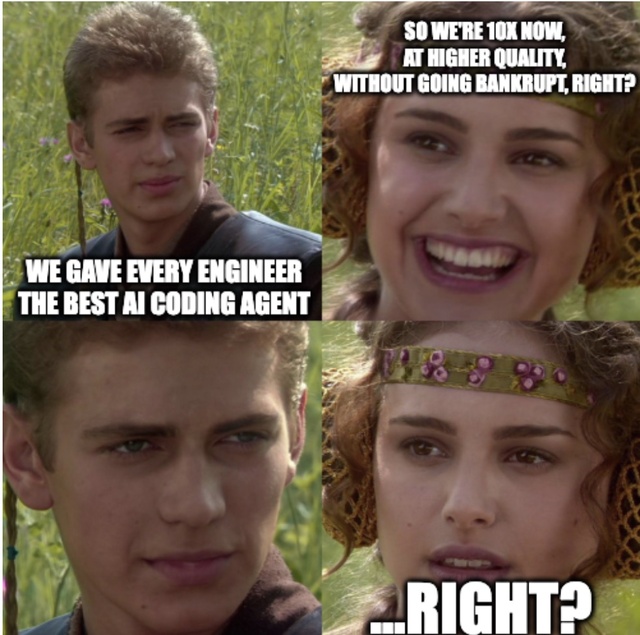
Give a team an AI coding tool and you have not given them a way of working. Everyone gets the same agent and uses it differently: one engineer explores the codebase before planning, another goes straight to code, a third writes the tests afterwards if at all. The same engineer does it differently on a different day. The phases live in people’s heads and get reconstructed from scratch every time, and nothing in the tool knows that your team reviews a plan before implementation, or what this repository’s conventions are, or which mistake the last change of this shape made.
The attention goes wrong in both directions, too. People sit and watch a model reason through a decision they were never going to argue with, then look away at the one point where their judgment was the only thing that mattered, and find out afterwards that it took a route nobody would have approved.
 Getting a model to write code is the easy part. The part that needs designing is getting it to do the
same thing twice, to stop where you want it to stop, and to leave behind something you can actually
review.
Getting a model to write code is the easy part. The part that needs designing is getting it to do the
same thing twice, to stop where you want it to stop, and to leave behind something you can actually
review.
This series is about how to design that: a family of agentic development workflows, what they are made of, why the pieces are shaped the way they are, what the shape buys, how you know any of it works, how you ship it to other people, and where it still hurts. It comes out of workflows we have designed, built and run on real work. Nothing here is about a particular product or codebase; the claims are about the pattern.
How the series is organized
| Part | Question it answers | |
|---|---|---|
| 1 | What a workflow is, and what it is made of | what the thing is, and what a single run looks like |
| 2 | The principles | what keeps the shape honest: the machinery, and the doctrine |
| 3 | The cost of control | how big an item, how many approvals, which model, and what the whole apparatus buys |
| 4 | Is it working, and is it worth it | is the output correct · where does the process hurt · did it deliver |
| 5 | Shipping it, porting it, letting it run | packaging, harness portability, and the road to unattended runs |
| 6 | Where it hurts, and what to build first | the limitations, and the short list |
What we mean by a workflow
In software development, “workflow” is a heavily overloaded term. Throw “agentic” in front of it and get two opposite things, so it’s worth defining exactly what we mean before building anything around the concept.
The distinction that earns its keep is Anthropic’s: a workflow is a system where models and tools are orchestrated through predefined code paths, while an agent is a system where the model dynamically directs its own process and tool use. Workflows buy predictability on work you can decompose in advance. Agents buy flexibility on work you cannot.
This series is about workflows in that sense, applied to software development. The part worth noticing is that they are not the opposite of agents. They contain them.
An agentic development workflow is a named, phased procedure that takes a unit of work from a request to a reviewable result, in which three parties each do what they are good at:
- The procedure owns the path. Phases and their order are decided before the run, not chosen by a model halfway through it.
- Agents own the judgment inside each phase. What to explore, what the plan should be, whether a review comment is correct.
- A human owns specific decisions, named in advance, that the workflow cannot make for itself.
None of the three is sufficient alone. A path with no judgment in it is a script, and judgment with no path is a prompt.
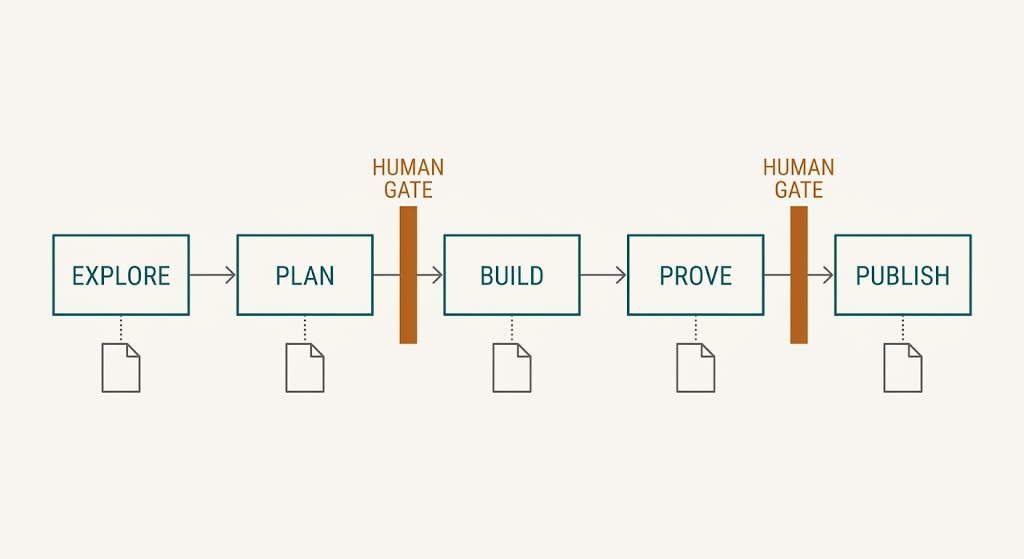
Figure 1: A fixed order, a file out of every phase, and a person required at exactly two points.
The interesting claim is not that a model can write code. It is that a procedure makes a model’s work inspectable and interruptible at points you pick in advance, and that something other than the model’s own discipline enforces those points. How you build such a procedure is a separate question with several answers, and the one used throughout this series is described below.
That combination is what makes the following six properties reliable rather than aspirational. You can ask a bare prompt for most of them, and you will often get them:
| Guarantee | Mechanism |
|---|---|
| A fixed execution path | phases in a declared order, not whatever the model improvises |
| Scripts over inference | anything that can be decided deterministically is, and by a script |
| Auditable state | every phase writes a file; the whole run is readable afterwards |
| Absolute human authority | gates the workflow cannot approve for itself |
| Isolation | the work happens somewhere that isn’t your working copy |
| Right-sized effort | each step runs at a deliberately chosen model and effort |
Two of the six are different in kind, not just degree. Absolute human authority cannot come from an instruction, because the thing you would be instructing is the same thing that would have to enforce it. And right-sized effort is decided by how a step is dispatched, so a step cannot ask for it on its own behalf. The other four you can get out of a well-written prompt on a good day. What the workflow adds is getting them on every run, including the bad days.
Those six run through everything below. Every later section is really an argument about how to keep one of them true under pressure.
The phases come from your development process, not from the tool
A development workflow maps a development process the team already follows. Something is requested; someone works out what it means; they decide an approach; somebody agrees to it; it gets built; it gets verified; it goes out for review; the review gets answered; it merges. The workflow does not invent that sequence, it encodes it.
Three things follow, and they remove most of the guesswork from designing one:
- You transcribe phases, you don’t design them. If your process investigates before planning, so does the workflow. The order is not a modeling choice.
- Gates go where the process already had a human checkpoint. A plan someone signs off, a review someone performs. Don’t invent checkpoints your process doesn’t have, and don’t quietly drop the ones it does.
- The artifacts are the ones the process already produces: a plan, a list of tests, a description of the change, a review. That is why people who never ran the workflow can still review its output. It looks like what they already read.
Two more things are worth stating plainly.
If your process is implicit, encoding it forces you to write it down. That is often the most valuable side effect of the whole exercise, and usually the hardest part, because the disagreements about how work should flow only surface when someone tries to make them executable.
And don’t invent a process for the agent. A workflow that follows a sequence nobody actually uses produces output nobody trusts, and its gates land where nobody wants to look. If a phase exists only because the workflow needed a phase there, delete it.
This is also why a family of workflows shares a skeleton and diverges in specific places: the underlying process is shared, and the differences are real differences in how the work is done.
One approach among several
This post describes one way to build an agentic development workflow: an orchestrator skill that drives other skills, with the agent runtime as the execution engine and prose as the control flow. It is not the only shape, and the alternatives are not strawmen:
| Approach | Strength | Cost |
|---|---|---|
| Orchestrator skill (this post) | legible to both the people who own it and the model running it; no build step; any step runnable by hand | prose is a weak way to express control flow |
| Code-first orchestration: the flow is a program that calls the model | precise, strongly typed at the seams, testable with ordinary tooling | heavier to change; the logic is opaque to the model itself |
| Graph / state-machine frameworks | excellent when the flow genuinely is a graph | overhead when it is a straight line with a few gates |
| One instructions file, no phases | the cheapest thing that works, and it often does, for small changes | no gates, no artifacts, nothing to inspect afterwards |
| Per-task commands or prompt templates | trivial to write and understand | fine until a task needs several steps to be trustworthy |
| Event-driven bots | no human has to start anything | a trigger, not a procedure; it still needs one of the above to run |
| Autonomous multi-agent crews | maximum flexibility | minimum auditability, and very hard to gate |
The case for prose-orchestrated skills is maintainability: the people who own the process can edit them, not only the people who can modify a program. The price is that prose expresses control flow poorly, which is exactly why every part that has to be deterministic (the loop referee, the seam guards, the gate checks) is a script and not an instruction.
Pick by what your team can actually maintain. A precise flow nobody edits is worse than a legible one they do.
Local-development first
These workflows are local-first by design. They run on a developer’s machine, against their checkout (or an isolated working copy beside it), with the developer present at three or four decision points. That is the primary mode, not a stepping stone to tolerate until the infrastructure arrives.
Four reasons to be deliberate about it:
- The human is the highest-value component at a handful of specific moments: approving a plan, judging whether a review comment is correct, deciding what gets published. In between, almost worthless. Running locally makes those moments cheap to insert.
- Failures are visible and cheap. When something goes wrong the developer is right there, the artifacts are on their disk, and they can open them in their normal editor.
- Nothing needs to be built first. No queue, no runner, no service account. A workflow is useful on the day it is written.
- It is how you earn the right to run unattended. You learn where a workflow breaks while somebody is watching. Every limitation in part six was found with a human sitting in front of a run.
The end game is autonomy, for some of them
For some workflows (implementing a feature is the clearest case) the destination is unattended operation: a ticket gets assigned to the agent and moved into a queued state, and some time later a human finds a pull request that has already been reviewed and revised once.
That is a real design target, not a fantasy, and it changes what the design in between has to look like. Part five covers the trajectory: which gates become policies, which stay human forever, and what has to be true before you let a run proceed with nobody watching.
A family of workflows, one skeleton
Build workflows as a family rather than one at a time, because most of what they do is the same and the differences are informative. They share a skeleton for the reason given earlier (the development process underneath them is shared) and they diverge exactly where the real processes diverge. Six concrete examples, all real shapes:
| Workflow | Trigger | What is distinctive | Ends at |
|---|---|---|---|
| Implement a feature | a ticket | explore the codebase, plan, write failing tests, build loop | a reviewed branch, then a pull request |
| Fix a bug | a ticket, or an alert-filed report | classify first (is it even a bug?), investigate root cause, then plan/test/build, then prove the regression test | a pull request plus a comment back on the ticket |
| Refactor code | a named target | plan for behavior preservation; the existing suite is the oracle, so no new tests are written | a pull request that changes no behavior |
| Review a change | a pull request, a commit range, or a working copy | no build loop at all: package the diff, fan out several reviewer lanes in parallel, synthesize, then verify each finding before publishing | structured findings + a posted review |
| Fix review comments | a pull request’s unresolved threads | triage (decide which comments deserve acting on), then plan/build, then reply in each thread | commits plus a reply on every thread |
| Generate service docs | a repository | inventory what exists, generate, populate, then a coverage check with a to-do ledger | a pull request |
Read the differences as design information:
- The bug workflow adds classify at the front (a surprising number of “bugs” are not bugs, and the cheapest possible outcome is a triaged ticket and no code) and prove at the back.
- The refactor workflow inverts the test relationship: instead of writing failing tests that define new behavior, it treats the existing suite as the specification and any change in it as a defect.
- The review workflow has no loop and no gate on code, because it changes nothing: its output is a judgment, and its risk is publishing a wrong one, so its distinctive phase is verification of its own findings.
- The docs workflow has no tests, so its quality gate is a coverage measure instead.
Underneath, all six share the skeleton below, and more importantly they share their parts.
The same six, as a grid. ✓ the workflow has that phase, — it skips it, ● the phase is
distinctive to it:
| Feature | Bug | Refactor | Review | PR comments | Docs | |
|---|---|---|---|---|---|---|
| Classify | — | ● | — | — | ● | — |
| Explore | ✓ | ✓ | ✓ | ✓ | ✓ | ✓ |
| Plan | ✓ | ✓ | ✓ | — | ✓ | ✓ |
| Red tests | ✓ | ✓ | — | — | ✓ | — |
| Build loop | ✓ | ✓ | ✓ | — | ✓ | ✓ |
| Self check | — | ● | ● | ● | — | ● |
| Report | ✓ | ✓ | ✓ | ✓ | ✓ | ✓ |
Two rows carry most of the information. Classify is present only where a request might turn out not to need code at all (a bug that is not a bug, a review comment that is wrong) and in both of those the cheapest good outcome is no diff. Self check is where each workflow proves its own work, and the oracle differs every time: for a bug it is reverting the fix and watching the new test fail; for a refactor it is the existing suite passing unchanged; for a review it is verifying its own findings before publishing them; for docs it is a coverage ledger. Same slot, four different definitions of “did this actually work”, and the workflows with no entry there are the ones whose oracle is simply the tests named in the plan.
The cast
Five kinds of component, and the distinctions earn their keep:
Orchestrator: the workflow itself. Owns control flow, phase order, human gates, dispatch and wiring. Owns no domain logic. It is thin on purpose (part two).
Skill: a unit of work: written instructions plus, usually, scripts. Planning, implementing, validating, exploring, presenting something for approval. A skill knows nothing about which workflow is calling it.
Agent definition: a file declaring a dispatched sub-agent’s context window, model, effort level and tool allowlist, registered with the runtime. This is the only place model and effort can be chosen (part two).
Channel adapter: the only component that knows the outside world exists: one that reads from the code-hosting platform, one that writes to it, one that talks to the issue tracker. Everything else is oblivious.
Deterministic primitive: a component that reasons about nothing: durable run state, artifact assertions, source-control isolation. Pure scripts; arguments in, exit codes out; no state of their own.
A skill up close
Three parts, and the split is what keeps a large collection affordable:
- The procedure: one file, always read when the skill is used. Keep it to the steps.
- References: the detail, in separate files, loaded only when needed. This is the difference between a skill that costs a paragraph and one that costs a chapter.
- Scripts: the deterministic work, so the model isn’t asked to be a computer.
The description in a skill’s metadata does more work than it looks like it does. It is what a model reads when deciding whether this skill applies at all, so write it as “use when … NOT for …”. The negative half is the one that gets dropped, and it is the one that prevents the failure nobody notices: a skill firing on work it was never meant for.
Who calls whom
A step can run two ways, and the difference matters more than any other implementation detail:
- Invoked inline: same context, same model. The orchestrator simply follows the skill’s procedure.
- Dispatched: a sub-agent with fresh context and its own model, effort and tool allowlist.
The same skill serves both paths, unchanged. That is what makes a skill reusable rather than a phase.
For dispatched work there is an extra link in the chain: the orchestrator does not call the skill, it calls an agent by name; the agent definition supplies the configuration, and the sub-agent it spawns then invokes the skill. The indirection earns its place because the two files know different things: the agent, in our case, is workflow-aware, the skill is not. The skill stays ignorant of which workflow is using it, while the agent carries what only this workflow knows: which tier this decision deserves, and which tools it may touch.
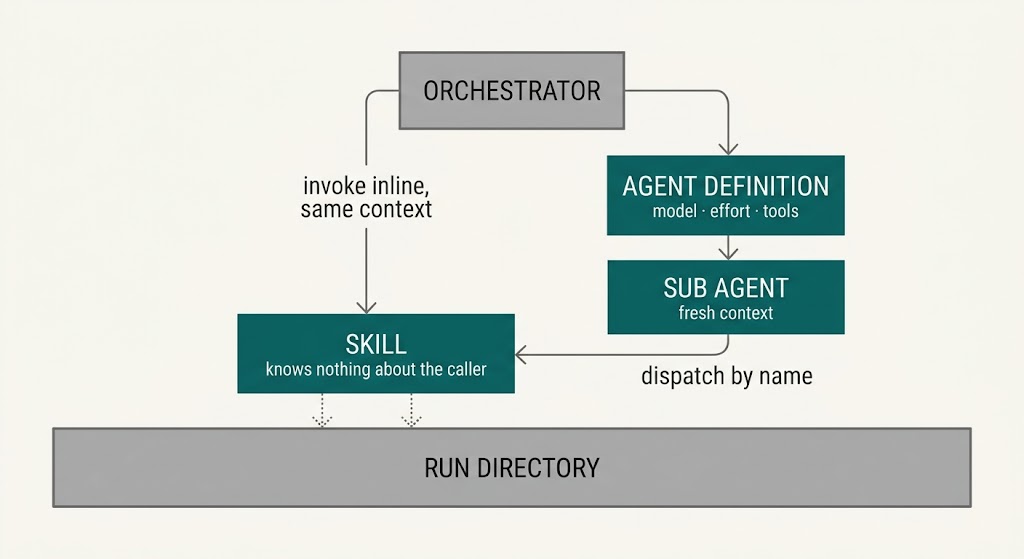
Figure 2: The same skill serves both paths. The indirection earns its place because the agent is workflow aware and the skill is not.
Skills have to be reusable
This is what makes a family cheaper than the sum of its members, and it rests on one rule:
A skill that only works inside one workflow is not a skill. It is a phase.
So every skill has to be usable at least two ways. One is inside its own workflow, which is a given. The other is some form of reuse beyond it, and that comes in two shapes. Either one is enough; what is not optional is that one of them holds.
Inside a workflow. The ordinary case: an orchestrator invokes it as a phase. This one comes free.
Either: inside several workflows. Planning, implementing, validating, writing failing tests, taking human approval, isolating a branch, filing a ticket. These are shared by nearly every workflow in the family. The reuse is not only economy. Improving one of them improves every workflow at once, and a defect in one is felt everywhere. That asymmetry is worth measuring deliberately: which shared component hurts, and in how many workflows, because a fault in a component used by five workflows deserves five times the attention of a fault in a leaf.
Or: standalone, by a human, with no workflow at all. “Explore how this subsystem works.” “Plan this change.” “Review this diff.” “Set up an isolated branch for me.” Standalone usability is a design constraint rather than a bonus feature, because it forces a skill to take its inputs explicitly, resolve its own context, and write its output to a file instead of leaning on an orchestrator’s conversation. A skill that can be run alone can be tested alone, debugged alone, and adopted by someone who does not want the whole workflow.
Two further composition properties fall out of the same discipline:
Workflows compose through artifacts. Because a review produces a structured findings file, and the fix workflow can consume either that file or live comments from the platform, review → fix works with no human in between and works before a pull request exists. When one workflow runs inside another, it runs in a “composed” mode where the parent’s approvals cover it, and it writes a decision log instead of posting replies: the accountability moves rather than disappearing.
The most reused code is the least clever. Run state, seam guards and branch isolation are shared by everything and reason about nothing. That is on purpose. The components with the widest blast radius should be the ones with no judgment to get wrong.
Anatomy of a run
Whatever the domain, the skeleton repeats. Individual workflows skip phases (review has no build loop, docs has no tests, refactor writes none) but the order never changes:
SETUP        register agents, verify prerequisites        (fail fast, before any work)
INPUT        parse the target; resume if a phase cursor exists
STATE        create or reuse the run directory and its state file
ISOLATE      create or adopt a scratch working copy on its own branch
GATHER       fetch the request / diff / feedback  → an artifact
DECIDE       classify, investigate or explore     → an artifact   ← the expensive judgment
  ══ GATE ══ a human approves the decision, recorded by content hash
PLAN         an ordered plan naming files and tests
  ══ GATE ══ a human approves the approach
BUILD        write failing tests → loop { implement → validate } → referee
PROVE        revert, re-run, restore → proven | vacuous
SCOPE GUARD  the diff touches only what the plan named
  ══ GATE ══ a human approves what is about to be published
PUBLISH      push, reply, comment — through adapters, never forcing
CLOSE        a report, on every exit path
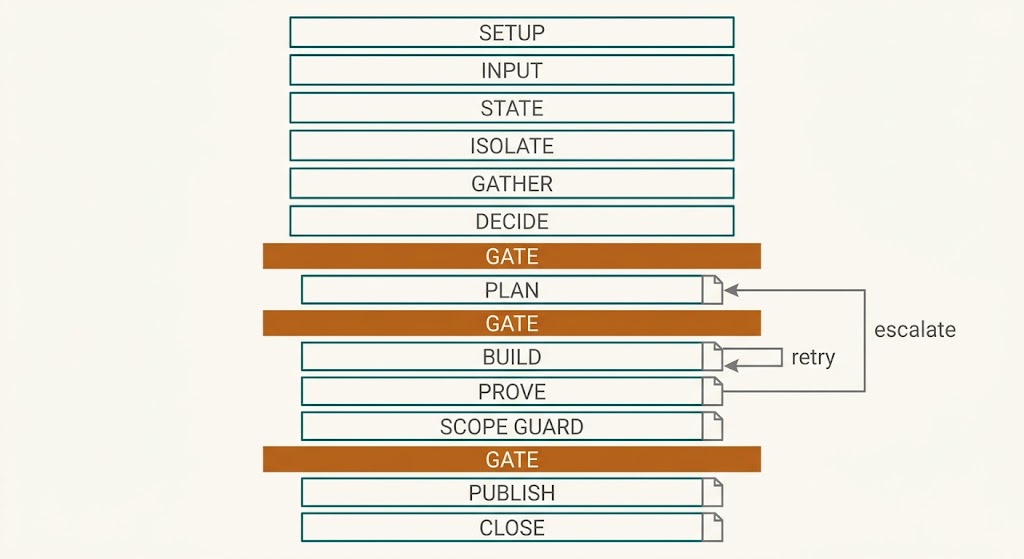
Figure 3: The skeleton. The amber bars are the only places a person is required.
Where the spine comes from. The plan → implement → validate loop in the middle of that skeleton is
not original here. It is Cole Medin’s PIV loop (plan, implement, validate) which he states as the
phased core of his AI-coding methodology
(ai-transformation-workshop), downstream of the
context-engineering / PRP work that precedes it
(context-engineering-intro). Four of his moves
carry straight into the design above: prime the context before planning rather than planning cold; a
plan that states its own validation strategy; a fresh context window for implementation; and
validation as layers: type-check and lint, then unit, then integration, then review, rather than one
test command. His CLAUDE.md-style rules file is the same instinct as the “name intents, not commands” rule in part two: the repository declares its
own rules, the procedure stays generic.
What this document adds is mostly about making that loop hold when the steps are delegated and nobody is watching every one of them: gates recorded by content hash, a script rather than the agent inside the loop deciding when it stops, files as the only interface between phases, and a prove step after green that tries to make the new tests fail. The loop is his; the refereeing, the artifacts and the paranoia are the parts that get learned the hard way.
A note on SETUP, because that is where the cheapest failures hide: a prerequisite check has to exercise the thing it is checking. Confirming that a build file exists proves nothing about whether its targets can run: the credential they depend on may have expired an hour ago. Probe the actual command, cheaply, before dispatching anything, and derive the probe from the project rather than hard-coding it. Otherwise you discover it ten minutes later, inside a step, dressed up as a test failure.
Two more details matter more than they look. Isolate the work outside the developer’s own checkout (a separate working copy on its own branch) so a run’s noise never disturbs whatever the human has open, and so several runs can proceed at once. And flatten at the handoff: a loop that commits after every iteration produces a history nobody wants to review, so collapse it into reviewable changes before handing over.
What all of this is for
Worth stating once before the principles arrive, because it is the only part the person invoking a workflow actually feels: what they stop having to do. They bring the unit of work and nothing else. No long prompt to compose. Nothing to remember about which steps come in which order, or which skill to reach for, or what this codebase’s conventions are: the practices are embedded in the procedure rather than in the habits of whoever happens to be driving. That is the whole adoption argument, and it is worth more than every engineering property in the rest of this document. Those properties (interruptibility, attributable failure, auditability, bounded cost, the ability to decline) are collected in part three, once there is enough machinery on the table for them to mean something.