Part two defined the category and named two tools in it. This part is one of them from the outside: Archon, the engine we have been evaluating. How a run starts, what composes with what, what the five claims rest on, and what grates.
Assumes part two’s vocabulary: node, layer, run state, provider resolution.
What Archon is, and what it used to be
Archon’s documentation opens with “a workflow engine for AI coding agents”, which is part two’s category in Archon’s own words. You define a multi-step development workflow in YAML, a code review or a bug fix or a feature, and run it with one command. Each run gets its own git worktree, and it can be started from a terminal, a chat message or a GitHub comment without those being three separate integrations.
Underneath, it is Bun and TypeScript over SQLite or Postgres driving the Claude Code and Codex SDKs, which is part four’s subject rather than this one’s.
Archon is built by Cole Medin, whose plan-implement-validate loop is the spine of the skeleton in part one of the previous series, and whose context-engineering work sits upstream of that. The procedure the first series described and the engine this one evaluates come from the same person, arriving by different routes.
There is a second piece of history, because Archon has not always been this. It started as a Python agent-builder: a tool for constructing Pydantic AI and LangGraph agents. In April 2026 that codebase was archived and the project rewritten from scratch in TypeScript into what its README calls a harness builder, with the original spun off into its own repository. A good deal of the old vocabulary survived the rewrite, so if you know LangGraph you will keep expecting semantics that are not there.
Having followed Cole Medin’s work since the start of the year, which is how I found Archon at all, that rewrite reads to me less like a change of direction than a conclusion. The move is from building agents to constraining them. Once the methodology was written down as prompts, rules and phases, the next step was to stop asking a model to follow it.
How you actually run one
Part two treated “the engine invokes the coding agent” as an abstraction. In practice there are several front doors, and which one you use changes the experience more than it changes the run.
Through the coding agent, via the Archon skill. This is the recommended route and the one that makes the whole thing palatable. The setup wizard copies an Archon skill into your target repository, so you keep working in Claude Code from your own project and simply say what you want. The agent picks a workflow, dispatches it in the background, and reports back. One run reads:
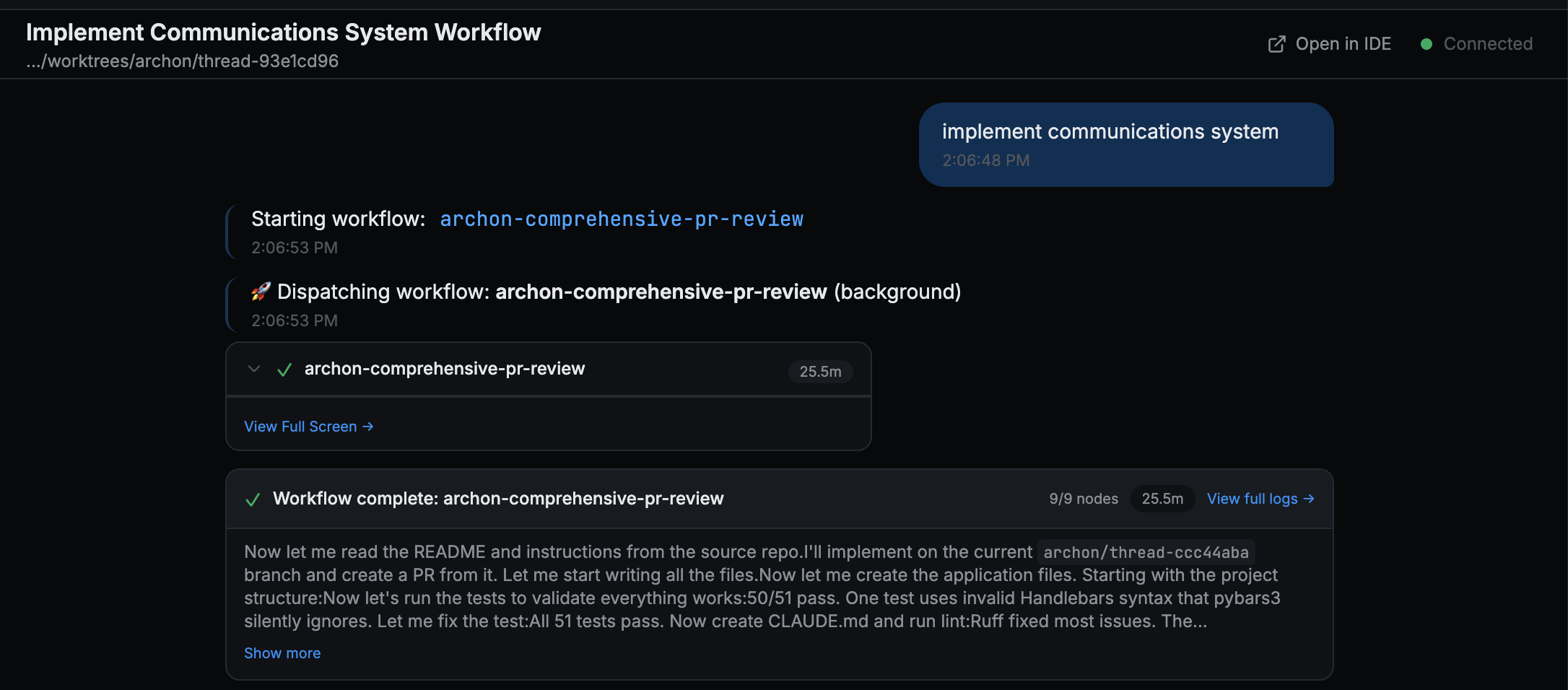
Figure 1: One prompt, nine nodes, twenty-five minutes, and a session that stayed free the whole time. The worktree path is in the header.
That is the coding agent driving the engine that drives coding agents. The session you are typing in never blocks for twenty-five minutes, and the run survives independently of it.
Through the CLI. archon serve starts the web console, archon workflow list shows what is
available, archon doctor runs diagnostics. Install is a Homebrew formula, a shell installer, or a
clone and bun install.
Through the web console. A Mission Control dashboard with run history filtered by project, status and date, a capacity indicator, per-run duration, and a source column recording whether each run came from the CLI, the web, or a chat platform. Workflows appear as cards you can run directly.
Through a chat platform or a forge. Slack, Telegram and Discord for conversation; GitHub, Gitea and GitLab for issues and pull requests. Each is an adapter over the same engine, which is what part two meant about a run id and an event stream making every surface a client of the same state.
What ships, and what you can add
Nineteen workflows are bundled, and they are not toys:
archon-fix-github-issueruns classify, investigate, implement, validate, PR, review.archon-idea-to-prtakes a feature idea through the same spine and ends in five parallel reviews.archon-piv-loopis plan-implement-validate with a mandatory human gate.archon-comprehensive-pr-reviewdeploys five parallel reviewers with auto-fix.archon-workflow-buildergenerates new workflow YAML: the engine writes its own configuration.
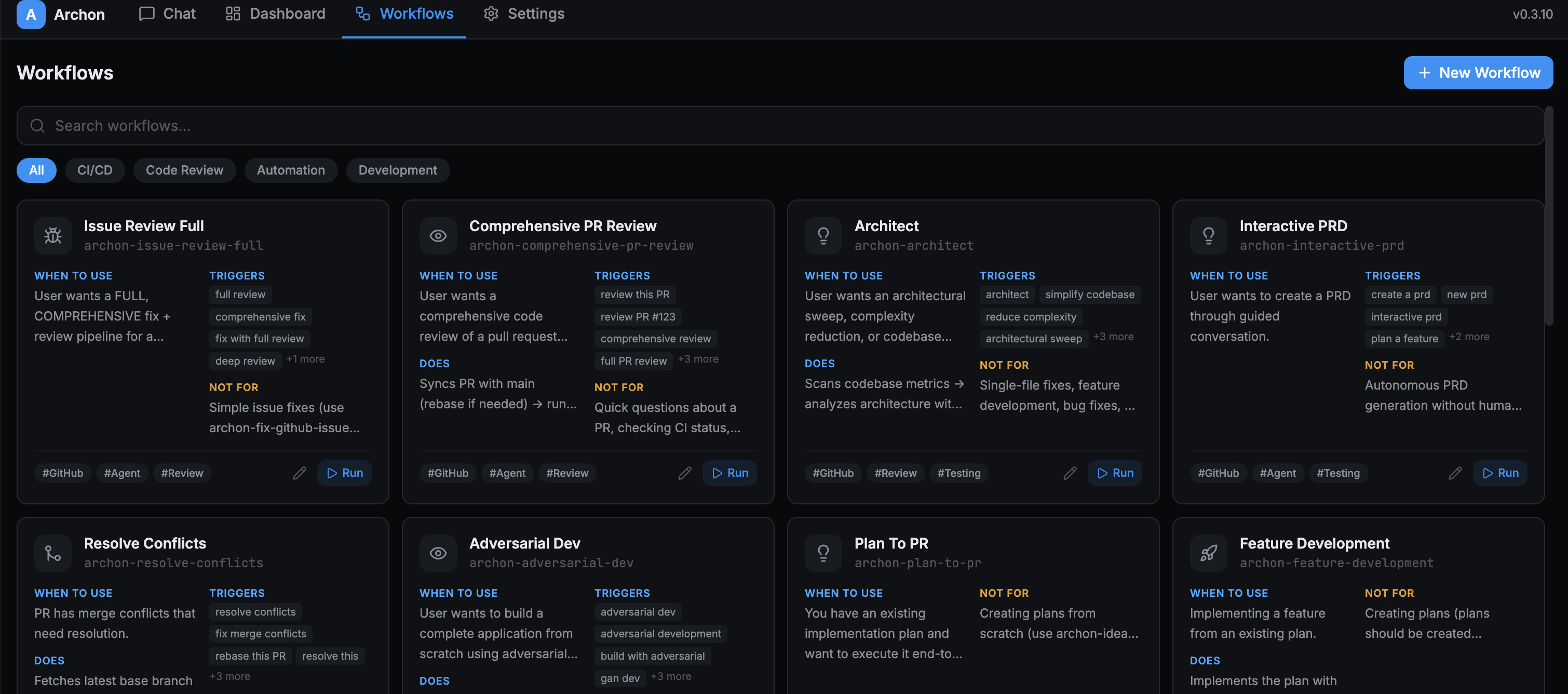
Figure 2: Every bundled workflow declares when to use it and, more unusually, what it is NOT for. That second field is routing metadata: it tells the router when to pick something else.
Your own live in .archon/workflows/<pack>/<workflow>/, keeping a workflow’s YAML, commands and
scripts together in one copyable folder. A same-named file in your repository overrides the bundled
default, so customizing archon-piv-loop means writing your own and leaving the name alone.
Commands are the unit of reuse
A command is a markdown file holding instructions for one AI task, and Archon’s own framing is the useful one: commands are atoms, each a single focused task with no knowledge of what comes before or after it, and workflows are molecules, YAML files arranging commands into a graph with a purpose.
That separation is what makes reuse possible. archon-investigate-issue is a command, and any
workflow that needs an investigation phase references it by name rather than restating it. Change
the command once and every workflow using it changes. A workflow, meanwhile, holds no instructions
at all: it holds order, conditions and dependencies.
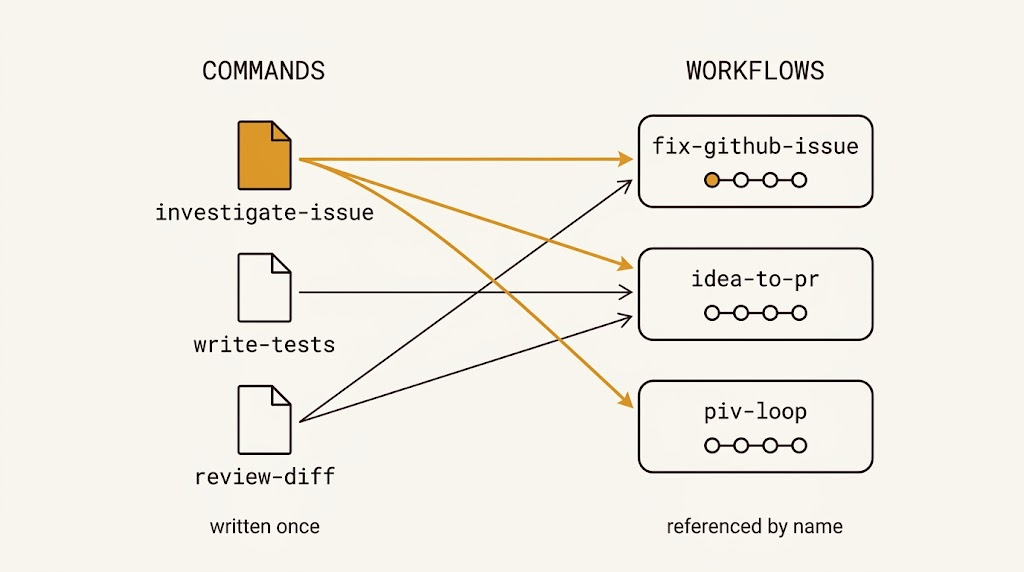
Figure 3: Change the amber file once and three workflows change. A workflow holds no instructions of its own, only which commands and in what order.
Commands compose through artifacts rather than through conversation, and the documented pattern is three lines long:
- write the important findings to an artifact;
- start the next node with
context: fresh; - have that node read the artifact.
Which is precisely the discipline the previous series arrived at by hand, here as the default way the pieces fit together. This is the piece I had underrated.
Workflows, commands and scripts each resolve across three scopes:
| Scope | Path | Beats |
|---|---|---|
| Bundled | compiled into the binary | nothing |
| Global | ~/.archon/workflows, /commands, /scripts |
bundled |
| Repo | .archon/workflows, /commands, /scripts |
global and bundled |
Same filename at a higher scope wins, which gives you a personal review checklist available in every project, overridable per repository, without copying anything. It is the packaging problem from part five of the previous series, solved by convention instead of by a manifest.
The marketplace
There is also a marketplace at archon.diy/workflows. Each entry carries a slug, author,
description, source URL, a pinned commit SHA, tags and a compatibility range.
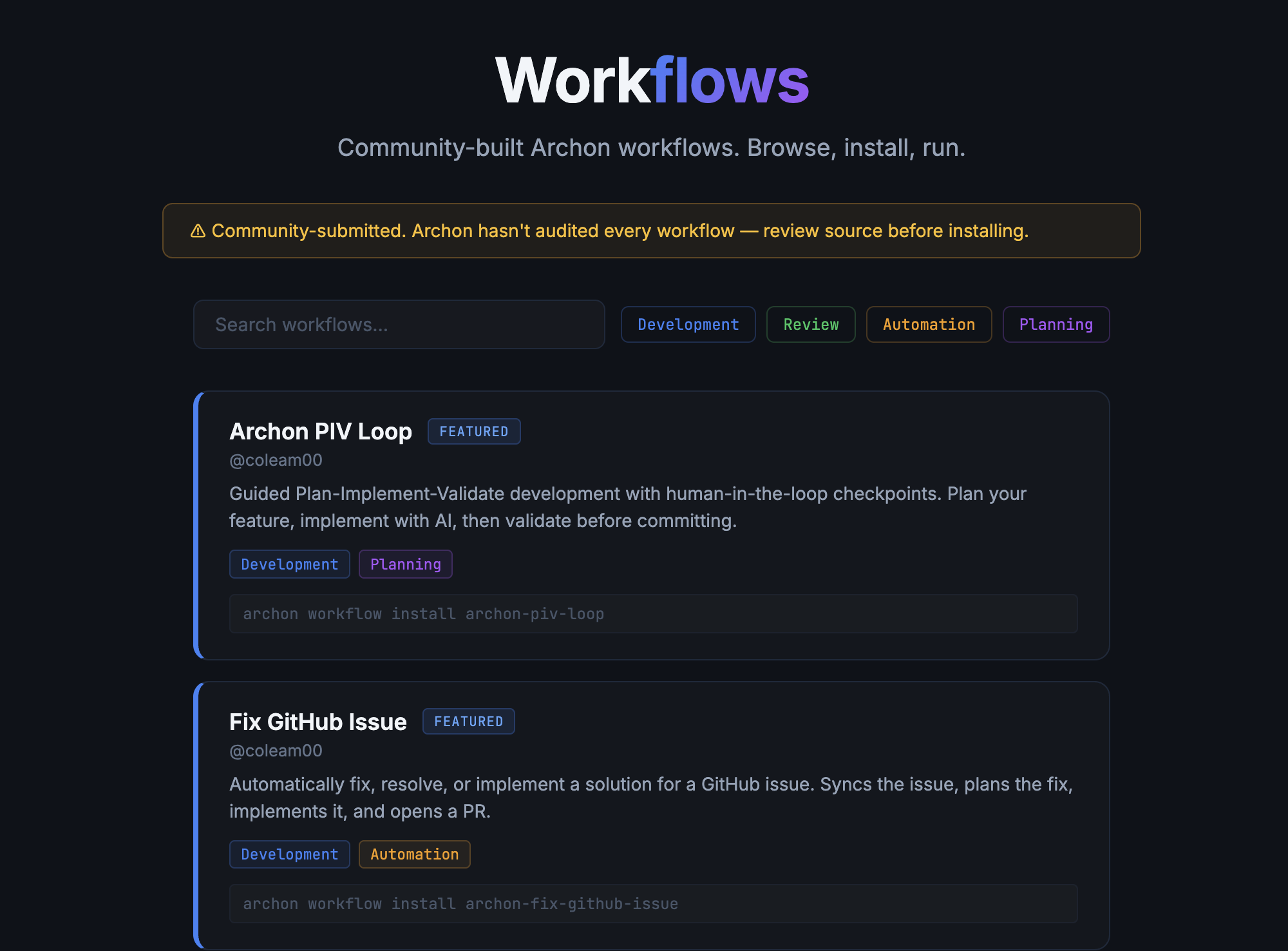
Figure 4: The warning is the most important thing on the page.
Pinning to a SHA rather than a branch is the right call for something that executes in your repository, and the listing carries a blunt warning that community submissions are not all audited and you should read the source before installing. That warning is doing real work: a workflow is code that runs with your credentials in your checkout.
The five claims, and what is behind each
Archon’s documentation makes five claims for itself: repeatable, isolated, portable, composable, multi-provider. They are the right five, and each one rests on a specific piece of machinery rather than on good intentions. Taking them in turn is the fastest way to see what an engine actually buys.
Repeatable
“Package your best AI coding patterns as shareable YAML workflows.”
The sequence is fixed at definition time and nothing at runtime can renegotiate it. Steps that need
no intelligence, the bash and script nodes, have no model in the path at all: they run because
the graph says so, which means they cannot be skipped, because nothing there is capable of deciding
to skip them.
The procedure is repeatable; the output is not. Every AI node is still a language model doing a language model’s job, and running the same workflow twice on the same input gives you two different pull requests. What repeats is that both of them were planned, implemented, tested, reviewed and gated in that order. That is a smaller claim than “deterministic AI coding” and it is the one that actually holds.
Isolated
“Each workflow runs in its own git worktree, no conflicts, no mess.”
The worktree is the mechanism and the path lock is what makes it trustworthy. Five runs on one repository are five directories on five branches sharing a single object store, and the lock stops two runs occupying one worktree.
Portable
“Run from CLI, Web UI, Slack, Telegram, GitHub, or Discord.”
Because the run owns its process and its id, every surface is a client of the same state rather than a separate integration. This is portability of access, not the portability the previous series worried about: it does not make your workflows runnable on a different harness, it makes them reachable from anywhere.
Composable
“Chain nodes into DAGs with dependencies, loops, and conditional logic.”
Two mechanisms under one word, and both matter. Reuse: a command is a single-task markdown file
that any workflow references by name, so it is written once and changed once. Chaining: every
node type, AI or shell or gate, writes to $nodeId.output, so any step can feed any later step,
whole or as one JSON field.
Reuse is why you write fewer instructions. Chaining is why the graph is a graph rather than a sequence. Lose either and the other stops being worth much.
Multi-provider
“Works with Claude Code SDK, Codex SDK, and local models via Pi.”
Provider and model resolve per node, and each node gets a fresh provider instance, so nothing is shared between them. The chain runs node, then workflow, then config, then the SDK default, and never the model of the session that invoked Archon.
The limit is honest and declared rather than assumed: sessions do not cross providers. Claude supports session resume, Codex and Pi do not, and the engine checks before trying. Cross-provider handoff therefore has to pass context explicitly, which is exactly what the output chaining above is for.
What it is like to live with

Three parts of using Archon that a feature list does not reach, all of them real and none of them why anyone stopped.
- You see what the harness decided to show you. Calling this a loss of observability understates it, because by one measure observability improves enormously: an event stream, a run history, status and cost per node, a console, all of which an orchestrator skill lacks entirely. What changes is that every view of the run becomes a rendering somebody else designed.
- The cost figure is not the bill. Per-node cost is recorded and shown, but it counts node cost and not the overhead of the coding agent that invoked the engine. That gap can reach forty percent, which is enough to matter when the number is the one you are budgeting against.
- The console will date. At the version evaluated it was pleasant to read and unreliable to operate. Viewing was fine; performing operations from it was not.
The first deserves more than a bullet.
Archon streams message chunks to the platform, writes a JSONL log and puts node states in the web console. Those are considered choices about what matters, and they are better organized than a terminal scrollback. They are also a filter. When the thing you need is not in the rendering, you drop to the logs, and the logs are a lower-level rendering rather than the thing itself.
You are watching a rendering in a coding agent session too. The difference is what is rendered: there it is the transcript, and here it is the run, with the transcript demoted to something you go and fetch. Which produces one specific failure mode, and it is the one engineers complained about: it is stuck and I do not know why. In a session you scroll up. Here you go looking, and first you have to guess which of three channels recorded the answer.
None of this was decisive. The friction was real, it was annoying, and it was liveable. What actually decides whether to adopt an engine is not in this list, and it is not about Archon.
What follows
That is the whole of Archon that most people need: what it is, how you start a run, what composes with what, what the five claims rest on, and what the rough edges feel like.
The next part goes underneath, into how a run is actually discovered, routed, set up and executed, and into the handful of decisions that separate an engine which works from one that mostly works. It is skippable, and it is the part I found most worth reading.