The first four parts describe a workflow that runs on your machine and can be shown to work. This part is about the three transitions that turn it into something other people depend on, and each one costs something specific.
Packaging makes a collection installable and lets one workflow depend on another’s components, at the price of a dependency graph nobody can hold in their head. Porting to another harness is cheap for everything that is a file and expensive for everything that is control flow. And autonomy, meaning a ticket assigned to the agent and a reviewed pull request some time later, turns out to be less about capability than about making the exceptional case detectable.
Leans on part one and part two throughout.
Packaging and distribution
At some point this stops being configuration on your machine and becomes something other people install. That step forces a decision the design has been able to defer: what is the unit of distribution?
A note on words, because the two get used interchangeably and they are not the same. This section says package for the general idea, since the argument holds whatever your harness calls it. Every concrete example is a plugin, which is Claude Code’s implementation of one. Where something is true only of plugins rather than of packaging in general, it is called out.
What a package can hold
More than skills. A plugin (the packaging format in Claude Code, and the concrete example throughout
this section) can carry skills, agents, slash commands, hooks, MCP servers, LSP servers, background
monitors, executables that go on PATH while it is enabled, default settings, and a schema for
configuration it asks the user for at install time. It can also carry arbitrary payload (dashboards, docs, scripts) and reference its own files through ${CLAUDE_PLUGIN_ROOT}, with ${CLAUDE_PLUGIN_DATA}
for state that must survive updates.
That matters more than it sounds. A workflow’s whole apparatus can travel as one unit: the
orchestrator, the skills it composes, its agents, the hooks that measure it, and the dashboard that
reads what they emit. Not just the prompts. The dashboard is the odd one out, riding along as plain
files rather than as something the runtime loads, which is what ${CLAUDE_PLUGIN_ROOT} is for. See the
plugins guide and
reference.
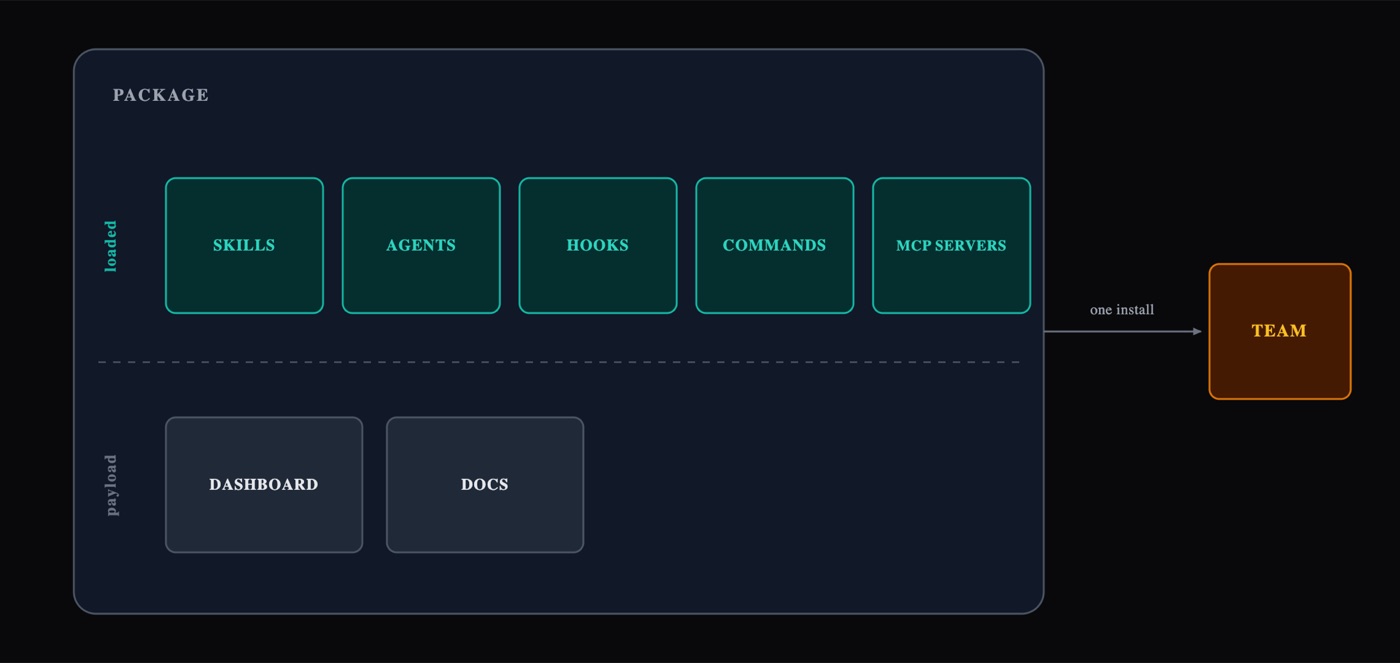
Figure 1: One install brings the whole apparatus. The runtime loads the top row; the bottom row rides along as files, which is why a bundled dashboard has to find itself through ${CLAUDE_PLUGIN_ROOT}.
One package, or one per workflow?
This is a distribution question, not an architecture question, and the answer depends on who consumes it, so the trade-off matters more than any default:
| One package for everything | One package per workflow | |
|---|---|---|
| Versioning | one number for unrelated changes | independent cadence per workflow |
| Consumers | everyone gets all of it | a team enables only what it uses |
| Blast radius of a release | the whole family | one workflow |
| Shared components | trivially one copy | must live somewhere, the hard part |
| Hooks | unambiguous | composition across packages is undocumented |
Enable/disable is per package, not per component, you cannot ship five workflows in one package and let a team turn four of them off. That alone makes the monolith uncomfortable once more than one team consumes it.
The fact that decides it: packages can depend on packages
A manifest accepts a dependencies array: bare names, or names with a semver range. I verified this
against the validator rather than taking it on trust:
{ "name": "workflow-x", "version": "1.2.0",
  "dependencies": ["wf-core", { "name": "wf-telemetry", "version": "~2.1.0" }] }
Install a package whose dependency is missing and the install fails and names what to install rather than half-working. Conflicting ranges from different packages are intersected, and an unsatisfiable combination fails loudly instead of silently picking. Depending across marketplaces is blocked unless the marketplace explicitly allows it. And a package may consist of nothing but a dependency list, which is the documented way to ship a bundle. See plugin dependencies.
That is what makes the split viable. Go one package per workflow and the components several workflows share have to live somewhere, and every obvious home is bad: copy them into each package and they drift, put them in one workflow’s package and the others depend on an unrelated workflow, keep everything together and you lose per-team enable/disable. A dependency array removes the dilemma. The shared layer becomes its own package, versioned on its own cadence, and each workflow package declares a dependency on it.
That also settles what granularity to choose. Without dependencies, the shared code dictates it: you keep things together because splitting means duplicating. Once the shared layer can stand alone, that constraint is gone and you are free to decide by who installs what.
Package granularity should follow the consumer boundary, not the code structure.
The question to answer is not “how is this organized?” but “who installs it, and do different installers want different subsets?” That gives a decision rule rather than a preference:
- One consumer group, everything used together → one package, one version. Granularity you don’t need is pure coordination cost: more manifests, more version numbers, more ways for the set to be half-installed. Do not split a collection because it looks like several things.
- Different consumers want different subsets, or parts need different release cadences → split, with the shared layer as its own package that the workflow packages depend on. This is the point at which per-package enable/disable and independent versioning start paying for their overhead.
- Either way, the shared layer exists exactly once. Whether it is a directory inside one package or a package of its own, two copies of a shared component is the failure mode below, not a strategy.
Two things make the split cheap if it comes later, and both are worth doing up front even when you don’t need them yet:
- Reserve the original name for the bundle. If the package everyone installs is
X, then when you split,Xbecomes a package that is nothing but a dependency list. Consumers keep typing the same install command and never learn that the internals changed. - Keep the internal boundaries visible before they are enforced. Directories that already separate “shared” from “this workflow only” split cleanly. A flat pile does not.
When the conditions above do call for a split, this is the shape it takes:
- Core: the deterministic primitives (run state, seam guards, source-control isolation), the shared judgment skills (plan, implement, validate, take-approval, write-failing-tests, publish), and the measurement hooks. One copy, one version, one owner.
- Per workflow: the orchestrator, the skills only it uses, its agents. Depends on core with a range.
- Bundle: dependencies only, under the name consumers already type.
Three traps
1. Duplication drifts silently, and faster than you expect. One observed case: a workflow packaged with twelve skills, eight of them shared with other workflows that were still distributed loose. Three weeks later, five of the six shared skills had diverged: the packaged copies three to seven lines behind, with the same name and a byte-identical description but a different body. Nothing surfaces that. The lesson is not “don’t package”: it is one source of truth, and packaging is downstream of it. Never edit the packaged copy, and never leave a loose copy of something you have packaged.
2. Skills get namespaced. Agents don’t. A packaged skill is addressed as package:skill, which makes
collisions impossible, but it is also a rename, so every cross-reference in your instructions has to
survive it. Worse, if a loose copy of the same skill still exists, it keeps the short unprefixed name and
answers to it, which is exactly how two divergent copies coexist unnoticed.
Agents have no namespace at all, and resolve by a priority ladder in which packaged agents rank lowest, below project-level and user-level ones (sub-agents). So if a workflow installs its agents into the user directory and ships them in a package, the user copies quietly win and the packaged ones are dead weight. Pick one home for agents and stick to it.
3. Hook composition across packages is undocumented. Whether hooks from several packages all fire on the same event, and in what order, is not specified anywhere I could find. Do not build a design that depends on it. Put hooks in exactly one package, which is a good constraint regardless, because measurement is cross-cutting and therefore belongs in core.
What packaging buys beyond convenience
- Version identity. A run can record which package version served it, which is what makes the “version anything you intend to trend” rule from part four actually implementable.
- Team enforcement. A marketplace declared in project settings plus an enabled-packages list gives everyone the same set, updating on its own, no “did you copy the new one?” ritual (marketplaces, installing).
- Opt-in by default. A package can install disabled, and prompt for the configuration it needs at enable time.
- A package boundary is also a test boundary. The “without the component” comparison from part four is naturally per package: does this one earn its place?
Context cost is not the deciding factor
A package contributes its skills’ names and descriptions to the prompt. Five packages of ten skills and one package of fifty cost about the same, because all fifty names appear either way. Split for ownership and release cadence, not to save context. What genuinely costs context is MCP servers, whose tool definitions are present on every turn, so bundle those deliberately, and separately.
Migration order
Whichever granularity you land on, the order of operations is the same, because each step de-risks the next:
- One source of truth in the repository. Whatever copies exist elsewhere (hand-installed directories, an older package, a colleague’s machine) reconcile and delete them first. Packaging a collection that already has two divergent copies just makes the divergence permanent, and this is not a packaging problem.
- Core package first: shared spine plus hooks, published and consumed by nothing.
- One workflow package, depending on core, taken end to end: install, run, measure.
- Then the rest, plus the bundle.
- Record the package version in every run, so the next question, “did this get better?”, is answerable at all.
Portability across harnesses
Everything so far has one unstated dependency: the harness: the agent runtime that loads the skills, dispatches the sub-agents, fires the hooks and enforces the permissions. That is a real lock-in risk, and it is worth knowing which parts of the design carry over and which parts are the port. (Portability across repositories, the same workflow against services in different languages and on different platforms, is the other axis, and it is the “name intents, not commands” rule in part two.)
What is already standardized
More than people assume, as of 2026:
- The skill format. Agent Skills is an open specification: a folder
with a
SKILL.md(YAML frontmatter plus a Markdown body) that can bundle scripts and references. It was published in December 2025 and is stewarded through the Agentic AI Foundation; by 2026 30–40 tools read the same files from the same directories, across competing vendors. Notably,.agents/skills/is the one location every major tool reads natively. - The instructions file.
AGENTS.mdis the cross-tool convention for “how to build and test this project”, now under the same foundation and read by dozens of agents (field guide). Some harnesses still prefer their own filename and import it. - The tool layer. Anything you build as an MCP server works across compliant runtimes without a rewrite. That is the portable way to expose a capability.
- The packaging format. An Agent Plugins standard was announced in August 2026 by several vendors together: a root manifest, fixed locations for skills and MCP configuration, and a namespaced escape hatch for client-specific behavior. Worth tracking against whatever native format you package in today.
What is not standardized, and won’t be soon
| Capability | Portability |
|---|---|
| Skills (content, frontmatter, bundled files) | Portable: same format, same directory |
| Project instructions | Near-portable: one convention, minor filename differences |
| Tools, via MCP | Portable |
| Sub-agent dispatch | Divergent: isolated agent files, “personas”, TOML definitions, persistent modes: different models of what a sub-agent even is |
| Hooks / lifecycle events | Divergent: event sets differ sharply, and one harness is far richer than the rest |
| Slash commands | Fragmented |
| Model and effort selection per step | Harness-specific |
| Permissions, sandboxing, background tasks | Harness-specific |
The pattern is consistent: content ports, control flow doesn’t. The more a capability is about orchestration, the less portable it is.
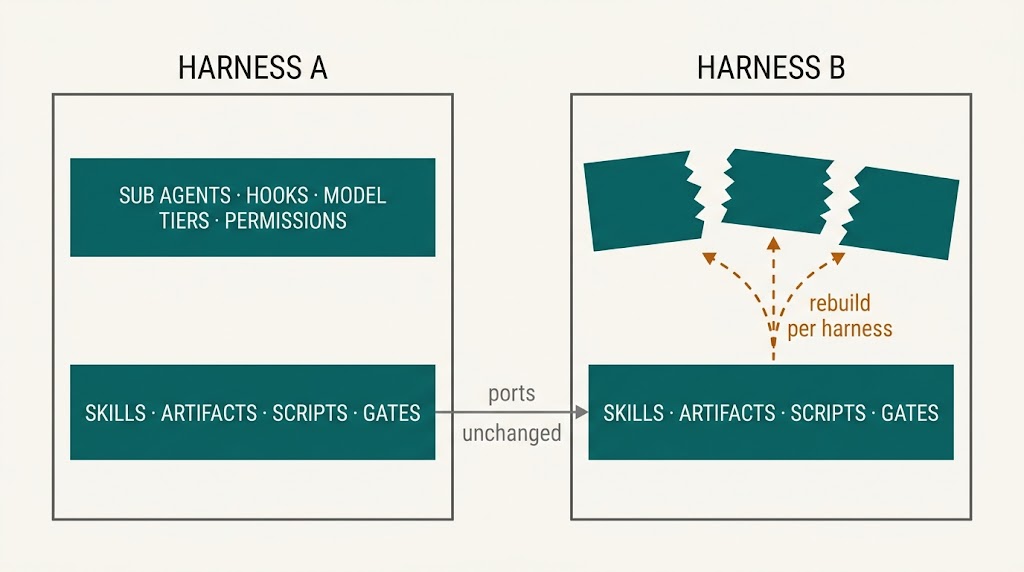
Figure 2: The file based half ports for free. The orchestration half is the port.
The one rule that buys portability
From obra/superpowers’ porting guide, which is the most concrete write-up of this problem I have found, and whose central invariant is worth adopting verbatim:
Skills name actions, not tools.
Write “read the file”, “run the command”, “invoke the planning skill”, “dispatch a sub-agent”, never the harness’s actual tool name. Porting then means adding a tool-mapping document for the new harness that translates each action into its real tool names, and it never reaches into a skill body to swap names. Their companion rule: everything ships through the harness’s own install mechanism, and you never edit the user’s files.
This is testable, and worth measuring on your own collection. In one measured collection, skill bodies almost never named a tool (three of fifty-four mentioned one) while the orchestration layer was the opposite: a dozen guides named the skill-invocation tool directly, and two dozen agent definitions carried harness-specific model, effort and tool-allowlist fields. Which is exactly the split you would predict, and it tells you where a port’s cost lands.
What a port actually costs
Per harness, roughly four things:
- Bootstrap: how the entry-point instructions reach the model. The superpowers guide treats automatic session-start injection as a hard requirement: if the only way to get your framework in front of the model is a per-session opt-in, that harness cannot be properly supported.
- Discovery: how skills are found: a native skill mechanism, a plugin registration API, a manifest
field, a generated index, or documenting “read the
SKILL.mddirectly” as the sanctioned path. - Tool mapping: one document per harness. Get the tool names from the harness itself, not from its docs.
- Distribution: the harness’s own install channel.
Degrade explicitly; never fake
When a harness lacks a capability, the skill must say do it inline, or report the missing capability, never invent a tool call that doesn’t exist. Their word for this is degradable, and the useful discipline is deciding the degradation in advance:
- No sub-agents → run the step inline, and state plainly that the fresh-context property is lost. That is a real reduction in quality, not a cosmetic one.
- No hooks → measurement moves to a scheduled reader over the artifacts, which part four argues you need anyway for anything happening after the session.
- No task-tracking tool → a plan file.
- No per-step model selection → the tiering in part three collapses; say which decisions are now running on the wrong tier rather than pretending the design is intact.
Why this design ports better than most
Not by luck: the earlier principles do the work:
- Artifacts are the interface, and the run directory is the only channel. Files are the most portable thing in computing.
- Gates are content hashes in a file. No harness feature required, so the whole approval mechanism survives a port untouched.
- The primitives are scripts, and the loop referee is a script. Exit codes are universal.
- Terminal states and reports are files.
What genuinely doesn’t survive: per-step model and effort tiering, hook-based measurement, and the sub-agent isolation that several principles depend on. So the honest summary is that the file-based half ports for free, and the orchestration half is the port.
A portability checklist
- Keep skills in the standard format and the standard location.
- Name actions, not tools, and grep your own skills to check.
- Keep exactly one tool-mapping document per harness, outside the skills.
- Keep state in files, not in harness memory.
- State each skill’s capability requirements explicitly, with a declared degradation for each.
- Put everything harness-specific behind a single boundary (the packaging manifest, the hooks file, the agent definitions) so a port touches a known, small set of files rather than fifty skill bodies.
From local to autonomous
Local-first is the starting position, not the ceiling. For some workflows the destination is unattended operation, and the shape of that destination is worth stating concretely.
The target flow
A ticket is assigned to the agent and moved into a queued state. That transition, not a human typing a command, is the trigger. The agent picks the ticket up, runs understand → plan → failing tests → build loop, and opens a pull request. The review and the response to review are part of the chain, not separate human errands: the review workflow reviews the change, the fix workflow triages those findings and addresses the ones that deserve it, and only then does a human look. What they find is a pull request that has already survived a review round and been revised once, with a written record of what was changed, what was argued against, and why.
The gates do not disappear; they move
This is the key transition, and it is a design job rather than a switch:
- Today: a human approves every plan.
- Tomorrow: a policy approves the ordinary plan and a human approves the exceptional one, and it approves it through the same mechanism, by recording the approval the way a human would (part four), so the gate check itself never learns there was nobody there. “Ordinary” is machine-checkable: the plan touches no protected file, stays inside a size budget, introduces no new dependency, carries no unresolved open question. Anything else escalates to a person.
- The workflow’s real job becomes making “exceptional” detectable. That is where the design effort goes, and it is why the plan artifact needs to be structured rather than prose.
Some gates stay human permanently
The list is the same one from part two: rewriting shared history, resolving someone else’s review thread, merging, and anything that speaks on the team’s behalf. Autonomy means removing the approval step from reversible work, never from irreversible-in-public work.
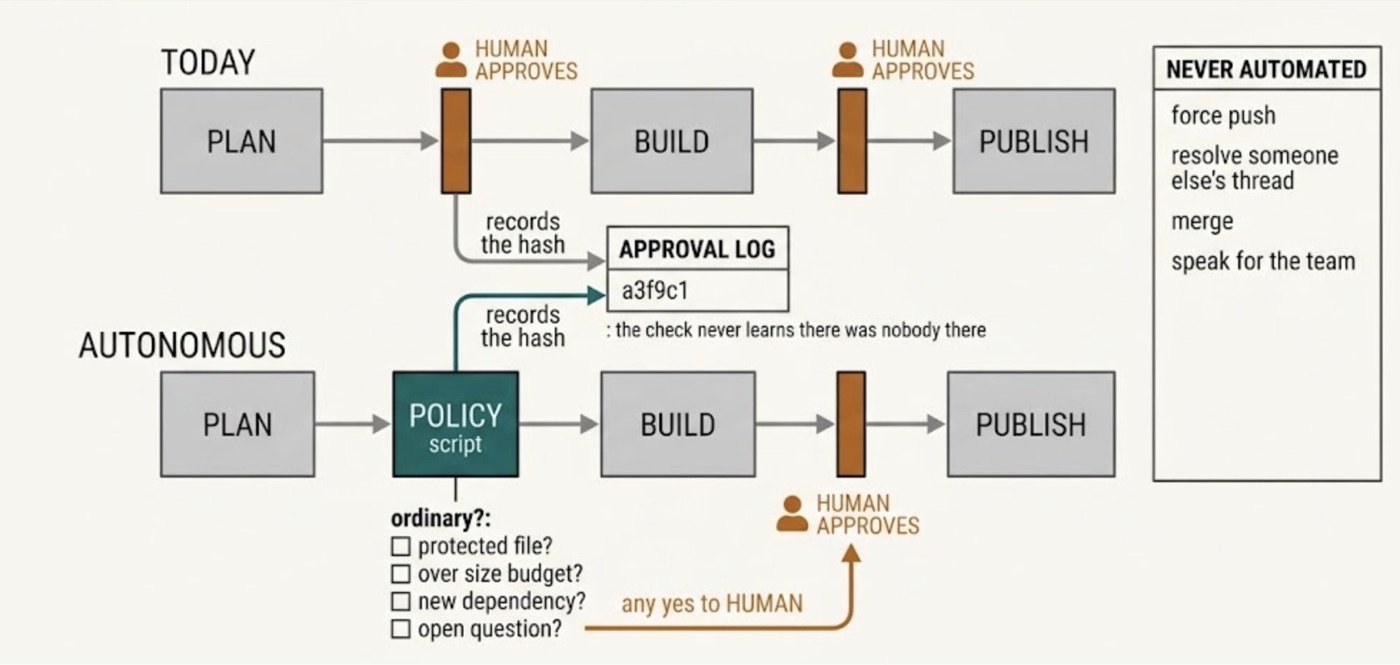
Figure 3: The gates move; they do not disappear. A policy approves the ordinary plan through the same recorded mechanism a human would use, so the gate check never learns there was nobody there, and the publish gate never changes hands at all.
What must be true first
Every one of these is a prerequisite, and every one of them was learned from a run that had a human watching:
- Every rule enforced by a script. An unattended run has nobody to notice a skipped gate. The unenforced-gate story in part two is a nuisance with a human present and a silent data-loss event without one.
- No question that stops the run. “Shall I carry on?” is fatal without an audience. An autonomous workflow either proceeds, or reaches a terminal state and reports; there is no third option.
- Terminal states and a report on every exit, including abandonment. The report is the only thing a human will read, and for most runs it will be the only thing they read.
- Environment-vs-test failure classification. Otherwise an infrastructure blip consumes the whole budget and produces a confident, wrong verdict.
- Isolation strong enough for concurrency. Separate working copies, no shared mutable services, no two runs racing on one database or one container name.
- Restraint that holds without supervision. The review-and-fix leg must be able to decline a wrong suggestion when nobody is there to back it up. This is the hardest prerequisite and the one most worth evaluating explicitly.
- Cost and iteration ceilings, because nobody is watching the meter.
- Structured telemetry per step, so a fleet of runs can be audited after the fact instead of inspected one at a time.
- An eval suite you actually trust (part four), including a clean control. Unattended operation without one is not automation: it is unmonitored production.
- Something other than a person to start it. A ticket transition can only be a trigger if some process is listening for it and can begin a run, and that process has to outlive any terminal session. This is the one prerequisite on the list that better skills cannot supply.
The honest reading: most of the work between “useful locally” and “trustworthy unattended” is not model capability. It is enforcement, isolation, classification and reporting: the boring parts, again. The exception is the last item, and it is a real one. Everything above it can be built inside the skills; a runner cannot, because a procedure that lives inside an interactive session has nothing to start it. Part six returns to that.
That is the workflow packaged, ported and, eventually, left to run on its own. What is left is the part a description like this owes the reader, and it is part six: where the design still hurts, and the short list of what to build first.